App Admin Access
Article Type: Concept Audience: Application Administrators, Partners Module: Fuuz Platform - App Admin Applies to Versions: 2024.12+
1. Overview
The App Admin Home is the central dashboard for users assigned the Application Administrator Access Type in the Fuuz Industrial Operations platform. It provides a comprehensive view of your Fuuz application, including real-time usage metrics, quick access to common administrative tasks, and navigation to all application management functions. This screen serves as your command center for managing application settings, user access, data operations, and monitoring system health.
Note: Access to the App Admin Home requires the Application Administrator Access Type. Only users assigned the Application Administrator Access Type will see this menu in the Fuuz application.
2. Architecture & Data Flow
Definitions
- Access Type: The primary classification that determines which menu sections a user can access in Fuuz. The three Access Types are Application Administrator, Developer, and Web Access. Users are assigned one or more Access Types based on their responsibilities.
- Application Administrator Access Type: Grants access to the App Admin menu with full administrative permissions to configure and manage the application, including access control, data management, and system settings.
- Developer Access Type: Grants access to the Developer menu with permissions to design and build application components, including data models, flows, screens, and integrations.
- Web Access Type: Grants access to role-based application menus for end users. Web Access Type users are assigned specific roles that control their access to application features and data.
- Roles: Define specific permissions and access to application features. While primarily used with Web Access Type, Application Administrators and Developers can also be assigned roles, generally for testing purposes.
- Application Usage Metrics: Real-time counters that display the total number of flows, models, screens, users, devices, and connections configured in your Fuuz application.
- Gateway: A software component installed on-premises that enables secure communication between the Fuuz cloud platform and local industrial systems or devices.
Components
- Welcome Banner: Displays application name and introductory guidance for administrators
- Quick Actions Panel: Provides instant access to common tasks such as inviting users and installing gateways
- Application Usage Dashboard: Presents six key metrics showing the current state of application resources
- Left Navigation Menu: Hierarchical menu structure providing access to all App Admin functions organized by category
3. Use Cases
- Application Health Monitoring: Quickly assess the overall state of your Fuuz application by viewing usage metrics including total flows, models, screens, active users, connected devices, and external connections.
- New User Onboarding: Efficiently add new users to the application using the Quick Actions "Invite User" button, streamlining the user provisioning process.
- Gateway Deployment: Rapidly deploy new gateways to connect additional industrial systems or locations using the "Install Gateway" quick action.
- Administrative Navigation Hub: Serve as the central starting point for accessing all application administration functions including access control, data management, app management, and system logs.
- Cross-Environment Access Management: Coordinate Access Type and role assignments across build, qa, and production environments by documenting and manually replicating user access configurations to maintain consistency.
- Daily Administration Workflow: Start each administrative session from the home screen to review current application state before proceeding to specific configuration tasks.
4. Screen Details
/app/[tenant]/admin/home
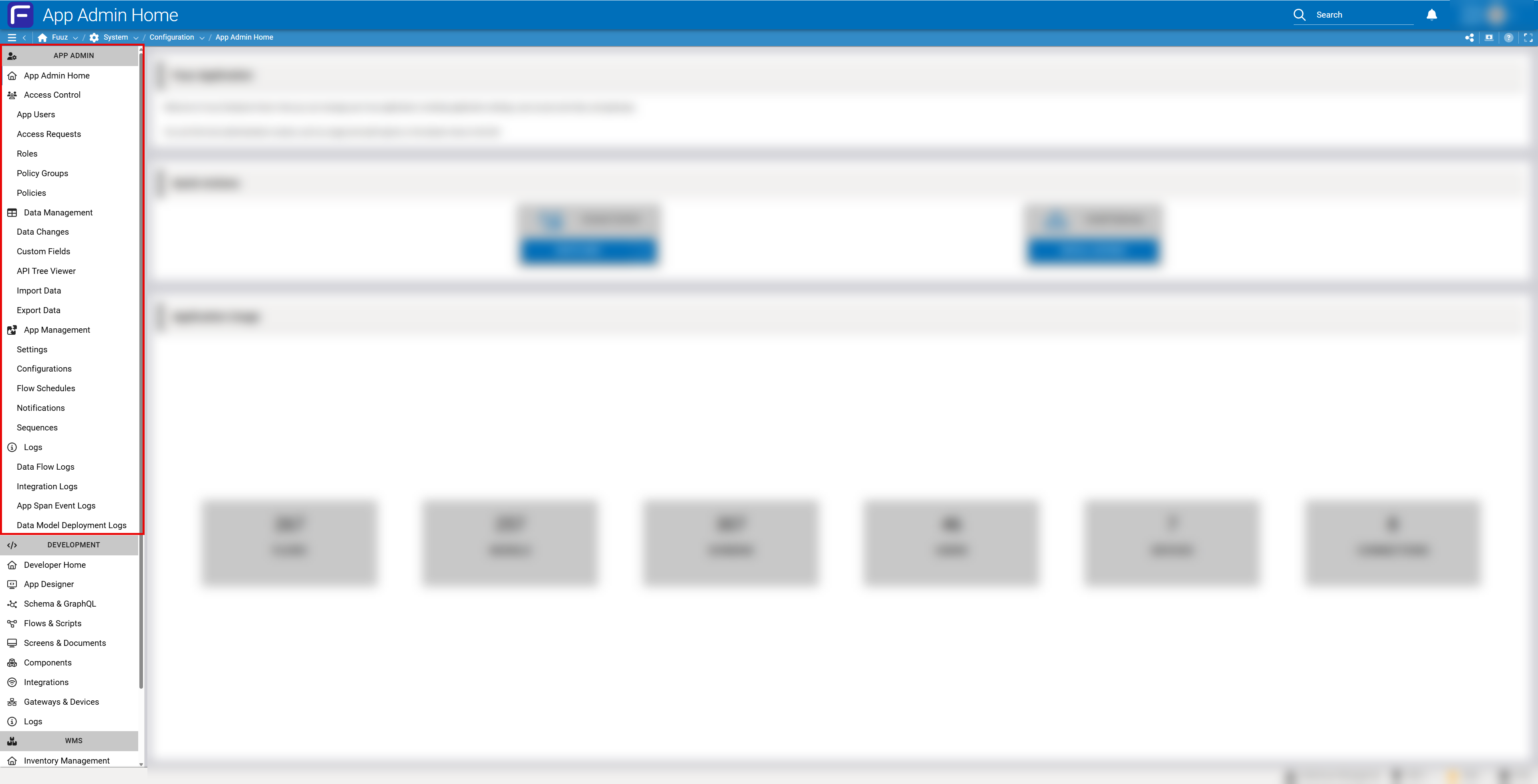
Navigation Structure
The App Admin Home is accessed through the top-level navigation bar. The left sidebar menu structure is organized by Access Type, with different sections visible based on the user's assigned Access Types:
- APP ADMIN Section (Application Administrator Access Type):
- App Admin Home (current page)
- Access Control
- Data Management
- App Management
- Logs
- DEVELOPMENT Section (Developer Access Type): Links to developer tools including Developer Home, App Designer, Schema & GraphQL, Flows & Scripts, Screens & Documents, Components, Integrations, and Gateways & Devices
- Role-Based Menus (Web Access Type): Sections like WMS (Warehouse Management System) are controlled by assigned roles within the application. These menus appear below the Access Type-based sections and provide access to operational features.
Note: A single user can be assigned multiple Access Types. For example, a user with both Application Administrator and Developer Access Types will see both the App Admin and Developer menu sections. Additionally, Application Administrators and Developers can be assigned roles, generally for testing purposes, which will display the corresponding role-based menu sections.
Quick Actions
Two primary quick action cards are displayed:
- Access Control - INVITE USER: Opens the user invitation workflow to add new users to the application
- Install Gateway - INSTALL GATEWAY: Launches the gateway installation process for connecting on-premises systems
Application Usage Metrics
Six metric cards display current application resource counts:
| Metric | Description |
|---|---|
| FLOWS | Total number of integration flows and automation scripts configured in the application |
| MODELS | Total number of data models defined in the application schema |
| SCREENS | Total number of user interface screens and forms configured in the application |
| USERS | Total number of active user accounts with access to the application |
| DEVICES | Total number of connected industrial devices, PLCs, or IoT endpoints |
| CONNECTIONS | Total number of external system integrations and API connections configured |
5. Technical Details
Access Requirements
- Required Access Type: Application Administrator
- Permissions: View application configuration, View usage statistics, Access administrative functions
- License Level: Standard Fuuz platform license with Application Administrator Access Type assignment
- Multi-Tenant Considerations: Access Type and role assignments are tenant-specific and do not automatically propagate across tenants or environments (build, qa, production). Administrators must manually ensure continuity of access assignments between all tenants and environments if desired.
Important: When promoting users or configurations from one environment to another (e.g., from build to qa to production), Access Type and role assignments must be manually replicated. These settings do not automatically transfer during environment deployments or tenant migrations.
Related Menu Structure
The App Admin menu provides access to four main administrative areas:
- Access Control: Manage App Users, Access Requests, Roles, Policy Groups, and Policies. This is where Access Types and roles are assigned to users.
- Data Management: Track Data Changes (Audit), configure Custom Fields, view API Tree, Import/Export Data
- App Management: Configure Settings, Configurations, Flow Schedules, Notifications, and Sequences
- Logs: Review Data Flow Logs, Integration Logs, App Span Event Logs, and Data Model Deployment Logs
Tenant & Environment Management
Fuuz applications typically operate across multiple environments and may span multiple tenants:
- Environments: Build, QA, and Production environments are separate instances where Access Type and role assignments are environment-specific
- Tenants: Different organizational or customer instances within Fuuz, each with independent Access Type and role configurations
- Manual Synchronization: Administrators must manually replicate user Access Type and role assignments when moving between environments or tenants. There is no automatic synchronization of these security settings.
- Best Practice: Document Access Type and role assignments in each environment to maintain consistency during deployments and migrations
Metric Refresh
Application usage metrics are automatically refreshed when the App Admin Home page is loaded. The metrics reflect the current state of the application at the time of page access.
6. Resources
7. Troubleshooting
- Issue: Cannot access App Admin Home • Cause: User does not have Application Administrator Access Type assigned • Fix: Contact your Fuuz administrator to verify your user account has been assigned the Application Administrator Access Type
- Issue: Access works in one environment but not another • Cause: Access Type and role assignments are environment-specific and not automatically synchronized • Fix: Administrator must manually assign the Application Administrator Access Type in each environment where access is needed
- Issue: Usage metrics not updating • Cause: Browser cache or network connectivity issue • Fix: Refresh the page or clear browser cache and reload
- Issue: Quick Actions buttons not responding • Cause: JavaScript error or browser compatibility issue • Fix: Check browser console for errors, ensure using a supported browser (Chrome, Firefox, Edge)
- Issue: Menu items missing from left sidebar • Cause: Access Type or role-based access restrictions • Fix: Menu sections are filtered based on Access Type assignments; contact administrator if expected items are missing
- Issue: Lost access after tenant or environment migration • Cause: Access Types and roles do not automatically migrate • Fix: Administrator must reassign Access Types and roles in the new tenant or environment
8. Revision History
| Version | Date | Editor | Description |
|---|---|---|---|
| 1.0 | 2024-12-26 | Fuuz Documentation Team | Initial Release |