2025.12 (December 2025)
Article Type: Release Notes Audience: All Users Module: Platform Releases
Note: QA Release Date: December 4, 2025. Production Release Date: December 16, 2025.
We've got some great holiday gifts for you with this month's release - read on to learn more!
Application Designer Workspace Panel
The flagship new feature this month is the new Workspace panel in our Application Designer. This panel replaces the previous "navigator" and brings much-improved browsing, filtering, and visibility of application components, as well as easier management of open application designer tabs!
The new Workspace panel uses a tree to group application components; by default, it's organized by module, but that can be changed if needed. The filter section provides quick filters for component type and status; and within the tree, indicators provide information on component status (draft, substituted, etc.)
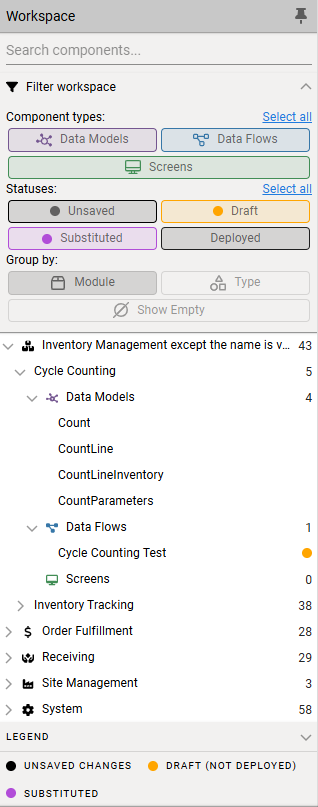
The new tab bar across the top of the designer displays the list of open application designer tabs using the same indicators, along with quick actions to create a new component and view recently closed or updated tabs.

These new navigation features make it much easier to find your way around complex applications, and even better, they provide a great foundation for a long list of further enhancements we'll be bringing to the application designer over the next year! If you want to check out the new Workspace panel, you can find it under the Development menu in our new...
Access Type Menus & Home Screens
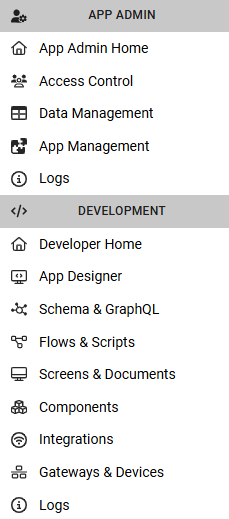
In last month's release notes, I talked about improving our drawer menu interaction in preparation for improved navigation - and the first step of that is rolling out this month with a new system for access type menus! These menus (example screenshot below) are system-defined and driven by a user's access type - administrator, developer, etc. - to give them a list of the common actions that access type needs. In a way, you can think of these as "system role" menus - but they live alongside the existing role system, which is aimed at allowing administrators to define custom permissions and navigation for their users. End users won't generally see these menus - they'll be using roles - but for administrators or developers, these role menus provide structured, discoverable navigation that we can add to as new platform features roll out.
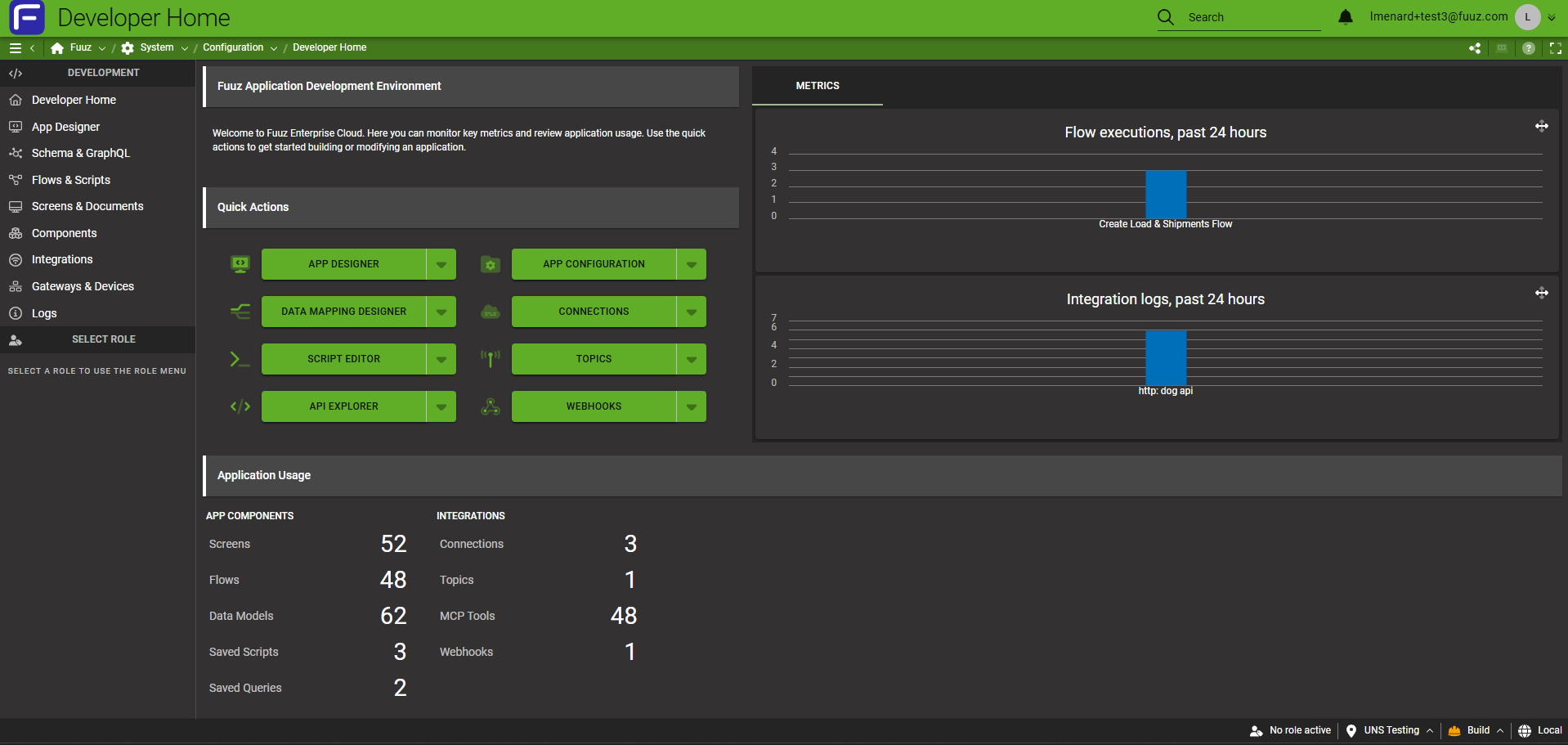
In addition to the menu structure, each access type now has a home screen, aimed at providing a snapshot of key information and access to "quick actions" for each access type. These home screens are certain to evolve over time, but the initial pass provides a set of enterprise or app metrics, as well as quick access to user management and other common tasks.
There are more navigation updates still to come - our goal is to continue to centralize navigation into the drawer menu, so keep an eye on future release notes!
More Highlights
Gateway Docker Container Image
This month we've also begun pushing public Docker images for our Gateway! Our development team has run the Gateway in Docker for our local development environment for years, so this wasn't a huge lift - we just had a few tweaks to make to ensure the image was ready for public consumption. There are three separate repositories - one for each release channel - with versions tagged as releases go out.
We're working on an Edge template for Portainer as well - our goal is to make it as easy as possible to get the Gateway deployed in your environment!
Full Release Notes: 2025.12.0
Data
GraphQL API
- Abstracted MongoDB service map into a backend library; began updates to existing services to use new library
- Added
userTenant(the current tenant the user is signed into) to theCurrentUserGraphQL query - Updated MongoDB Node.js driver to latest version
- Added "download" argument to the
urlfield on File and Image data models to control whether the browser should immediately download the file (the current and default behavior) or try to display it (e.g. in a new tab's PDF viewer)
Security
- Updated TOTP 2FA registration process to correctly display scannable QR codes
Integration
Edge Gateway
- Updated Edge Gateway build toolchain to support obfuscation for Docker images
- Updated Edge Gateway build pipeline to build and publish public-facing Docker images for the Edge Gateway
- Added support for routes in Edge Gateway edge screens
Integration Platform
- Updated NetSuite connector nonce value to use a collision-resistant CUID instead of a pseudorandom number
Orchestration
Data Flow System
- Fixed an issue with the "Load Form Data" web flow node where switching from static to dynamic values would cause the value to become nested within a transform
Package Management
- Updated the Data Change node to ignore events created by package and app installations and updates
Scripts
- Added support for the
$retrieveFileContentbinding in frontend transforms, supporting more efficient PDF document printing
User Interface
Framework
- Added simple admin home screens to act as a starting point for admin actions in Fuuz
- Corrected rendering of JSON input schema fields when the schema specifies a nested array of arrays
- Added data props to key UI elements to improve reliability of automated E2E UI tests
- Updated json-2-csv library
Application Designer
- Implemented new Application Designer Workspace panel and tab navigation
Screen Designer
- Corrected an issue which could cause a rerender loop when using screen widgets
- Updated Scripts tab to also include transforms from action steps within Action screen elements
- Updated Table element functions (e.g.
addRows) so they no longer require callingsetDatafirst - Added new validation options for number inputs (e.g. min value, max value, max digits)