App Access Requests
Article Type: Configuration / How-To Audience: Application Administrators, Enterprise Administrators Module: Access Control Applies to Versions: All Versions
App Access Requests provide a governed workflow for granting users access to applications within the Fuuz platform. This two-tier approval process ensures proper oversight while distributing access management responsibilities between local application administrators and central enterprise administrators.
Note: The current interface labels this feature as "Tenant Access Requests." This will be updated to "App Access Requests" or simply "Access Requests" in a future release. Both terms refer to the same functionality throughout this article.
1. Overview
Request Workflow Summary
| Step | Actor | Action |
|---|---|---|
| 1 | App Administrator | Creates access request with user email and business justification |
| 2 | Enterprise Administrator | Reviews and approves or denies request |
| 3 | System | Creates or updates Enterprise User record and grants app access |
| 4 | Requested User | Receives notification and sets password if new user |
Key Concepts
- One Request Per User Per Application: Each access request grants a single user access to one specific application. Multiple requests required for multiple applications.
- New vs. Existing Users: System detects whether user exists and either creates new Enterprise User or adds app access to existing user.
- Role Pre-Assignment: App Administrators can optionally specify access type or role when creating request for automatic assignment upon approval.
Request Statuses
- Pending: Request submitted and awaiting Enterprise Admin review (automatically expires in 5 days)
- Approved: Enterprise Admin approved; user access granted
- Denied: Enterprise Admin rejected request with reason provided
- Cancelled: Request withdrawn before approval/denial
- Expired: Request not reviewed within 5-day window
2. Prerequisites
For Application Administrators
- Access Level: Administrator access type within at least one application
- Navigation: Within application → Access Control → Access Requests (or Tenant Access Requests)
- Required Information: User's email address and business justification
For Enterprise Administrators
- Access Level: Administrator access type with Enterprise Admin Home access
- Navigation: System → Access Control → Access Requests (or Tenant Access Requests)
- Visibility: Can view all access requests across all applications
3. Procedure Steps
Creating Access Requests (App Administrators)
Step 1: Navigate to Access Requests
- Navigate to your application's Access Control section
- Select Access Requests (or Tenant Access Requests)
- Review existing requests and their statuses
Step 2: Create New Request
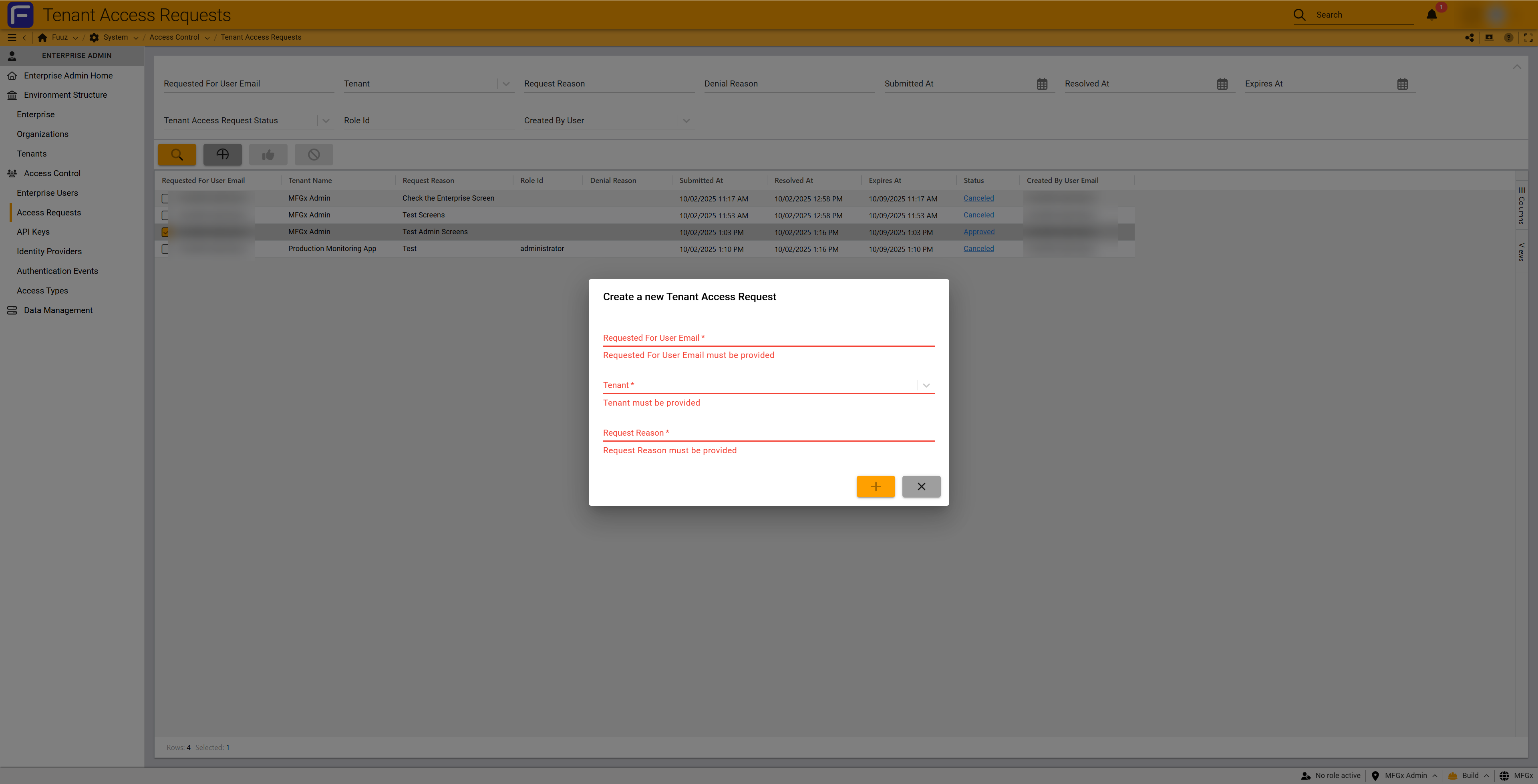
- Click the + (Add) button
- Complete the request form:
- Requested For User Email (required): Email address of user needing access
- Tenant (required): Pre-filled with your application
- Request Reason (required): Clear business justification with specific details
- Optionally specify a role for automatic assignment upon approval
- Click + (Submit) to create the request
Step 3: Monitor Request Status
- Request enters Pending status
- Enterprise Administrators receive email notification
- Request expires automatically in 5 days if not reviewed
- You receive email notification when request is approved or denied
Reviewing & Approving Requests (Enterprise Administrators)
Step 1: Navigate to Access Requests
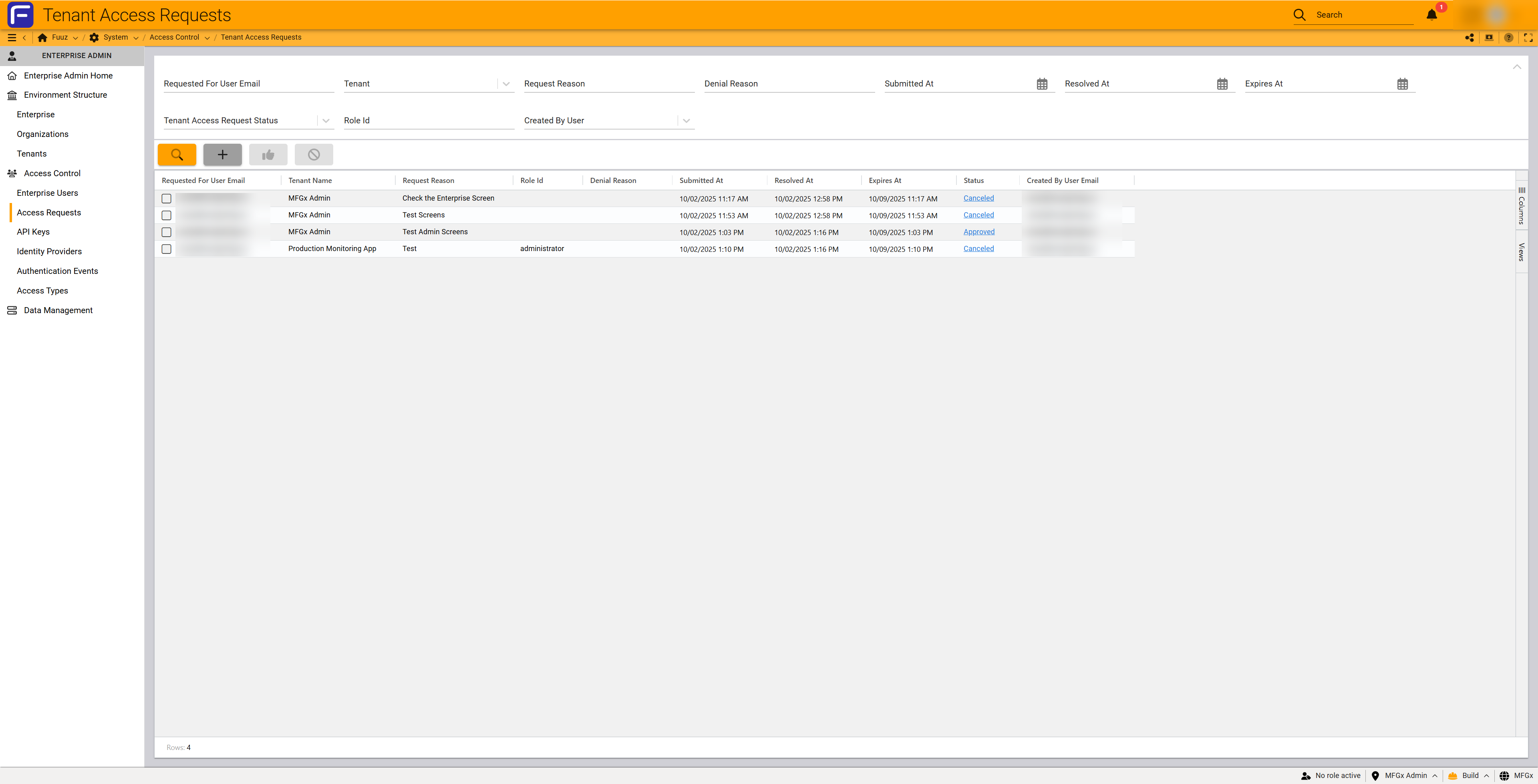
- Navigate to System → Access Control → Access Requests
- Filter by Tenant Access Request Status = Pending
- Select a pending request to review details
Step 2: Review Request Details
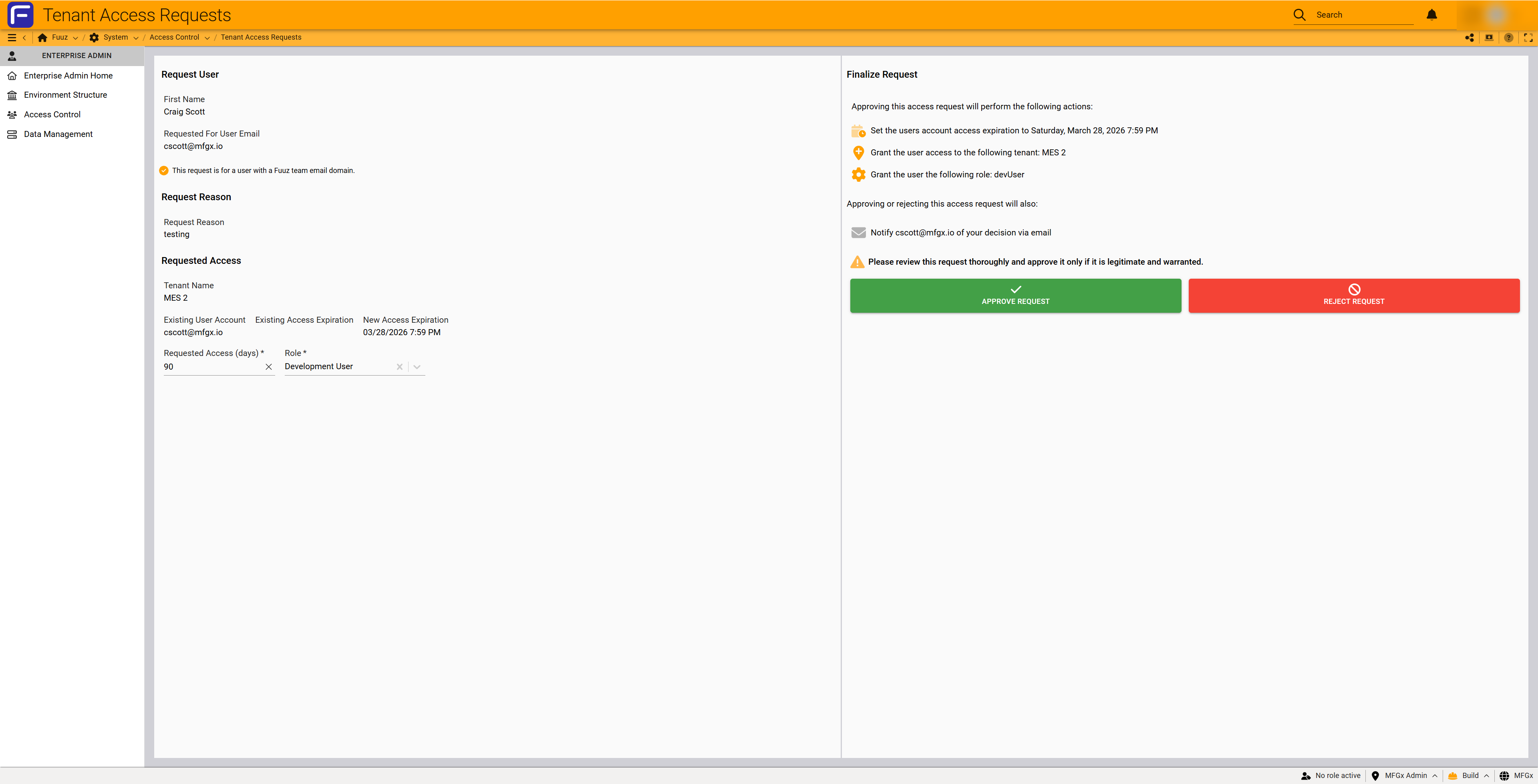
- Request User: Verify user email, name, and domain (Fuuz team vs. external)
- Request Reason: Review business justification
- Requested Access: Review tenant, existing access status, expiration dates, and requested role
- Finalize Request Panel: Review what will happen upon approval
Step 3: Approve or Deny Request
To Approve:
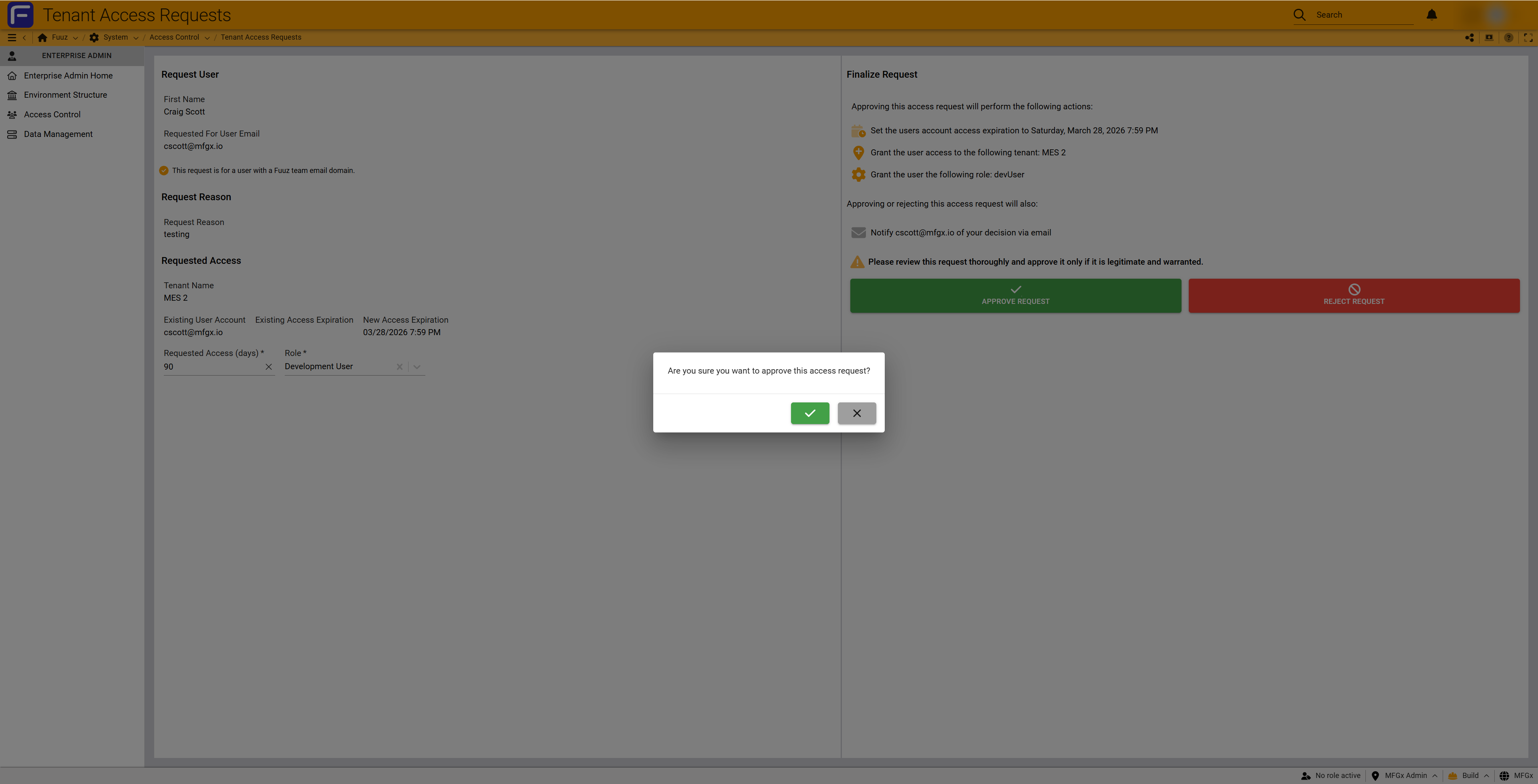
- Click APPROVE REQUEST (green button)
- Confirm the approval in the dialog
- System creates/updates user record and grants access
- User receives email notification (password setup link for new users)
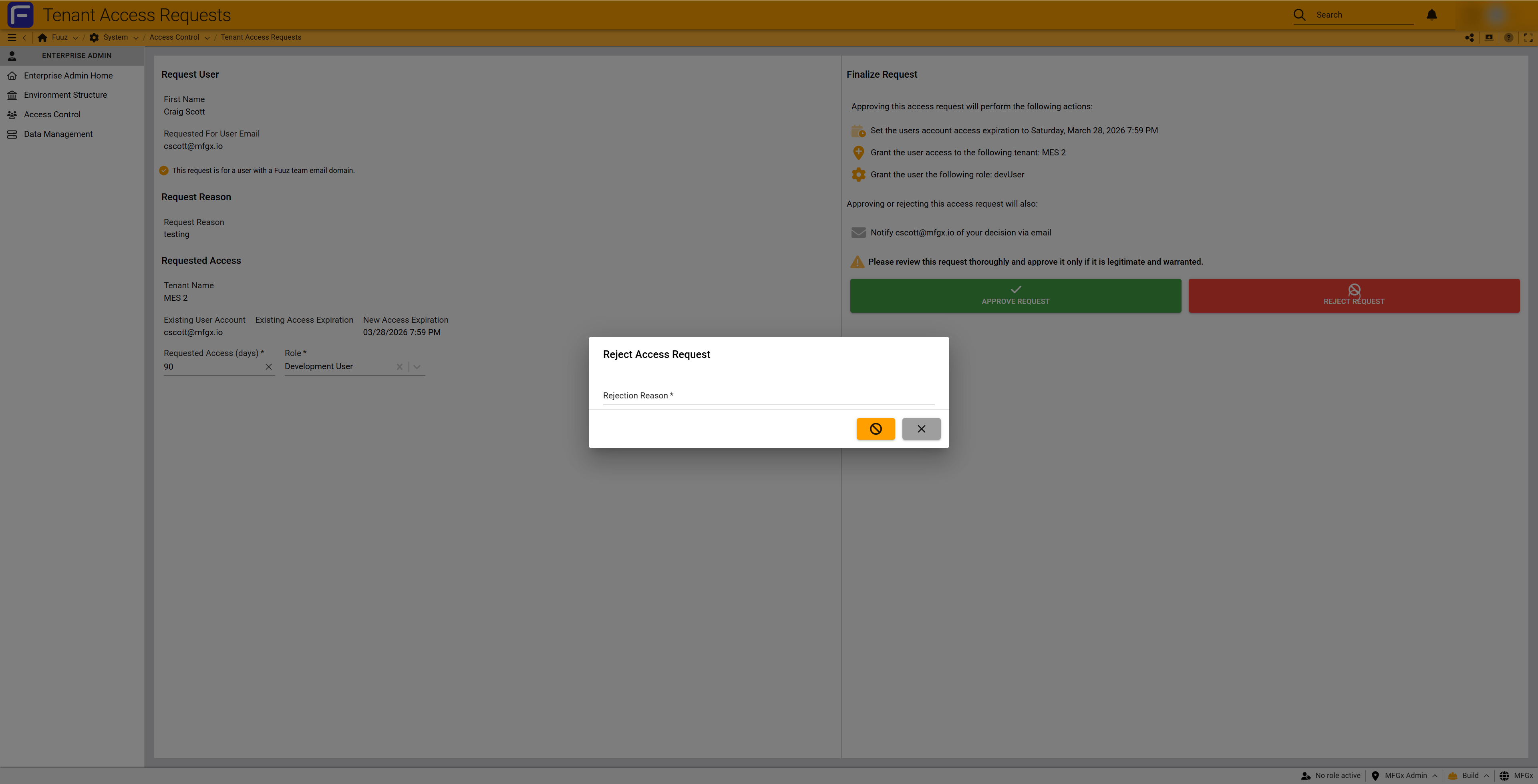
To Deny:
- Click REJECT REQUEST (red button)
- Enter required Rejection Reason with clear explanation
- Submit the denial
- User and App Admin receive email notification with rejection reason
Post-Approval Actions
For New Users:
- Enterprise User record created
- Email sent with password setup link (expires in 7 days)
- User sets password and logs in
- App Admin assigns additional roles if needed via App Users interface
For Existing Users:
- App access added to existing Enterprise User record
- Email notification sent
- New app appears in user's app list after page refresh or next login
- App Admin assigns additional roles if needed via App Users interface
4. Configuration Reference
Request Form Fields
| Field | Required | Description |
|---|---|---|
| Requested For User Email | Yes | Email address of user needing access; can be new or existing user |
| Tenant | Yes | Pre-filled with requesting application; cannot be changed |
| Request Reason | Yes | Business justification; provide clear explanation for audit purposes |
| Role | No | Optional access type or role for automatic assignment upon approval |
Automatic Settings
| Setting | Value | Description |
|---|---|---|
| Request Expiration | 5 days | Pending requests automatically expire if not reviewed |
| Requested Access Days | 90 days | Default access duration before inactivity lockout |
| Password Setup Link | 7 days | Expiration for new user password setup email link |
5. Best Practices
For Application Administrators
- Provide Detailed Justifications: Clear, specific reasons help Enterprise Admins approve quickly and create proper audit trails
- Use Role Pre-Assignment: Specify access type or role when creating requests to streamline provisioning
- Track Multiple App Needs: Note in Request Reason if user needs access to multiple applications
- Verify Email Addresses: Double-check email addresses to avoid delays from typos
- Assign Additional Roles Promptly: After approval, immediately assign any additional roles needed via App Users interface
For Enterprise Administrators
- Review Requests Daily: Check pending requests at least once per day to avoid expiration
- Verify Business Need: Ensure Request Reason provides adequate justification before approving
- Check for Existing Access: Review "Existing User Account" field to avoid duplicate access errors
- Provide Clear Denial Reasons: Give specific explanations and guidance for resubmission
- Monitor External Access: Pay special attention to requests for users with non-company email domains
Multi-Application Access
Organizations should document their preferred approach for users needing access to multiple applications:
- Separate Request Per App: Required for organizations with strict audit trail requirements; provides individual justification for each app
- Note in Request Reason: For less stringent requirements; App Admin indicates multiple apps needed; Enterprise Admin grants additional access directly
6. Troubleshooting
| Problem | Cause | Solution |
|---|---|---|
| Error approving: "API key already exists" | User already has access to application | Deny request with explanation that user already has access; App Admin should check App Users screen. Known issue to be resolved in future release. |
| Request expired before review | Not reviewed within 5-day window | App Admin must submit new request; Enterprise Admins should review daily |
| User didn't receive password setup email | Email filtered to spam; incorrect address; server issues | Check spam folders; verify email in Enterprise Users; Enterprise Admin can resend or reset password |
| Password setup link expired | User didn't set password within 7 days | Enterprise Admin resets password and sends new setup instructions via Enterprise Users interface |
| Existing user doesn't see new app | Page not refreshed; browser cache | User refreshes browser page or logs out and back in |
| User has access but can't perform actions | Role not assigned or insufficient permissions | App Admin navigates to App Users and assigns appropriate roles with required permissions |
7. Revision History
| Version | Date | Editor | Description |
|---|---|---|---|
| 1.0 | 2025-12-28 | Fuuz Documentation Team | Initial Release |