2026.2 (February 2026)
Article Type: Release Notes Audience: All Users Module: Platform Releases
Note: QA Release Date: February 3, 2026. Production Release Date: February 24, 2026 (one week later than the regular production release date).
2026.2 Release Highlights
In February and March, we'll have a broad slate of new features to announce, as well as a wide array of "fit and finish" improvements to existing features - so without further ado, let's dive in!
Application Graph
The most eye-catching feature this month is our brand new Application Graph - a visual way to view the complex web of relationships between the components (screens, flows, and data models) that comprise an app. In this view, each node is a component, color-coded by type - purple for data models, blue for data flows, and green for screens. Each link represents a reference - a place where one application component queries, executes, navigates to, or otherwise touches another. Nodes are scaled according to the number of relationships - the bigger the dot, the more important that node is to the application - and hovering over a node highlights it and any components it references.
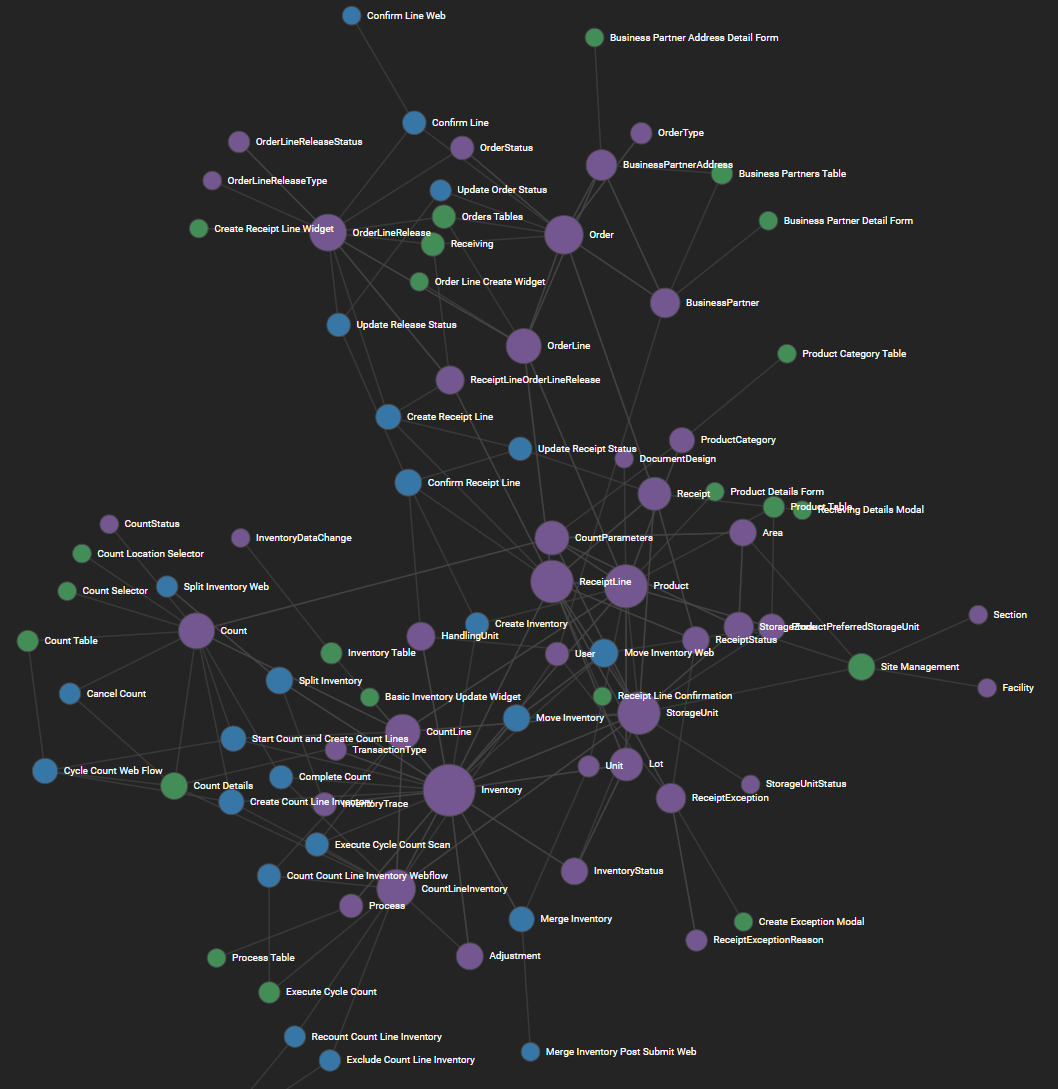
This graph uses a force-directed layout - an interactive system that simulates elastic and magnetic forces between nodes, allowing the graph to organically organize itself so tightly-related groups of components clump together. It's also a ton of fun to play around with!
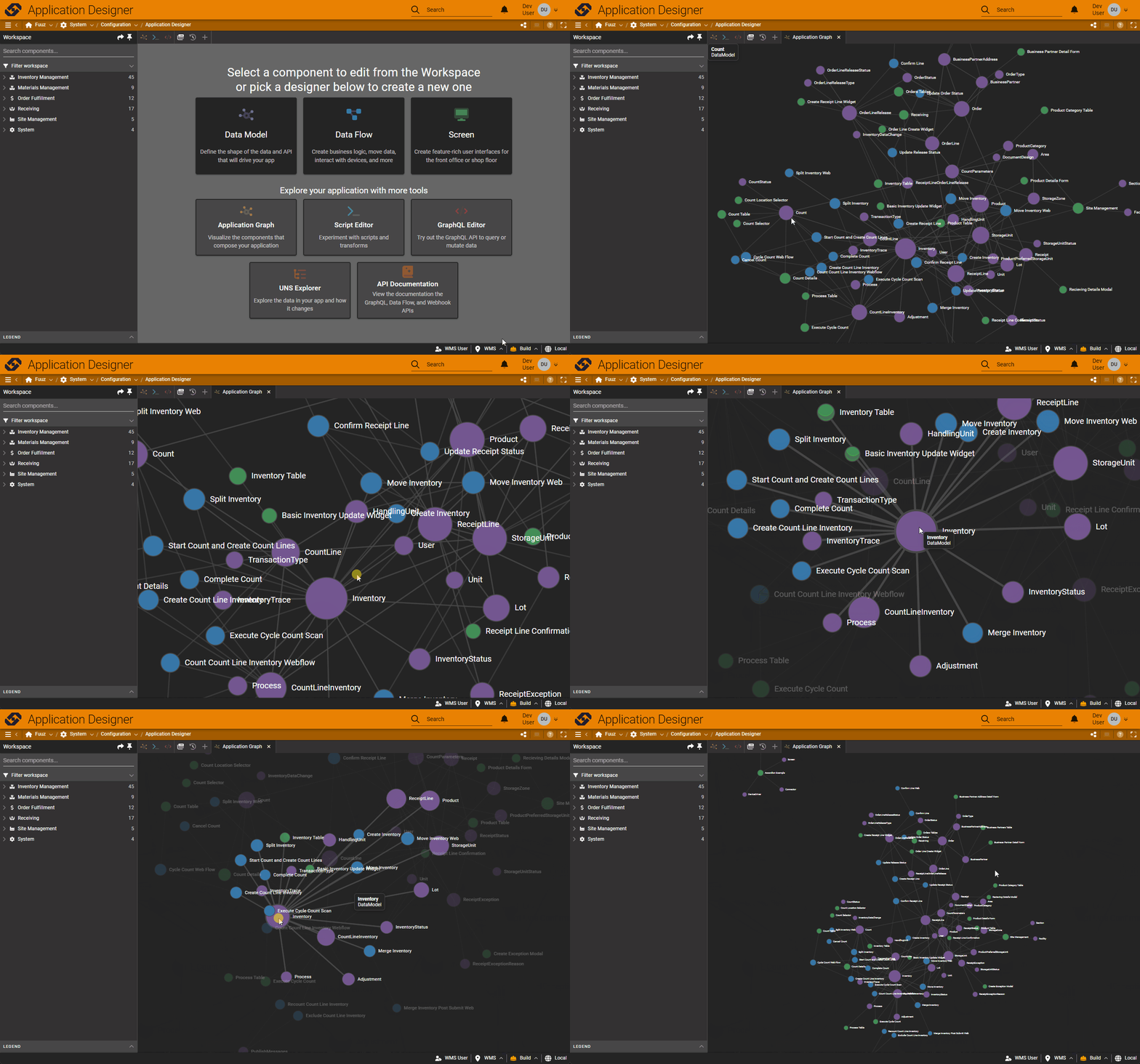
We already have several more features planned for this graph, including making the nodes interactive and integrating the view with the workspace panel filters - so keep an eye out for future improvements!
Rapid Field Edit & Entry
Another significant new feature this month is over in our schema designer: a streamlined system for adding or quickly editing fields. Historically, adding or updating fields - changing their name, type, or metadata - has required using the properties panel, which is cumbersome when trying to quickly build out a new data model. The new rapid field entry system adds inputs to the model nodes right in the schema diagram, allowing users to quickly add fields by typing out names and hitting tab or enter, and then go back and edit names, types, and the "required" flag by selecting a field.
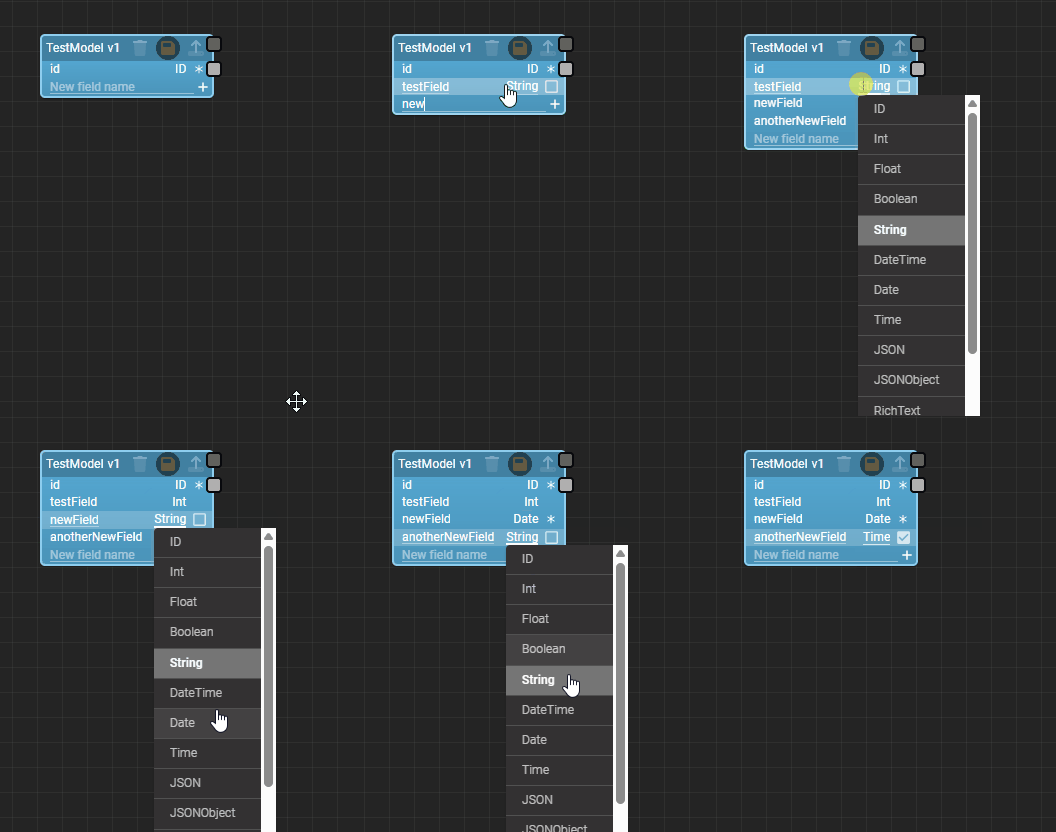
This allows users to "sketch out" a model very quickly, filling in the most important details, and then go back later to fine-tune the field-level configuration - much faster than using the properties panel!
Other Highlights
Improved Duplicate Key Error Handling
With this month's release, we've finally addressed an issue we've wanted to fix for years: duplicate key errors! If you've been using Fuuz for some time, you may be familiar with the cryptic "duplicate key error" messages which arose when unique indexes were violated (e.g. a user tried to create two records with the same name). Those errors have annoyed us from the very beginning, but we were handcuffed by the data returned to us by the MongoDB driver. Thankfully, after our recent updates to use a newly added client feature, we are finally able to format human-readable error messages for these cases - a huge improvement for the user experience in Fuuz, helping users identify what went wrong and how to address it. It's about time!

Device Subscription Streaming Optimizations
As part of our solution for the ProveIT! 2026 conference, we've built a historian which consumes large amounts of data from their MQTT broker via our Edge Gateway. As the solution scaled, we noticed a few bottlenecks in the data pipeline. We've implemented a round of performance optimizations throughout that pipeline, allowing our showcase to scale to match the scope of the ProveIT UNS... and benefiting existing customers in the process!
Full Release Notes: 2026.2.0
Data
Schema Designer
- Added system for rapidly adding and modifying data model fields in the diagram node
- Added configuration option to entirely disable publishing data change events
GraphQL API
- Added human-readable error formatting for common MongoDB errors (e.g. duplicate key errors)
- Corrected an edge case causing
_and/_orpredicate behavior to incorrectly be sensitive to where clause order in niche cases
Security & Administration
- Updated user login flow to automatically select the first assigned role if no default is selected, so users are no longer prompted to select a role on sign-in
- Updated password policy schema to no longer require a maximum length
DevOps
- Updated services to use standardized MongoDB service map library
- Unified service ENV for standardized handling and formatting
Integration
Edge Gateway
- Added ENV argument to simplify passing an API key to a containerized gateway deployment
- Implemented a variety of performance optimizations to reduce overhead in device subscription data streaming
- Added support for the
$executeTransformbinding in gateway screens
Integration Platform
- Added simplified system for creating inter-tenant integration connections from the target app tenant
- Updated to latest NetSuite ODBC certs
Orchestration
Data Flow System
- Added "MCP Tool Enabled" column to default table view when MCP Server beta is enabled
- Converted transformation microservice to TypeScript
Schedule Engine
- Fixed several small bugs in the scheduling configuration system
User Interface
Framework
- Converted web flow engine framework to TypeScript
- Implemented loading spinners and fixes for race conditions in select inputs
- Corrected a few scattered help links to point to the new knowledge base
- Implemented a variety of performance tweaks for web flows and mobile-oriented screens
Screen Designer
- Added support for Timeseries charts in Chart screen element
- Added an auto-refresh configuration option to Chart screen element
Application Designer
- Added Application Graph to visualize application components and their relationships
- Added a Share button to create a shareable Application Designer workspace link