2025.5 (May 2025)
Article Type: Release Notes Audience: All Users Module: Platform Releases
Important: Plex SQL Connector Deprecation: With the 2025.5 release, the Plex SQL connector will be deprecated. The connector will be removed in an upcoming release. Please migrate any integrations using this connector over to the ODBC connector using Plex's ODBC system.
Important: End of Support for TLS 1.0 / 1.1: With the 2025.5 release on 20 May 2025, Fuuz will no longer allow connections using TLS 1.0 and TLS 1.1. All clients connecting to the Fuuz platform should utilize TLS 1.2 or TLS 1.3. Modern web browsers such as Chrome, Firefox, and Edge automatically use TLS 1.3, so this change will require no action from most users.
The 2025.5 Fuuz platform release features several significant new features we're excited to announce - read on to learn more!
Data Export System
The May 2025 release of the Fuuz platform includes a new feature to streamline data management: a flexible, powerful, and easy-to-configure export system! You can read the full documentation on the new tool in the Export Data article, but we'll cover some of the highlights here.
Exporting data with the new tool starts at the Export Data screen, accessible via the menu search. This screen displays the already-configured exports, including their last run date, and a form which is used to create new export configurations or edit existing ones.
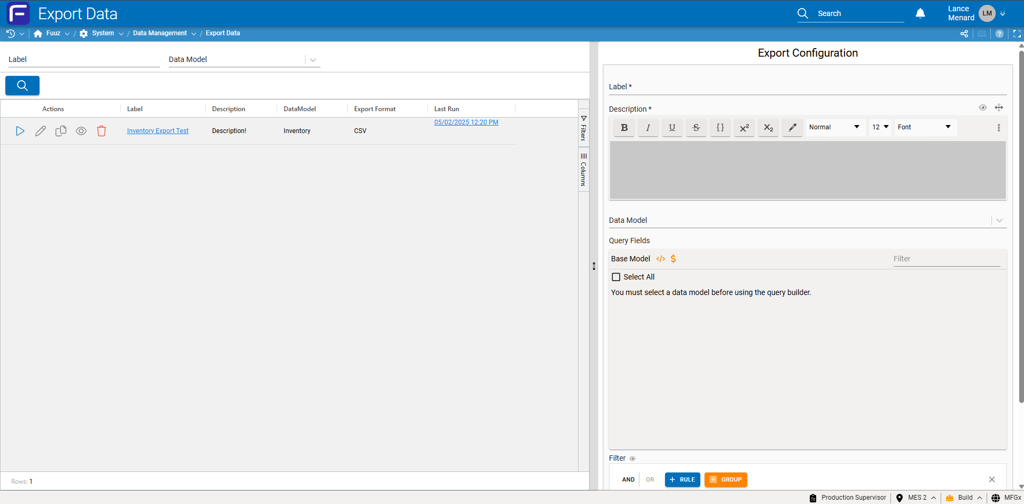
Administrators can create a new export configuration by filling out the Export Configuration form on the right and clicking Save. Along the way, they'll select the base data model; which fields to export, including related data; what filter (if any) to apply to the exported data; and what format to export to. The tool currently supports JSON and CSV export formats.
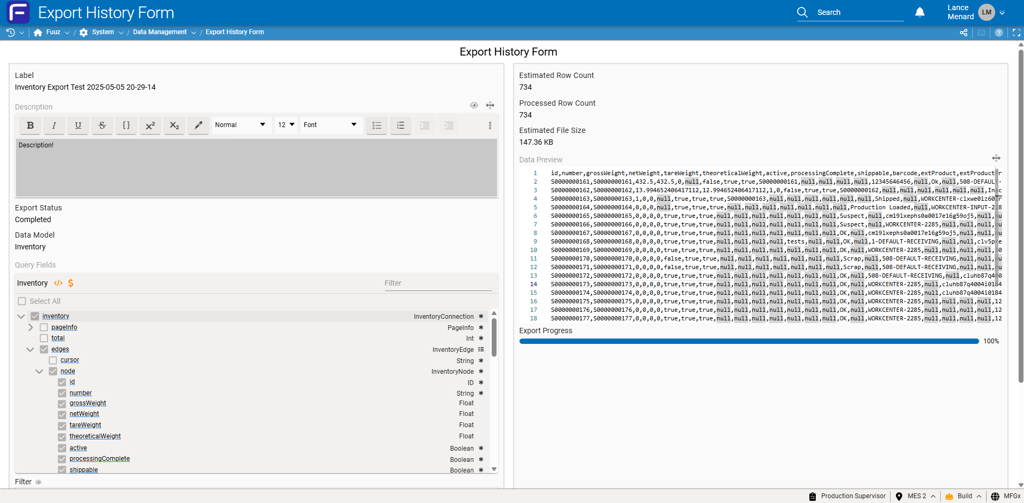
Once an export configuration is saved, the "eye" action in the table will display a preview of the data to be exported, including an estimated row count for the export. Once ready, the export can be run using the "play" action.
At this point, the action moves over to the Export History Form, where the export will start in a Pending status. As the export starts, the status will change to Running; as the export progresses, the Processed Row Count and Export Progress will update. Finally, once the export is done, the status will change to Completed and a link to download the export file will be available. Fuuz will also send the user who initiated the export an email letting them know their export is ready.
Note: While the Export History record will be retained, the file containing exported data will be automatically deleted after 30 days. If you need to retain an export longer than that, be sure to download the file.
We have more feature improvements lined up for this data export system, including recurring scheduled exports - keep an eye out for those features in future releases!
GraphQL Builder Enhancements
The May 2025 release includes significant new improvements to the GraphQL Builder UI element. This element is used in quite a few places - including the screen designer, query and mutate nodes, the API explorer, and even the brand new export tool - so it's worth explaining what's changed and why it matters.
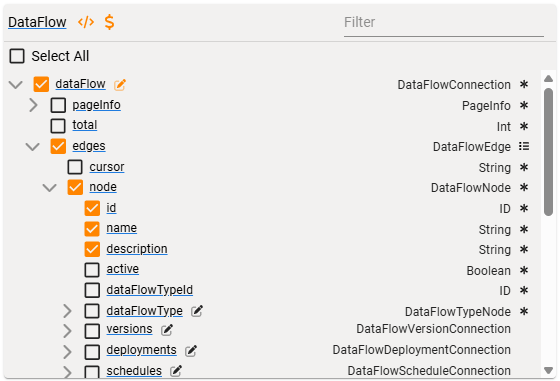
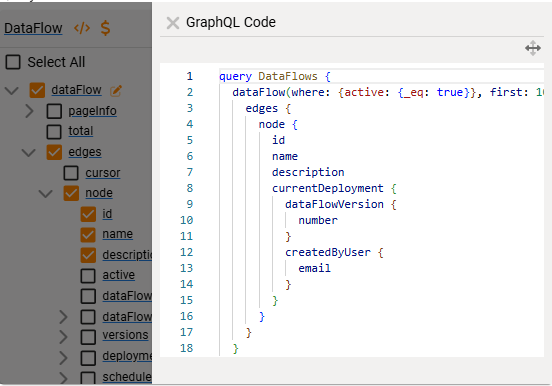
First up, the GraphQL Builder now has several new "panel" views. When enabled, three of these are accessible using buttons in the title bar. The </> button will toggle a GraphQL Code panel, which displays the GraphQL query in "code" format for viewing and editing, while the $ button will toggle a Variables panel, which displays the configured variables for the GraphQL statement. The Validation Errors panel is accessible using the ! button, which only appears when the GraphQL statement has validation errors.
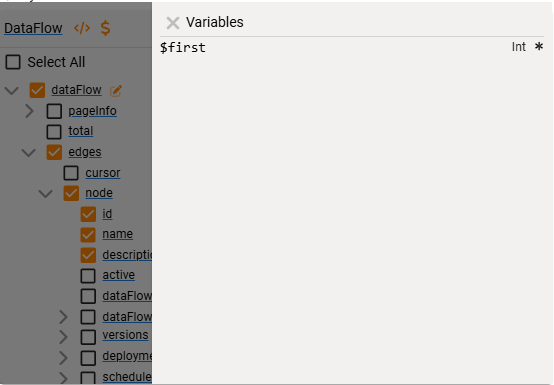
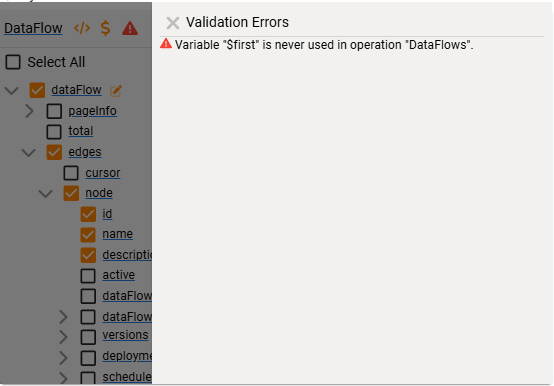
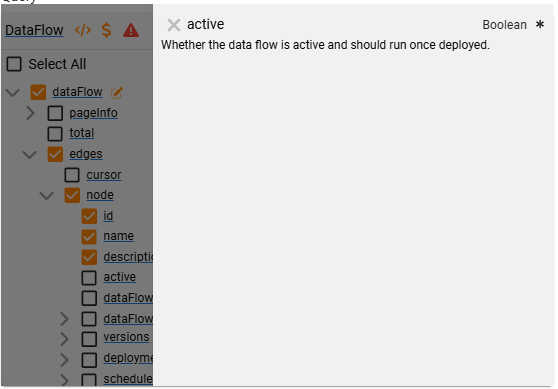
The fourth and most interesting panel view is the Field Details panel, which is accessible by clicking on any of the underlined field names in the tree. Most scalar fields will simply display the name, type, and description of the field - not very exciting. Some fields, including relations and some scalar types, support arguments which alter the behavior of the field; for example, they might apply a filter or change the output format. These fields display a "pencil edit" icon next to their field name in the tree. For these fields, the Field Details panel displays another section which lists the arguments for the field and allows users to enable arguments and configure a value.
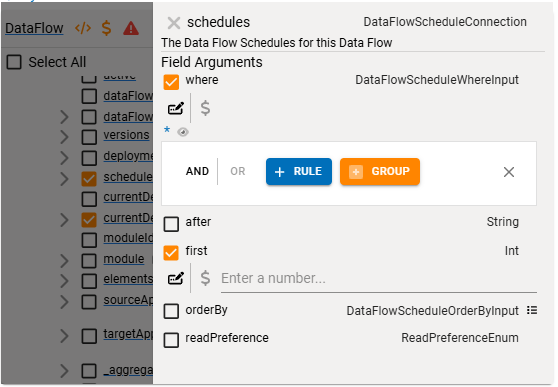
The element supports several "argument modes", and which argument modes are available depends on where and how the GraphQL Builder element is used:
- Inline arguments render a suitable input for the argument type and embed the value directly into the GraphQL statement. These argument values can't be changed dynamically.
- Variable arguments create a variable in the GraphQL statement which needs to be populated by a separate variables argument passed along to the API.
- Transformable arguments also create a variable behind the scenes, but additionally allow users to enter a transform which produces the value of the variable. These transforms can then be used by certain areas of the platform to evaluate and provide the value for the variable automatically.
You'll mostly encounter Inline and Variable arguments in the system at the moment; we'll be expanding support for Transformable arguments to screens and data flow nodes in future releases.
This rework also included a number of smaller improvements to layout and styling, performance, and usability - but you'll have to discover those on your own!
Other Highlights
Sequence Type & Increment
This month's release also includes a new feature for Sequences: the ability to specify a Sequence Type and an Increment. For those who don't know, sequences are used in the Fuuz Platform to create a sequence of values that increase each time a new value is generated. These sequences can then be tied to a field in the Schema Designer or used directly through a mutation.
In prior versions of the platform, Sequence values were always generated as text - which is necessary to support configuration options like prefix, suffix, and zero padding. However, there are times where it would be helpful to tie a Sequence to a numerical field, and store the value as an incrementing integer. The new Sequence Type option supports that use case!
The String sequence type matches the behavior of sequences up to this release, but the Int sequence type acts differently - the values returned are numbers rather than text, and the Prefix, Suffix, and Zero Padding configuration options aren't available.
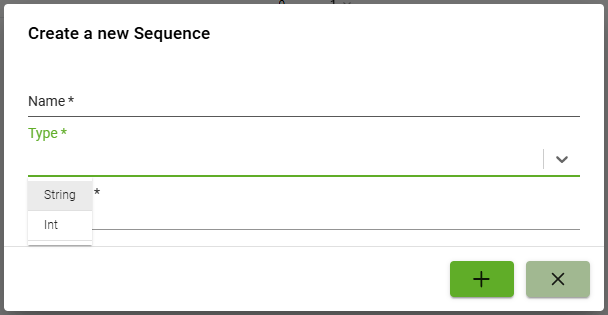
We also added a new configuration option for both String and Int sequences: an Increment. This allows users to configure the amount by which sequence numbers increase with each new value. For example, a common convention for manufacturing operation numbers is to increase by 10 with each subsequent operation; the Increment configuration option works perfectly for that use case.
Duration Input & Display Improvements
Finally, the 2025.5 release includes a significant round of improvements to UI elements related to Durations. Duration is a field type added to the platform in September of 2024 and is purpose-built for storing a length of time. In prior releases, duration strings would always display as a time string - for example, 03:30:00 for 3 hours and 30 minutes. This format is great for durations measuring in hours, but is very difficult to interpret if the duration is several days or longer. It can also provide too much information, depending on use case - sometimes, all you need is the rounded number of hours.
To address these needs, this month's release includes two new duration formats in addition to the existing Time format: Abbreviated and Humanized.
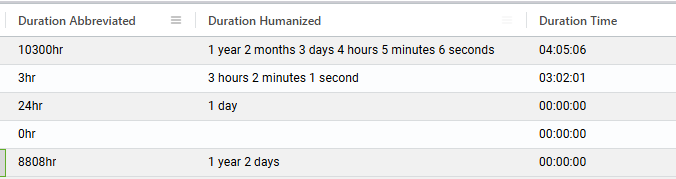
Abbreviated durations will round to the nearest whole number of the selected unit - minutes, hours, days, etc. - while humanized durations will display each part in a human-readable string, with the additional option of a "threshold" of how many units to display. These formats are available for table columns and display text fields, and provide more flexibility in how duration values are displayed to users.
Additionally, the Duration input element has received a few updates. Most notably, there is now a more flexible configuration option for which unit inputs to display, which allows app builders to fine-tune the input to match the range of expected values.
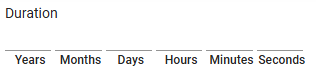

Durations aren't done receiving updates - we hope to add support for filtering and aggregating duration values in an upcoming release, so keep an eye out for that!
Full Release Notes: 2025.5.0
Data
GraphQL API
- Implemented a round of small tweaks and improvements to the new API Explorer
- Fixed a bug that could cause an error in rare cases with upsert mutations that result in both creates and updates and generate sequences
Data Management
- Added data export system for repeated or large data exports from Fuuz
Schema Designer
- Fixed a bug affecting data migrations on Duration fields
- Added validation to the Prefix field when creating a relation between models
- Optimized schema designer toolbox to improve load times in apps with large amounts of custom schema
Sequences
- Added support for the Int sequence type which stores an incrementing number without a prefix or suffix
- Fixed a bug which could cause the
generateSequenceNumbermutation to return the incorrect sequence number when no key was provided
Security
- Fixed several small inconsistencies on the External User Access Request form
DevOps
- Updated to latest version of Nx
- Removed Lerna from monorepo structure
- Updated default security policy to disable TLS 1.0 and 1.1 and enable TLS 1.3
Integration
Edge Gateway
- Added a minimum value of 5 seconds for status sync intervals to prevent bad configuration from locking up the gateway
- Fixed a crash that could occur when error handling tried to serialize a circular object
- Fixed a crash that could occur when signing out of an Edge Gateway with a store-and-forward device configured
- HTTP Server: Added driver configuration for request size limit to permit administrators to configure a limit higher than the default 100kb
- OPCUA: Fixed a crash that could occur when the OPCUA server issues a bad certificate to the Edge Gateway
Orchestration
Data Flow Designer
- Corrected an issue with the Screen Parameters input on the Screen Dialog data flow node
Transformations
- Added a
$getContrastTextbinding which takes a color string and returns the best text color (white or black) for contrast with the background
Scheduling Engine
- Added Scheduling Configurations, Scheduling Engine, and updated Scheduler screen designer element to support complex scheduling use cases
User Interface
Framework
- Updated Fuuz logo on login page to remove tagline
- Updated Data Changed indicators on forms to provide information about the user who made the change
Components
- Fixed an issue where re-loading a table's data might not re-run column data transforms
- Updated GraphQL Builder UI component to allow editing arguments and variables and to display field documentation
- Added a dedicated UI input for Time Zones
- Updated Duration inputs and display fields to support a range of different input and format styles
Screen Designer
- Added an option to generate an action button column during table generation
- Updated the Chart screen element to provide a more realistic preview of the chart using the actual data queried while editing the chart properties
- Improved performance of screen deployment action for screens with lots of deployments
- Added a visual indicator for the Hide property in the screen designer, similar to the Visible property
- Updated drag-and-drop library underlying screen designer to latest version
- Added a Fullscreen button to Chart screen elements
- Updated Tab Bar screen elements to keep the
tabIdproperty internal to the screen system - Fixed a bug that could cause the System Name input to change unexpectedly while typing
- Updated the
$components.Form1.fn.save()and$components.Form1.fn.loadData()functions to better support use cases where the form isn't a standalone screen