2024.2 (February 2024)
Article Type: Release Notes Release Version: 2024.2.0 Release Date: February 2024 Applies to Versions: 2024.2+
Release Overview
The February 2024 release (2024.2) delivers significant platform capabilities focused on streamlining data analysis, improving developer productivity, and strengthening enterprise security. This release introduces the highly anticipated Aggregate Query system for the GraphQL API, Screen Designer auto-save functionality, and a new external user access request system to enhance support workflows.
Additionally, this release expands integration capabilities with a new Google API connector and PCCC PLC driver, while implementing important security clarifications around tenant type API restrictions to encourage best practices in enterprise deployments.
Important: Support for the legacy Electron-based Edge Gateway ends with this release on 2/20/2024. Please migrate to the service-based Edge Gateway before this date.
Highlights
- Aggregate Queries: Dramatically streamline the creation of business reports, summary screens, and dashboards by aggregating data directly through the GraphQL API without needing transforms, data flows, or manual calculations.
- Screen Designer Auto Save: Automatically saves and syncs screen changes after periods of inactivity, protecting developers from losing work due to browser or PC crashes.
- User Access Request System: Enables Fuuz support staff to request site access through a formal approval workflow, enhancing security transparency and audit capabilities.
- Google API Connector: New integration connector supporting connections to Google APIs including Google Drive, with flexibility to support additional Google services.
- PCCC Edge Gateway Driver: Expanded industrial connectivity with support for PCCC PLC communications.
- Tenant Type API Restrictions: Enhanced security by restricting administrative activities to the Enterprise Administration tenant.
New Features
Aggregate Queries
The 2024.2 release introduces a major API feature that enables data aggregation directly through the GraphQL API. This capability dramatically streamlines the process of creating business reports, summary screens, dashboards, and other data analysis workloads without requiring transforms, data flows, or manual mathematical calculations.
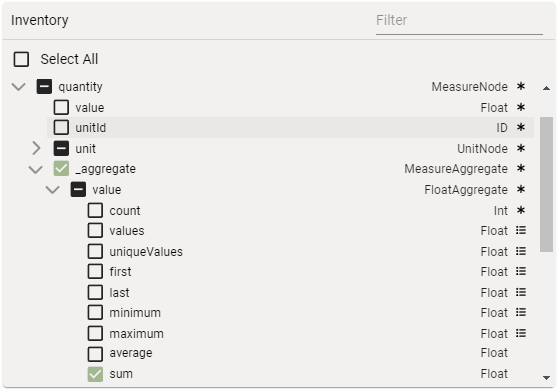
A new _aggregate field now appears in GraphQL queries and field pickers. By selecting a field and operator from an object, the API automatically groups by every selected field not inside _aggregate and returns the computed value for the selected field and operator.
Example: By selecting the table template in the Screen Designer and selecting inventory status and quantity unit to group by, plus aggregate operators on the quantity value, you can generate an inventory report in seconds.

- Availability: All App Admin and Developer access types
- Learn more: Aggregate Query API
Screen Designer Auto Save
The Screen Designer now includes auto-save functionality to protect designers from losing changes due to PC or browser crashes. The designer automatically saves and syncs with any open screen runners after a period of inactivity.
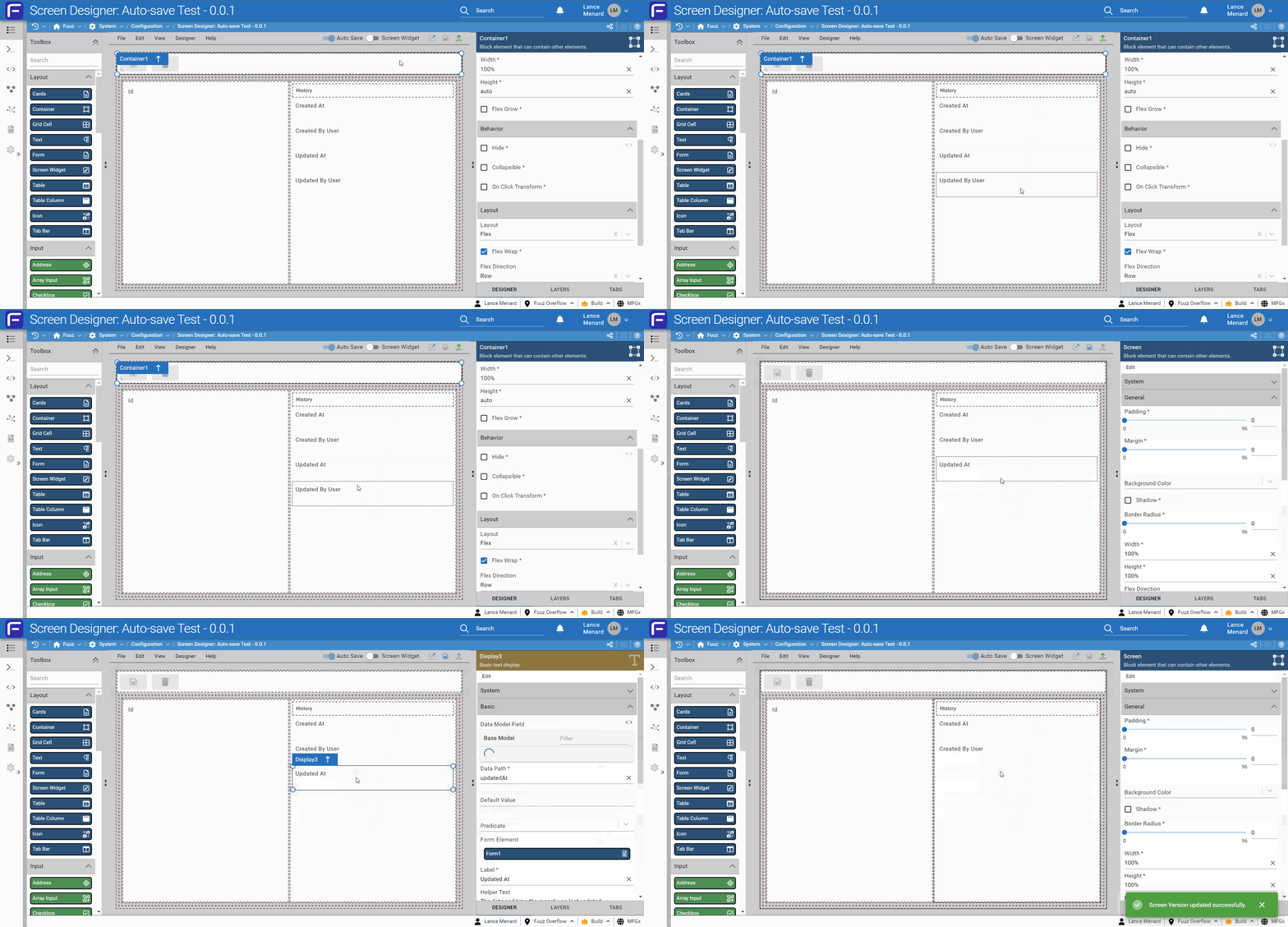
If there is a reason to turn off auto-save temporarily—for example, when testing changes without saving them—the feature can be disabled using the toggle in the subheader.

Note: Future releases will enhance this system with automatic versioning and will extend auto-save functionality to the Data Model Designer, Data Flow Designer, and Application Configuration.
- Availability: All App Admin and Developer access types
User Access Request System
A new external user access request system enables the Fuuz support team to offer quicker and more streamlined support while maintaining full security transparency. When a Fuuz support team member requests access to a customer site, enterprise administrators receive an email with the subject "Fuuz Site Access Request" containing:
- Which site and tenants/applications access is requested for
- Who is requesting the access
- Duration of the requested access
- Reason for the access request
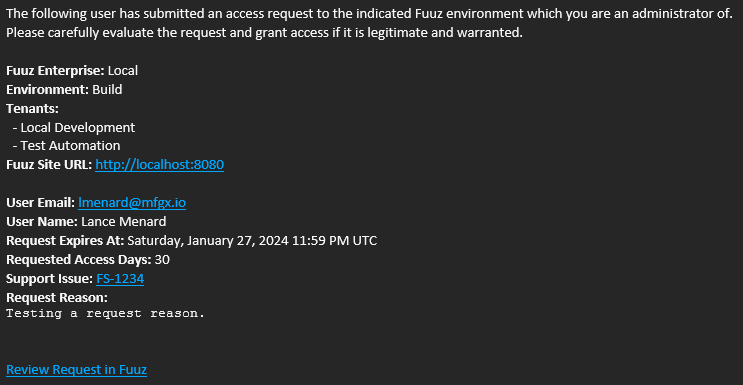
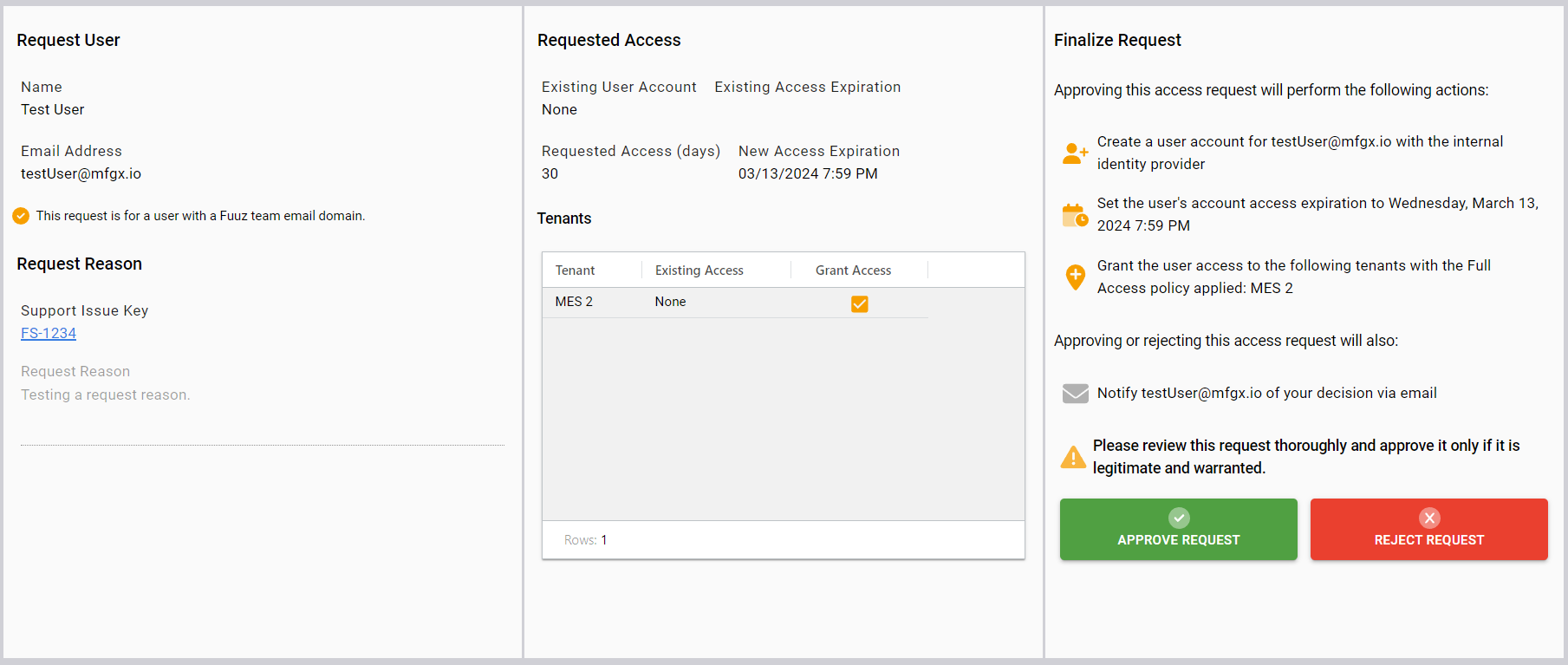
The email includes a "Review Request in Fuuz" link that opens the request directly in your Fuuz site. From there, you can review the request in detail, including whether the user currently has an account, their current access level, and what actions approving the request will perform. You can then approve or reject the request with an optional rejection reason.
Note: A similar feature for internal access requests (when existing users need to request access to another application) is planned for a future release.
- Availability: Enterprise Administrators
Google API Connector & Node
A new integration connector supporting connections to Google APIs has been added. Initially developed to support Google Drive connections, this connector has been designed with flexibility to support all Google APIs. The current release includes a specific data flow node for Google Drive, while other Google APIs can be accessed through the generic Integrate node. Additional specific nodes for common APIs such as Gmail, Docs, and Search are planned for future releases.
- Availability: All App Admin and Developer access types
PCCC Edge Gateway Driver
The Edge Gateway now includes a PCCC (Programmable Controller Communication Commands) PLC driver, expanding industrial connectivity options for legacy Allen-Bradley PLC communications.
- Availability: Edge Gateway deployments
Success Factors Data Flow Node
A new data flow node has been added to support integration with SAP SuccessFactors, enabling streamlined HR data synchronization workflows.
- Availability: All App Admin and Developer access types
$isNotNilOrEmpty JSONata Binding
A new JSONata binding $isNotNilOrEmpty has been added, which returns true when the provided value is not null, undefined, 0, or an empty array, object, or string.
- Availability: All JSONata expression contexts (screens, data flows, transforms)
Enhancements
Data Team
- Date and Time Field Defaults: Added support for default values and triggers for Date and Time field types in the Data Model Designer
- Enterprise Users UI: Updated Enterprise Users table and form to improve the user interface around deactivating and reactivating users
- API Key Deactivation: Added middleware to automatically deactivate user API keys when tenant access is deactivated
- Authentication Error Handling: Improved handling of certain authentication errors to prevent users from getting "stuck" in error states
DevOps Team
- XML Content Handling: Implemented better handling of XML content types for webhook and data flow requests and responses
- Infrastructure Update: Updated infrastructure to latest service mesh version
- Health Check Optimization: Updated health check routes on some services to no longer try to load unused access model from cache
Integration Team
- Notification User Roles: Updated notification service to correctly capture changes to user roles when updating internal email lists
- Notification Recipients: Added a list of recipients to communication records to capture the list of email addresses a notification was sent to
- Gateway Error Handling: Updated Gateway UI error handling to better handle long-running requests to the Gateway server
Orchestration Team
- Data Flow Validation: Implemented data flow validation system to encourage best practices in flow development
- Walkthrough Improvement: Updated walkthrough to no longer close when clicking off the walkthrough dialog
- Schedules Display: Updated data flow schedules screen to correctly display frequencies as inactive when their schedule is inactive
- Log Capture: Added a new system to asynchronously persist log-type records to improve durability and reduce write workload
User Interface Team
- Routes Tab Fix: Updated the Routes tab on the Screen form to correctly apply an exact match based on screen ID
- Console Deep Expand: Added CTRL+Click shortcut to deeply expand nested properties in console components
- Console Text Truncation: Added truncation of long text values in console components
- Tenant Type Metadata: Added
tenantTypeIdto$metadata.tenantcontext in frontend transforms - Help Mode Info: Added screen version number and deployment date to the footer when help mode is enabled
- Screen Import: Added the ability to import screens from the splash screen in Screen Designer
- Module Field: Added a Module field to screens directly, copying modules from routes where available
- Save Dialogs: Updated save dialogs to provide default values for required Active and Full Screen fields
- Application Designer: Updated application designer actions to retain fullscreen state when creating new objects
Components
- Icon Picker: Added new features for the icon picker component, including support for custom colors, configuration around which properties are available, and support for disabling the input
- Array Input Component: Added an Array Input component type to handle input of lists of scalar values (text, numbers, etc.)
- Scan Beep: Added "Beep on Scan" option to the Scan element to play a simple success/error beep on scan
- Select Dialog Mode: Added "Dialog Mode" option to the Select element to allow more flexibility around dialog behavior; added "Advanced Search" mode to open the advanced search dialog on request
- Table Cell Checkbox: Updated table cell styles for editable checkboxes to correct alignment and remove indeterminate state
- SVG Element: Added several new configuration options to the SVG element
Fixes
Data Model Designer
- Fixed a bug causing nullable one-to-one relationships to throw unexpected errors
- Fixed a bug which could cause the incorrect field to be deleted when deleting a relationship between two models which have multiple relationships between them
Edge Gateway
- Fixed a potential crash caused by the Modbus driver reconnecting
- Fixed an issue which could cause the IBM DB2 driver to fail to load
Data Flow Designer
- Removed unused Data Flow Library option from help menu and corrected Knowledge Base URLs
Breaking Changes
Important: Review these changes carefully as they may require updates to your implementation.
Tenant Type API Restrictions
The 2024.2 release implements API restrictions that clarify the different tenant types and their intended purposes:
- Application Tenants: API restrictions have been added to prevent use of designers in installed application environments
- Custom Tenants: API restrictions now require user, tenant, enterprise, and other security administration activities to be performed in the Enterprise Administration tenant
When attempting administrative activities in non-administrative tenants, you will encounter errors such as:
The createAccessControlPolicy mutation is not permitted in custom tenants.
These errors indicate you need to switch to the Enterprise Administration tenant and repeat the action.
End of Support for Electron-based Edge Gateway
As announced in the 2024.1 release, the service-based Edge Gateway now fully supports all features of the legacy Gateway application. Support for the legacy Electron-based Edge Gateway ends on 2/20/2024.
Note: To identify which Gateway version you are running: if the Gateway opens in a desktop application window rather than a browser window, you are running the legacy Electron application and should migrate to the service-based Gateway.
Migration / Action Required
Edge Gateway Migration
If you are currently running the legacy Electron-based Edge Gateway:
- Contact Fuuz Support to schedule your migration to the service-based Gateway
- Complete the migration before 2/20/2024 to avoid service interruptions
- Review the service-based Gateway documentation for any configuration differences
Administrative Workflow Update
If you have previously performed security or user administration activities in custom tenants:
- Update your workflows to perform administrative activities in the Enterprise Administration tenant
- Review any automation scripts or integrations that create or modify access control policies, users, or permissions
- Update any documentation or training materials to reflect the new administrative workflow
Note: Access types and roles do not automatically update across tenants or environments (Build, QA, Production). Administrators must ensure continuity between all tenants and environments as desired.
Revision History
| Version | Date | Editor | Description |
|---|---|---|---|
| 1.0 | 2024-02-20 | Fuuz Documentation Team | Initial Release |