2023.1 (January 2023)
Article Type: Release Notes Audience: All Users Module: Platform Releases
Here are some of the major highlights from this month's release. There's a lot here to kick off 2023!
Updated Versioning Scheme & Release Calendar
The January 2023 release is the first under our new versioning scheme and release calendar. This new calendar should provide better predictability for customers, and allow us to better communicate new features with more detailed release notes like these.
New version numbers
Going forward, releases will versioned with the year and month of their deployment, plus a patch number. For example, this release will be versioned 2023.1.0. This version number is also now displayed on the Enterprise form, so you can always check what version of Fuuz you're using.
New release calendar
In addition to new version numbers, releases will now happen on a regular schedule. This schedule varies by the type of environment, as outlined below; the frequency or exact dates may vary in the future, but the approach of a consistent month-oriented release schedule is here to stay!

- Build Environments now receive automated nightly releases from our integration branch. This means customers with build environments will be able to try out the latest and greatest features as soon as they're ready. It also means there's a greater chance for bugs to pop up on build environments - just keep that in mind, and be sure to identify the type of environment you're on when you submit a ticket!
- QA Environments will be updated to the monthly release on the first Tuesday of the month. For example, this month (January 2023), that will be the 3rd. These release notes for the monthly release will be published at the same time.
- Production Environments will be updated to the monthly release on the third Tuesday of the month. This means customers with QA environments have a two-week window during which they can test applications or experiment with upcoming features before the release is promoted to Production.
- Hotfixes will be infrequent, but may happen to QA or Production environments at any time. Each hotfix will increment the patch number for the release, and the release notes for the month will be updated to communicate what was fixed.
New UI Components: Rich Text Editor & PDF Renderer
Among the many new features, two major new UI components have made their debut: a rich text editor, and a PDF renderer!
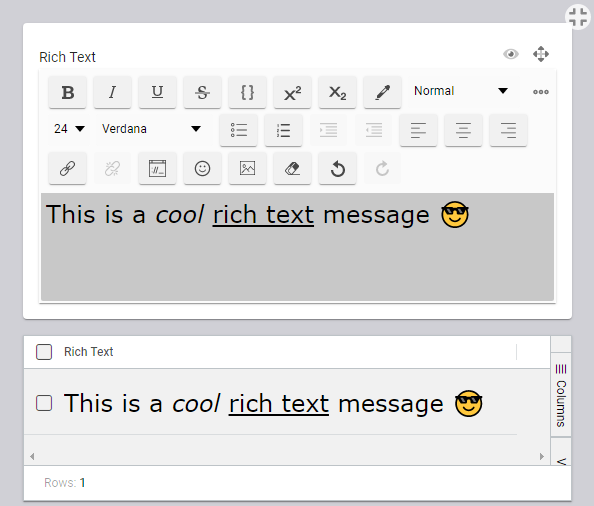
Rich Text Editor
With this new "what you see is what you get" (WYSIWYG) component comes the ability to write and display rich text in Fuuz, including fonts, colors, sizes, alignment, and - of course - emoji. This expands the capabilities previously offered through the markdown editor. To accompany the UI component, there's a new RichText field type in the schema designer and a set of conversion bindings in the scripting system to let you convert between rich text, markdown, HTML, and plain text!
PDF Renderer
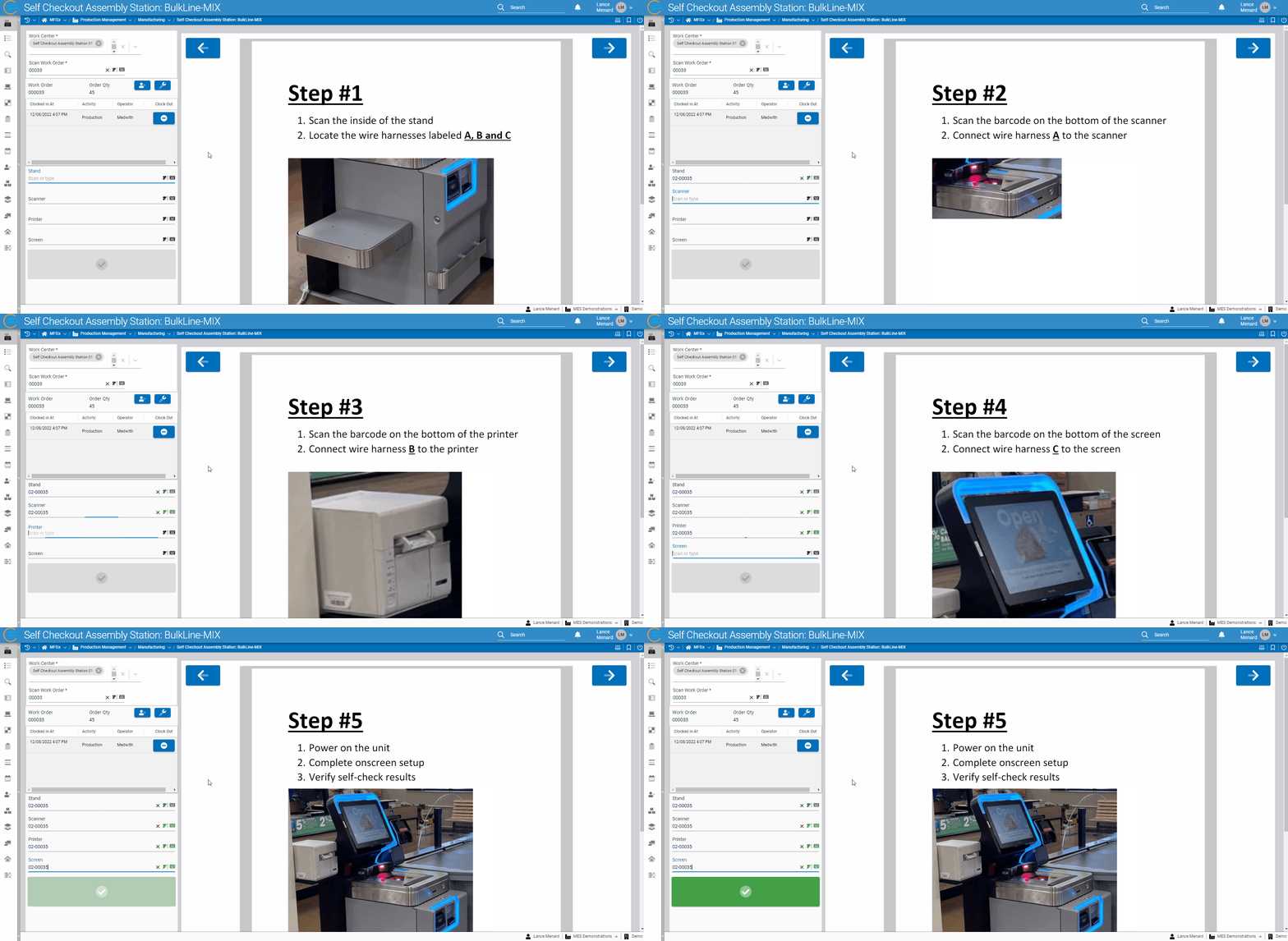
Frequently, users building applications wish to display PDF documentation to the end users of those apps. Fuuz now offers a powerful and fully-integrated option through a new PDF display component! In addition to being able to display a static PDF selected while building a screen, the component allows app builders to programmatically change the PDF source, zoom level, and page - meaning your app can automatically page through the documentation as users complete a process. For example, in the demonstration below, Fuuz automatically navigates through a PDF of instructions as users complete scans in an assembly process!
Screen Designer: Table Enhancements
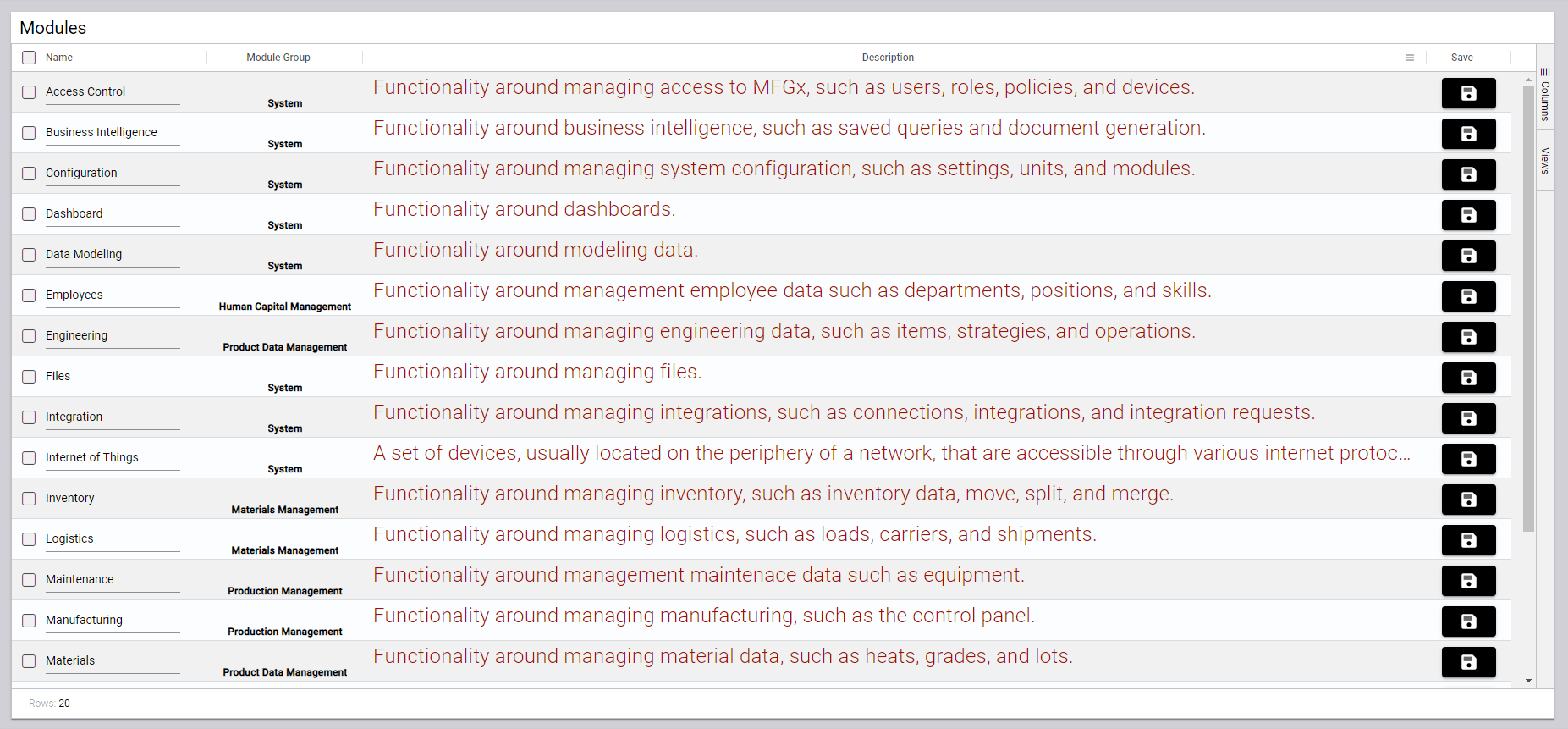
Among the many enhancements to the screen designer in this release are a set of exciting new features for tables. Columns can now render an input, enabling applications wanting to utilize inline editing; they support color and font formatting, improving at-a-glance display of information and usability on small devices; and they support rendering action buttons in table rows, allowing app builders to support row-level actions on table data!
Core API: Mutation Performance Optimization
After a series of performance optimization passes, the runtime of create, update, and delete operations - called "mutations" in GraphQL - in the Fuuz API has been improved significantly for operations affecting large numbers of records. First, the top-line number: Fuuz APIs are now up to 95% faster. As a result, the API can now process larger batches of records than ever - depending on the data model, up to or exceeding 50,000 operations in a single request.
If you're a data lover like me, I've included a table below outlining the runtimes comparing the 2023.1 release with the prior production version, 3.107.1, for varying payload sizes.
| Payload Size (ops) | 3.107.1 Runtime (s) | 2023.1 Runtime (s) | % Improvement |
|---|---|---|---|
| 1 | 0.045 | 0.036 | 20% |
| 100 | 0.343 | 0.091 | 73% |
| 1,000 | 2.867 | 0.467 | 84% |
| 10,000 | 91.712 | 4.008 | 96% |
| 50,000 | Timeout | 21.208 | ∞? |
The data tells an interesting story: for small numbers of operations, the API has always been fast; but previously, it slowed down quickly as payload size increased. After our optimization passes, the runtime increase is roughly linear, which makes runtime and performance changes predictable based on data volume growth.
This optimization pass reflects one of our major goals of the Fuuz platform: to get our software out of the way of end users. Building business applications is challenging enough without having to think about the software platform you're building them on - if we can make Fuuz transparent in the process, it lets users focus on the business requirements rather than the technology!
Data Flows: Dashboards, Nodes, and More
This release includes quite a few new features for data flows, including new nodes, a new integrated transform editor, and a metrics dashboard for monitoring system health.
New Nodes
Several new nodes make their debut in this month's release, including Throw Error and Filter Array. This release also includes new Mutex Lock and Unlock flow control nodes; however, those require a bit too much explanation for release notes!
Throw Error
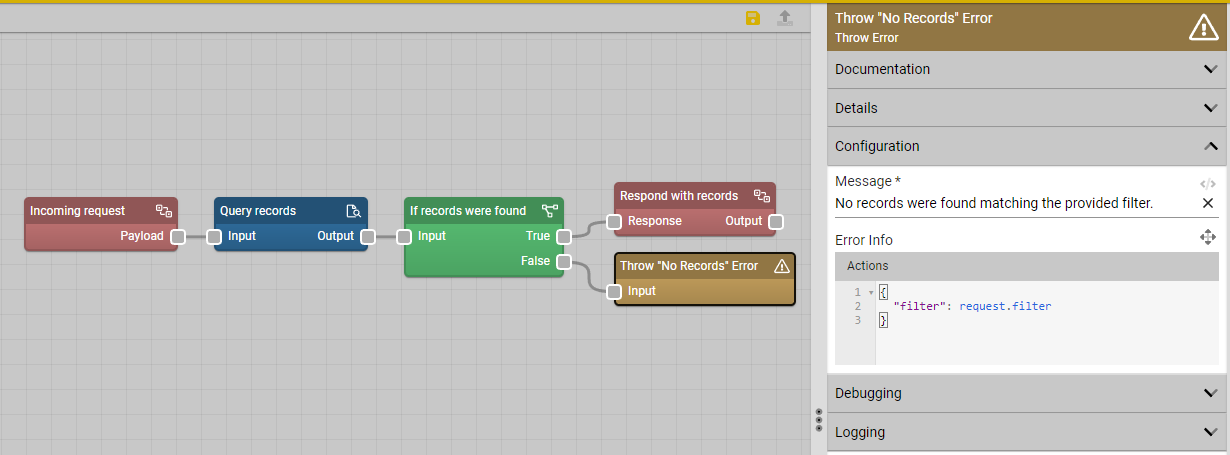
The first of the new nodes with this release allows flow builders to easily throw errors during flow execution, which stops execution on that branch and returns the error to the requester. The screenshot below illustrates its use with an If Else node in a Request/Response flow, and it can also be combined with the Try Catch node for greater control over flow error behavior.
Filter Array
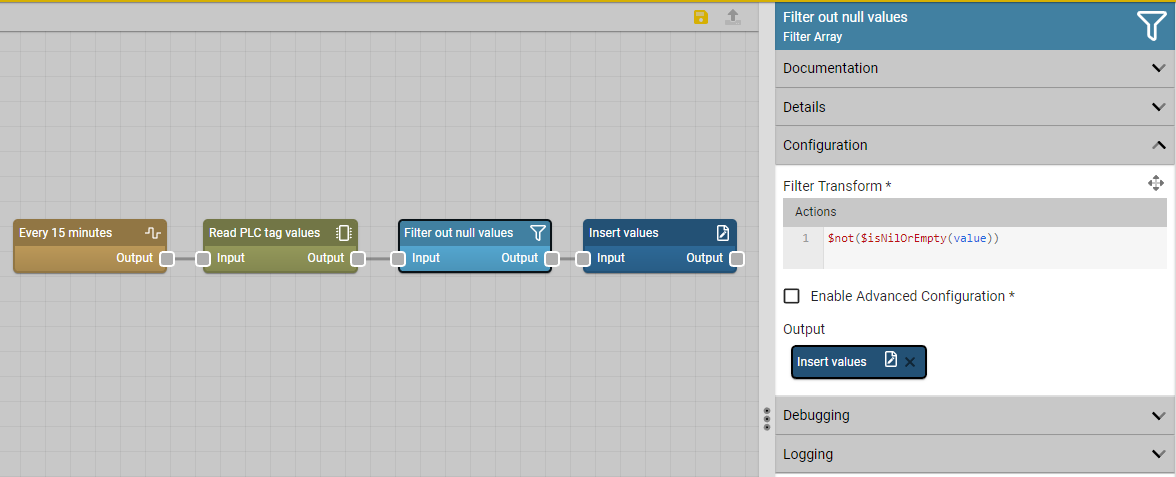
The other new node to highlight this release is the Filter Array node, which provides an easy mechanism for filtering arrays of data passing through flows. The example below shows its use in a scheduled flow reading PLC tag data.
Note that along with this new node, the node previously named Filter has been renamed to Accept, which matches the verbiage used in its twin (the Reject node) and which should be less confusing. Those nodes either accept or reject an entire flow message, whereas the new node filters out array entries in the payload.
Integrated Transform Editor
This month's release includes a much-anticipated new feature for the flow designer: an integrated transform editor. This editor pulls many of the features available in the standalone Script Editor into the flow designer, so "pro-code" users can seamlessly edit and test scripts embedded in data flows without switching tabs or copying and pasting between editors.
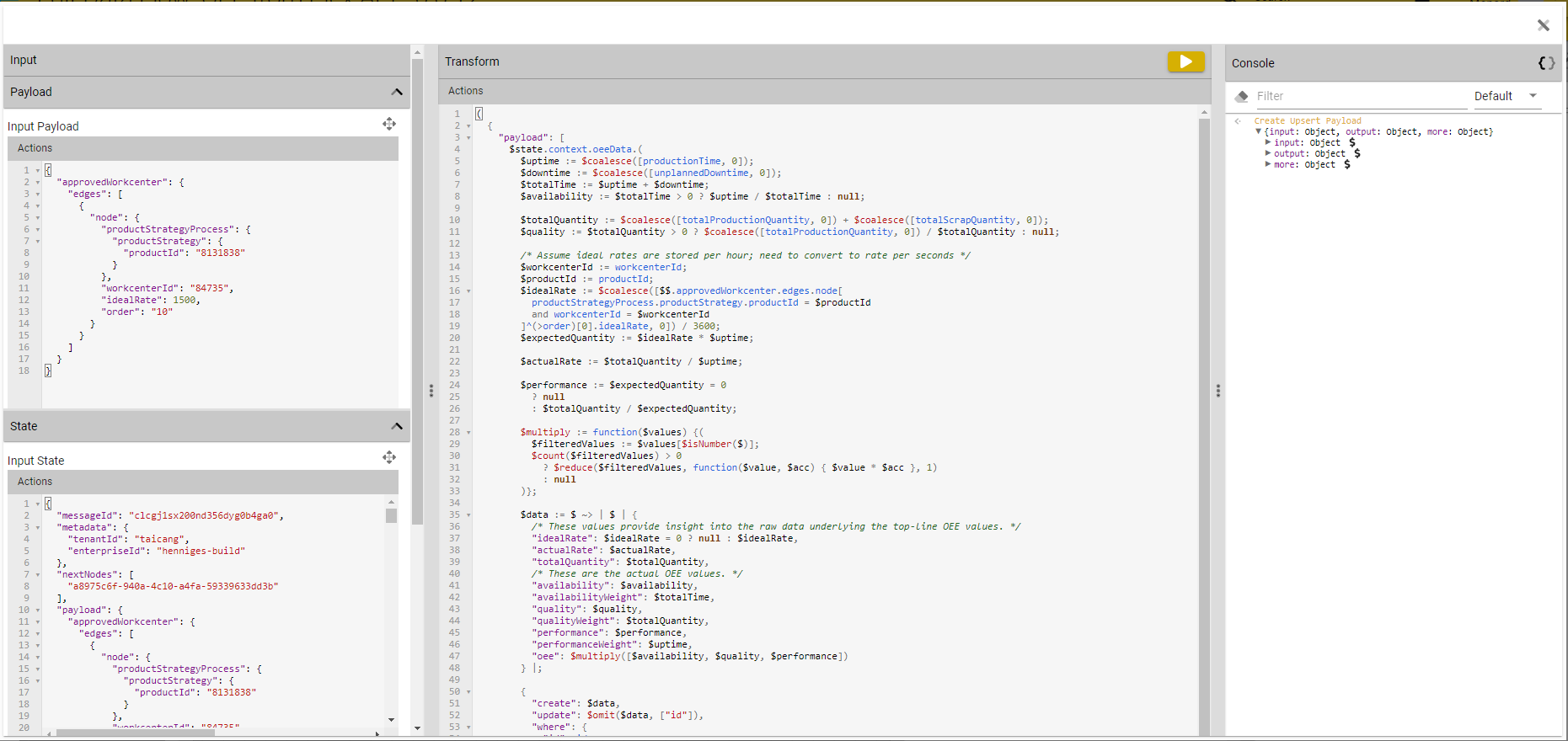
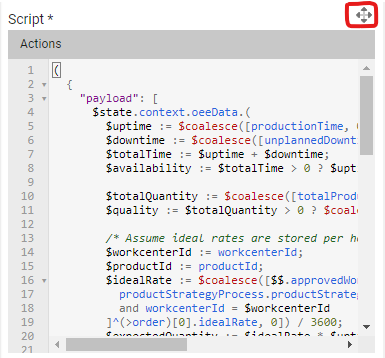
This new editor can be accessed on any script or transform input in the flow designer by clicking the "expand" icon in the upper right:
Data Flow Metrics Dashboard
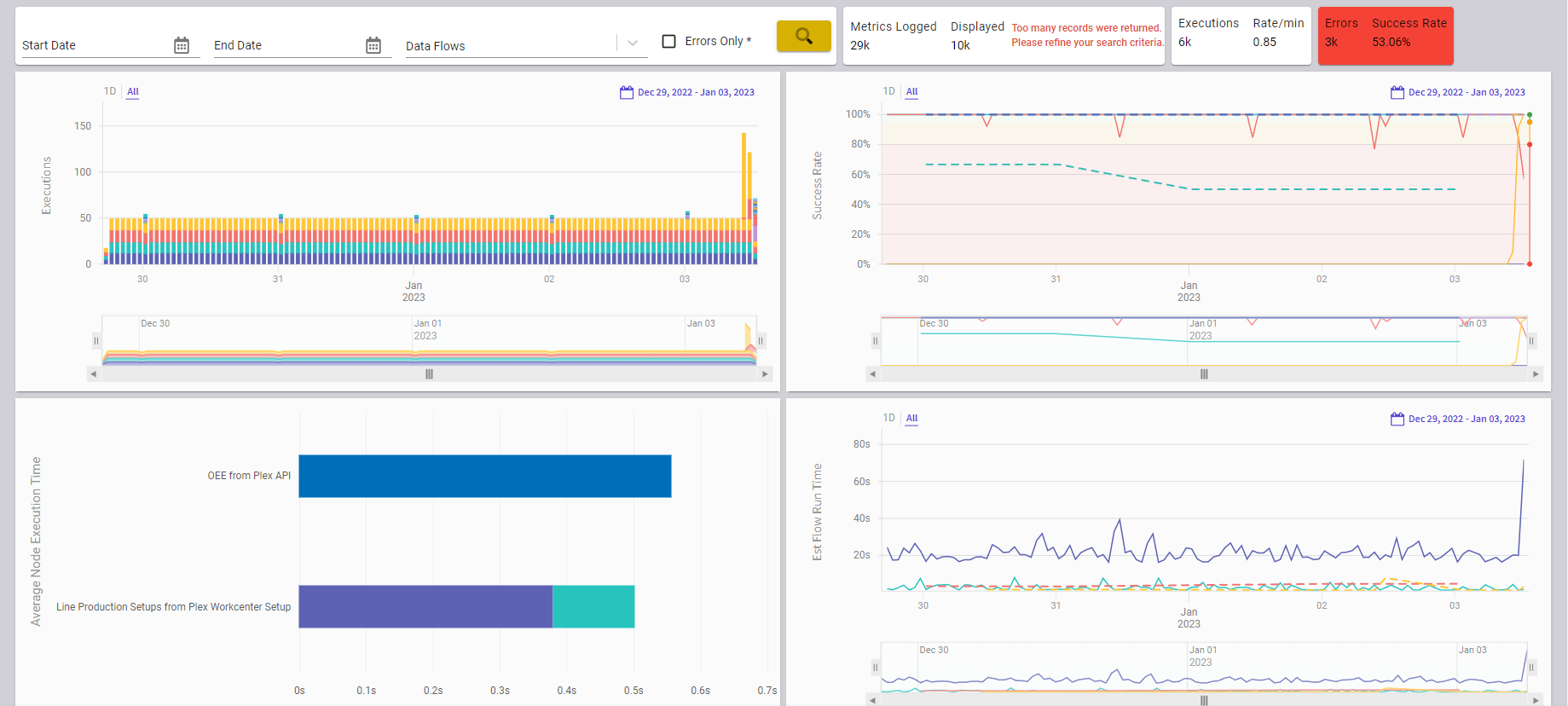
In addition to new nodes and improvements to the flow designer, the 2023.1.0 release also includes a new dashboard for monitoring system health. This dashboard - the Data Flow Metrics Dashboard - displays a number of useful system metrics: the number of flow executions over time, the success rate of running flows, the estimated runtime of running flows, and the average runtime of any nodes with metric collection enabled.
Together, these data points give an overall picture of system health: for example, if an external system goes offline and integration data flows start failing, the success rate for those flows will drop, signaling an issue. Similarly, if a data flow seems to be running slowly, metrics can help pinpoint the problem nodes. Currently, metric collection for nodes is opt-in, but there is work planned to make metrics opt-out instead, so metrics are collected by default for all nodes.
Full Release Notes: 2023.1.0
Data Team
Core APIs
- Added
_alland_nonepredicates for list relations - Added detailed error message when relations fail to resolve at query time
- Updated mutation pipelines to significantly optimize performance for large array payloads
- Updated document rendering to apply service degree of parallelism
- Updated reference checks to correctly validate embedded model references
- Fixed behavior of
_somepredicate to correctly combine nested predicates
Schema Designer
- Added button to delete undeployed data model versions
- Updated field auto-sort behavior to retain custom sort order
- Updated default value input to correctly display
falseas a default value for Boolean fields
Security
- Added "last authenticated at" and configuration fields to support upcoming user access expiration features
- Added beta version of email-based multi-factor authentication
Miscellaneous
- Added dark mode theme for API explorer
- Added platform version and environment fields to Enterprise form
- Added description field to calendar event base schema
- Added setting for tenant time zone
- Fixed issues with system flag on modules & module groups
DevOps Team
Helm Charts
- Added stabilization window to HPAs
- Updated small cluster size to reduce idle server overhead
Miscellaneous
- Implemented new automated nightly release to build environments
IIoT Team
Edge Gateway
- Added extra context to "function not supported" error messages
- Added
startandlengthparameters to Read File device driver function to allow partial reads of large files - Updated Ethernet-IP PLC driver for improved reliability and better error messages
- Fixed gateway screen titles
Subscription Service
- Added ability to publish messages via subscription service
Orchestration Team
Bindings
- Added
$urlStringifybinding - Added
$urlJoinbinding - Added new string bindings:
$startsWith,$endsWith,$removeLeadingValues, and$replaceLeadingValues - Fixed
$getCalendarbinding error when providing only ID or name but not both
Connectors
- Updated UPS connector to allow passing reference numbers
Data Flow Designer
- Added "Copy to Node" button in data flow deployment log form
- Added data flow event nodes screen
- Added data flow metrics dashboard
- Added option to enable auto-collapse for node editor panel
- Added "Enable Trace Logging" config value to node configuration Logging section
- Updated execute flow node to add link to selected data flow
- Updated MFGx node icons to simplify distinguishing between them
Data Flow Nodes
- Added improved ODBC V2 node; deprecated existing ODBC node
- Added a Throw Error node
- Added a Filter Array transformation node
- Added Mutex Lock and Mutex Unlock nodes to allow flows to ensure only a single message is processed at a time
- Updated existing Filter node to rename to Accept, mirroring verbiage used in Reject node
Miscellaneous
- Added tenant name & querystring value to footer for applicable emails
- Added RabbitMQ service map library with channel pooling
- Updated data flow deployment log schema to improve query performance on logs screen
- Updated Fuuz Packages screen to support "deprecated" packages
- Removed data change capture on integration request collections
User Interface Team
Components
- Added PDF viewer component and screen element
- Added rich text input, field type, and bindings
- Added loading/error indicators to tree browser component
- Added "markdown" format for Display Text element
- Added ability to render inputs in table cells to build inline editing functionality
- Updated Calendar component to enable "List" view
- Updated actions to allow both text and icons and to allow custom text and icon sizes
Screen Designer
- Added action buttons for tables
- Added "Data Transformation" input to Table element
- Added font size, justification, alignment, and wrapping options for table columns
- Added input for "Disabled" property for table column action buttons
- Added support for user-defined views in screen designer tables
- Updated default label for form inputs to use just the deepest selected field instead of the full path
- Updated forms to correctly auto-load when no fields are registered
- Updated action input to add link from Data Flow combobox for flow action steps
- Updated editor panel tab sizes to fit on screen
- Fixed crash which could happen after the base model on a form or table was changed
- Fixed bug causing Save As to not function correctly
Miscellaneous
- Added "Design" action to "Screens" table
- Fixed browser extension data subscriptions to backend