Edge Gateway System Requirements & Deployment Best Practices
Article Type: Concept / How-To Audience: Solution Architects, OT/IT Engineers, Administrators Module: Fuuz Edge Gateway Applies to Versions: 2025.12+
Overview
The Edge Gateway acts as a secure door between your facility and Fuuz Cloud. It is not a full-stack platform but a lightweight edge component designed for secure connectivity, data flows, and optional local HMIs. Proper sizing and deployment are critical for performance, reliability, and security.
Critical: If using Edge Flows and Edge Screens (HMI, Local MES, PLC control), deploy one gateway per PLC or workstation for optimal load balancing and security.
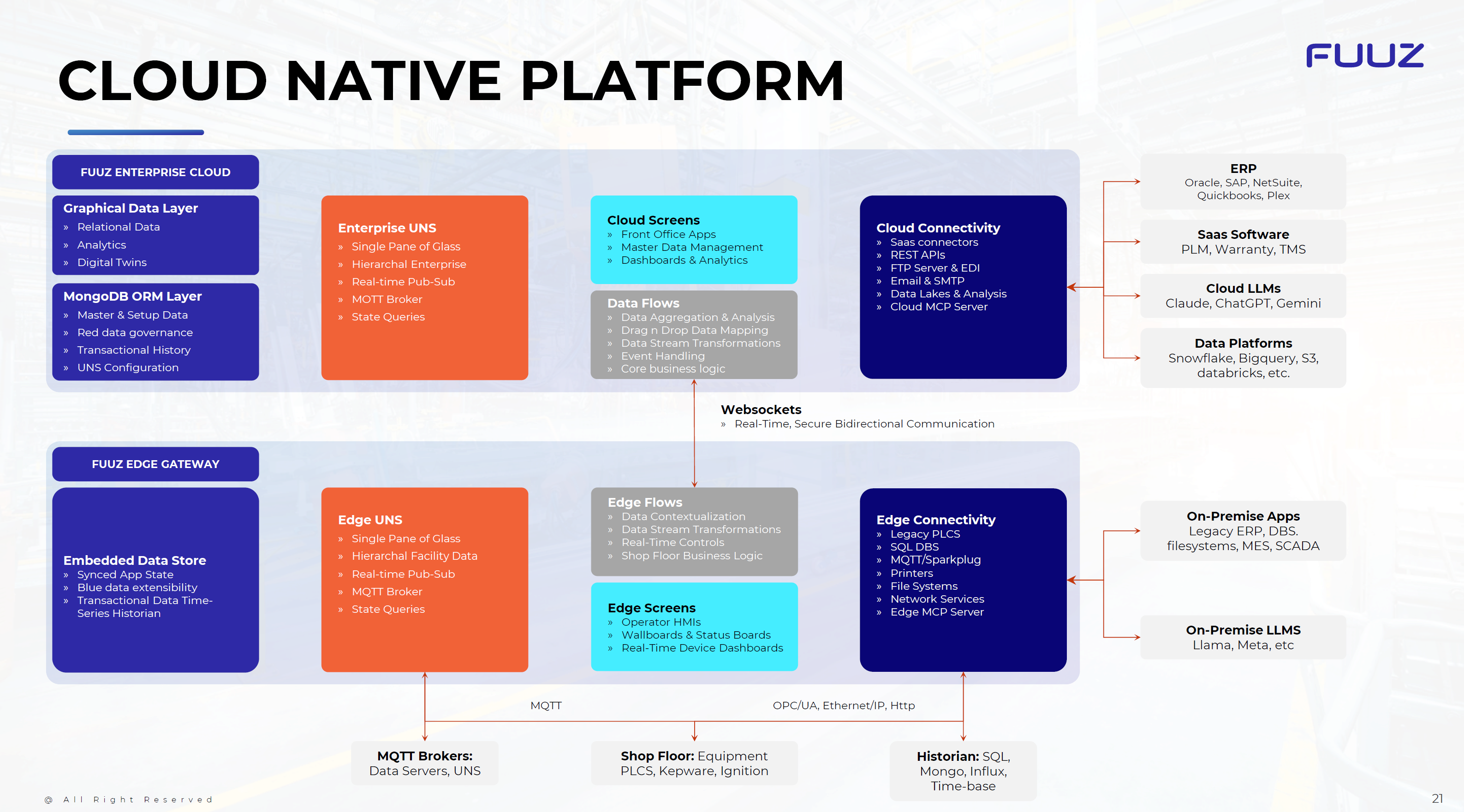
Optimal Deployment Strategies
- Edge Workloads: For HMIs, Local MES, and PLC control, use dedicated gateways per PLC/workstation.
- Monitoring Only: For centralized data monitoring, a single gateway on a VM can suffice.
- Small Deployments: For fewer than 100 devices, running as a Windows service on a VM may be acceptable.
- Best Practice: Always start with Docker-based deployments, ideally managed via Portainer.io templates for scalability and lifecycle consistency.
Hardware Profiles
Single PLC with HMI Screen
- 64-bit Processor
- 64-bit Windows Operating System
- 2–4 GB RAM
Standard PLC / Data Collection
- 64-bit Dual-Core Processor
- 64-bit Windows Operating System
- 4–8 GB RAM
Adding Store-and-Forward
- 4 CPU Cores
- Additional 2–4 GB RAM
- 20 GB free storage for the database
- Requirements for MySQL (included in the Gateway installation bundle)
- If exceeding 500 tags with Store-and-Forward, use separate gateways for tag collection and the database.
Deployment Best Practices
- Use Docker for containerized gateway services.
- Manage deployments with Portainer templates for Build, QA, and Production environments.
- Align the gateway lifecycle with cloud environment promotion and validation steps.
- Configure secure networking (firewalls, VLANs, certificates for MQTT/WebSocket).
- Enable observability: logs, metrics, and dashboards for gateway health.
Tip: For edge-based UI workloads, do not consolidate everything into one gateway — use dedicated or virtual machines for Fuuz Edge.
Security & Governance
- Role-based access and tenant isolation apply at both edge and cloud.
- Harden OS and network configurations.
- Follow compliance standards (SOC 2, ITAR, CFR) for data governance.
Revision History
| Version | Date | Editor | Description |
|---|---|---|---|
| 1.0 | 2025-12-23 | Fuuz Documentation Team | Initial Release |