Managing Applications (Tenants)
Article Type: Concept / How-To Audience: Enterprise Administrators Module: Enterprise Admin - Environment Structure Applies to Versions: Fuuz 2024.1+
Applications (historically referred to as "Tenants") are modular software solutions deployed within the Fuuz platform to deliver specific functionality such as Manufacturing Execution Systems (MES), Warehouse Management Systems (WMS), Computerized Maintenance Management Systems (CMMS), or custom business applications. Each application runs as an isolated instance with its own MongoDB database, users, access controls, and integrations.
1. Overview
Important: Fuuz is transitioning from the term "Tenant" to "Application" beginning in 2026. While both terms currently appear in the platform, "Application" more accurately reflects the purpose of these modular solutions. This article uses both terms interchangeably, but "Application" is preferred for future usage.
Enterprise Administrators are the only users authorized to create new applications in the system. Applications are scoped to Organizations and can range in complexity from comprehensive enterprise systems managing complex business processes across multiple departments to simple, focused tools like a single digital form or workcenter HMI.
Note: In 2026, Fuuz plans to release new "Application Management" features. Enterprise Admins will install or copy applications from the Fuuz Marketplace, provided by Fuuz, partners, and customers who allow redistribution (either for a cost or free). This will deprecate the current tenant type selection process.
2. Architecture & Data Flow
Application Isolation
Each application is an isolated instance with dedicated resources:
- Database: Each application has its own MongoDB database instance ensuring complete data isolation
- Users: Application users must be explicitly granted access. Enterprise Users must first exist, then be granted application-specific access
- Access Controls: Roles, policies, and permissions are application-specific
- Integrations: Connections and data flows are scoped to the application
- Localization: Each application is scoped to a single timezone, currency, and language setting
Application Types
Fuuz supports four application types, each with distinct capabilities and restrictions. Application type cannot be changed after creation.
| Type | Purpose | Capabilities | Status |
|---|---|---|---|
| Application | Pre-built applications, no development | Install pre-built apps only. No developer tools. Connect to other Fuuz apps only | Active |
| Application Development | Custom app building and extension | Requires build environment purchase. Full developer toolkit access. Install apps and modify/extend. Connect to other Fuuz apps only | Active |
| Integration | Cloud/edge integration broker | Access Connections and Connectors. Integrate with external systems (ERP, PLM, databases, machinery). Use Edge Gateway drivers. Publish to Fuuz apps | Active |
| Custom | Legacy unrestricted type | No restrictions. Build apps and integrations in same app | Deprecated |
Integration Architecture
Application and Application Development types cannot integrate directly with external systems. Instead, you deploy Integration applications that broker data between Fuuz apps and external systems. This architectural pattern separates business logic and schema from integration, data mapping, and ETL pipelines, ensuring data is cleaned and validated before entering business-critical applications.
Note: To monitor machinery, install an Integration app, connect with the Edge Gateway, then publish information to recipient Fuuz apps (like MES) using internal data flow tools. For ERP integration, create an Integration app with an ERP connector that publishes data to your WMS and MES applications.
Application Lifecycle Status
- Active: Users can access the application (if granted access). All integrations, data flows, and API access are operational
- Inactive: Application is not in use and not accessible. All user access and API access are revoked. All data flows, integrations, and subscriptions are terminated. Can be reactivated at any time
- Obsolete: Application is still accessible by users and APIs but is not in general use. Typically used to mark applications being phased out but requiring continued access for historical data or legacy processes
3. Use Cases
- Manufacturing Execution System (MES): Application Development type for custom MES functionality specific to each manufacturing site with screens, data models, and workflows tailored to production processes
- Warehouse Management System (WMS): Application type with pre-built WMS functionality installed, used across multiple warehouse locations with shared processes
- ERP Integration: Integration type application with SAP or Oracle connectors that publishes purchase orders, production schedules, and inventory data to multiple business applications
- IIoT Gateway Integration: Integration type connecting to the Edge Gateway for machinery monitoring, publishing real-time sensor data to MES and CMMS applications
- HQ Aggregation: Application Development type that aggregates data from site-specific MES and WMS applications for enterprise-wide reporting and analytics
- Workcenter HMI: Small Application Development type focused on a single workcenter with one screen and minimal data model for operator interface
- Digital Form System: Simple Application type with a single isolated digital form for quality inspections or safety checklists
- Cross-Site Planning: Custom enterprise application for proprietary business processes like production scheduling across multiple facilities
4. Managing Applications
Creating Applications
Prerequisites: Enterprise Administrator access type
Required Fields:
- Name: Application display name (no format restrictions or required conventions)
- Organization: Select from available organizations via dropdown
- Tenant Type: Select Application, Application Development, Integration, or Custom (deprecated)
- Description: Optional rich text documentation of application purpose and scope
Critical: Application type cannot be changed after creation. If you need to change the type, you must create a new application and migrate data/configurations using package management.
Steps:
- Navigate to Enterprise Admin Home in the left navigation menu
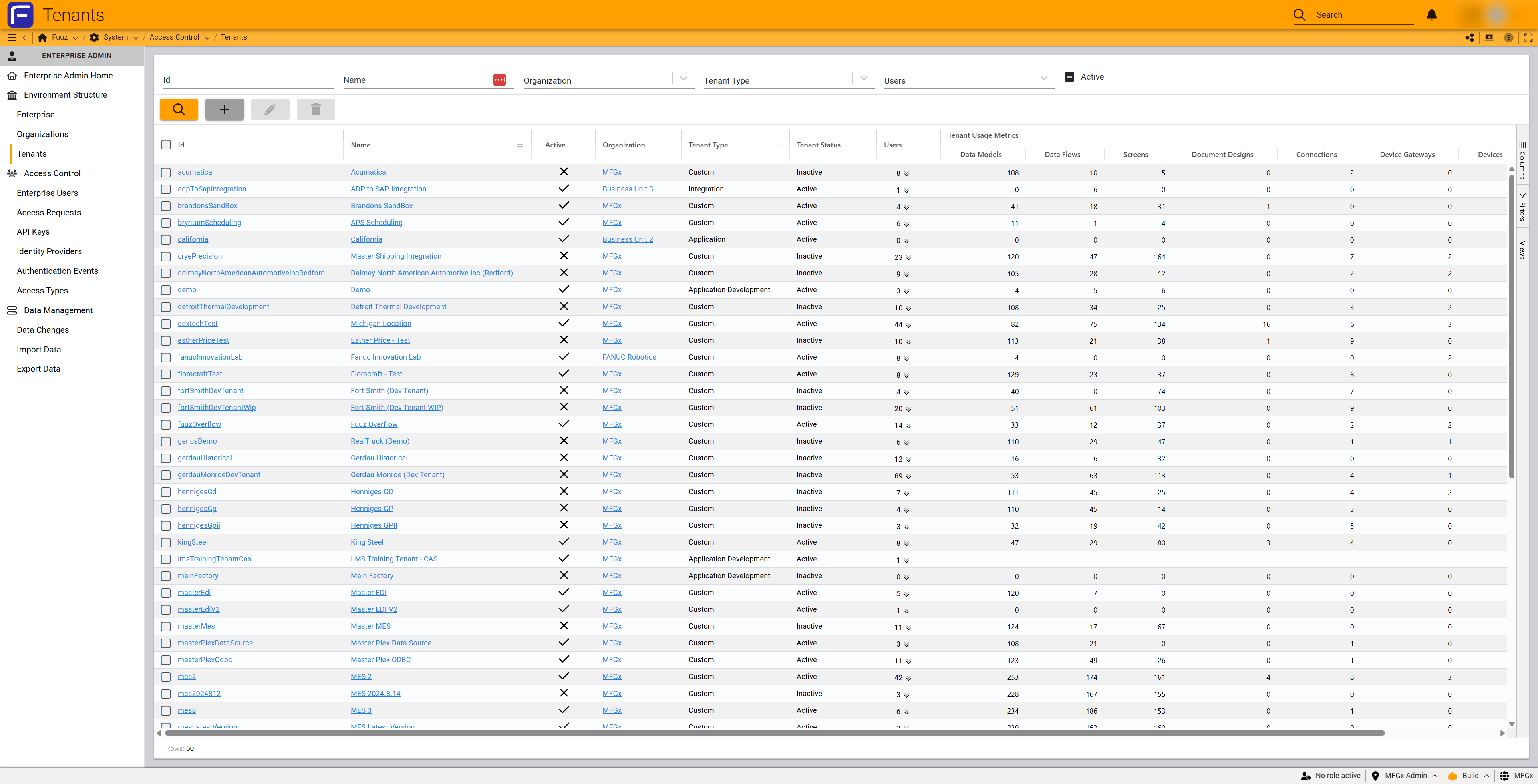
- Select Environment Structure > Tenants
- Click the + (plus) button in the toolbar
- Enter the application Name
- Select the Organization from the dropdown
- Select the Tenant Type from the dropdown
- Optionally enter a Description
- Click the + (save) button to create the application
Editing Applications
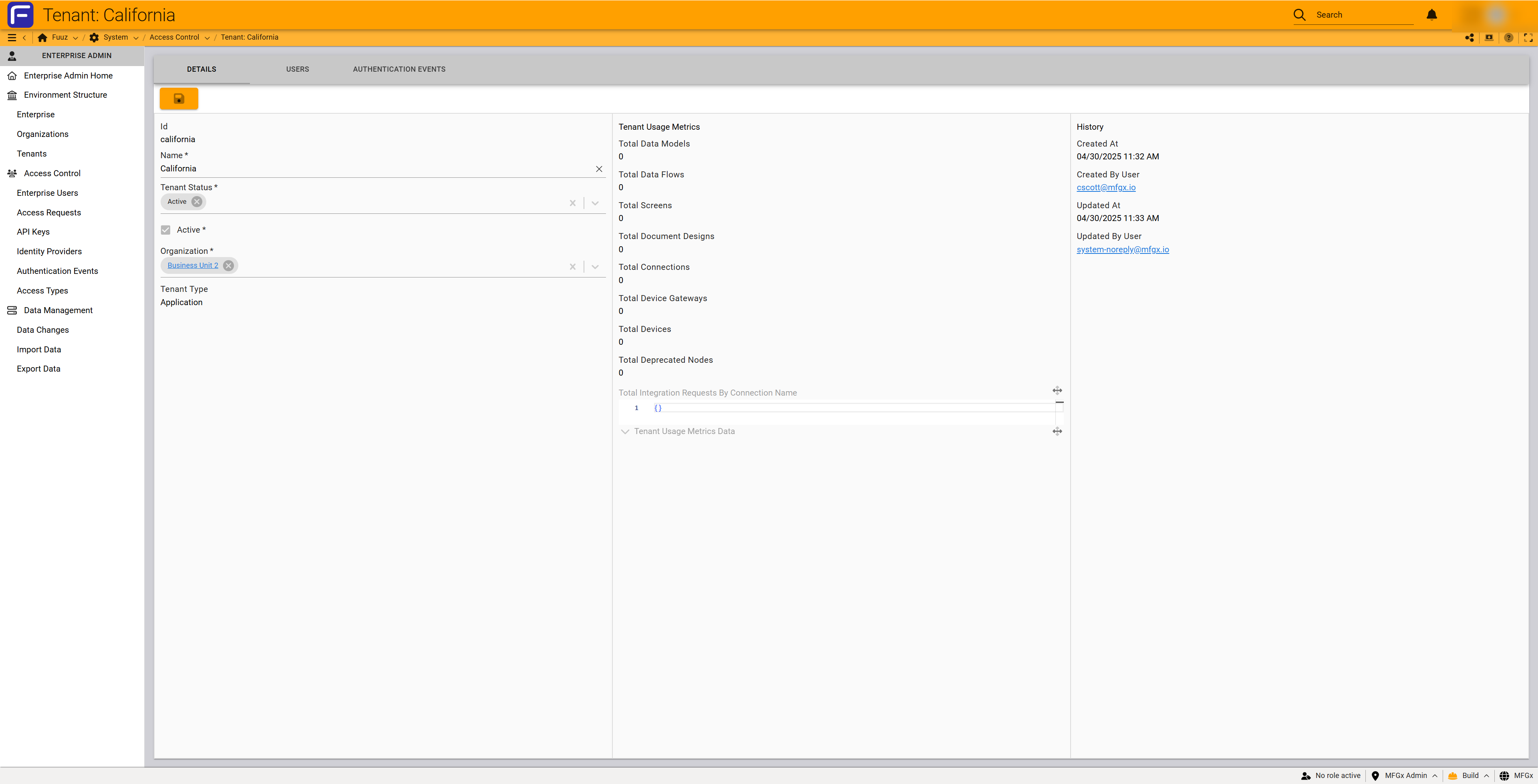
You can modify the application name, description, and organization assignment. Tenant type cannot be changed.
Steps:
- Navigate to Environment Structure > Tenants
- Click on the application name to open the detail form
- Modify the Name, Description, or select a new Organization from the dropdown
- Click the save icon to commit changes
Note: Changing the organization assignment reallocates the application to a different organization. This supports organizational growth, expansion, divestitures, and acquisitions. Users, data, and configurations remain intact during reallocation.
Managing Application Status
Inactivating an Application:
- Navigate to Environment Structure > Tenants
- Click on the application name to open the detail form
- Change the Tenant Status dropdown to Inactive
- Save changes
When an application is inactivated, all data flows, integrations, subscriptions, and user access are immediately terminated. The Active checkbox (checkmark/X) in the list view reflects the Tenant Status field.
Deleting Applications
Important: Application deletion is permanent and irreversible. When an application is deleted, all data is permanently lost. Before deleting, use data extraction tools (API Explorer, Data Export, API) to preserve data if needed.
Prerequisites: Application must be in Inactive status
Steps:
- Navigate to Environment Structure > Tenants
- Select the checkbox next to the inactive application
- Click the trash can (delete) button in the toolbar
- In the confirmation dialog, type the exact application name to confirm deletion
- Click the + (confirm) button to permanently delete the application
Viewing Usage Metrics
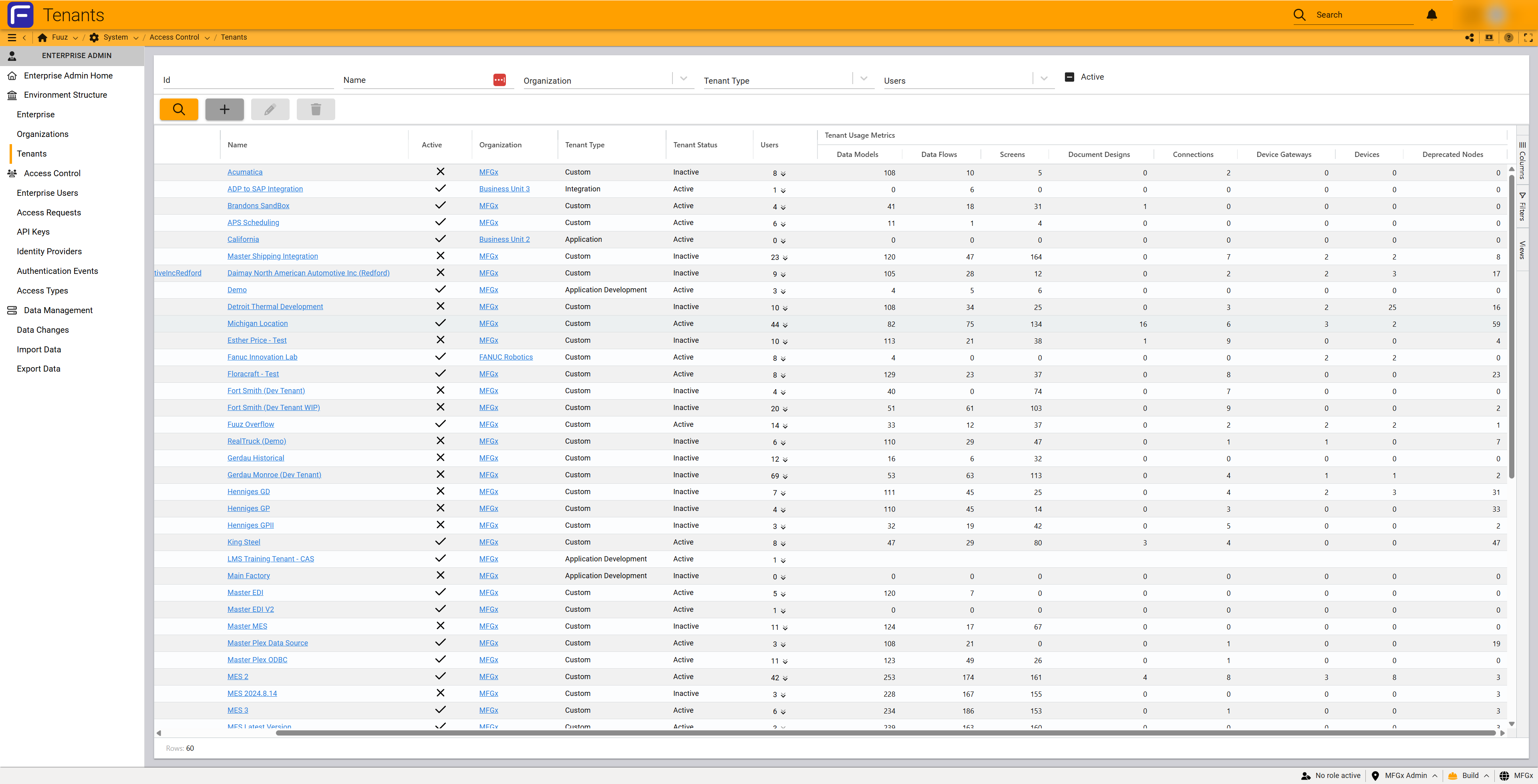
The Tenants list view displays aggregated usage metrics for each application including counts of Data Models, Data Flows, Screens, Document Designs, Connections, Edge Gateways, Devices, and Deprecated Nodes. These metrics are cached nightly and provide a high-level overview of application complexity.
For detailed usage reports, log in to each application directly to access comprehensive analytics and usage data.
Deprecated Nodes: Flow nodes in use within your applications that should be changed, removed, or replaced with new node types. Check Fuuz release notes regularly for deprecation information. Contact a Fuuz partner if unsure how to update deprecated nodes.
Managing User Access
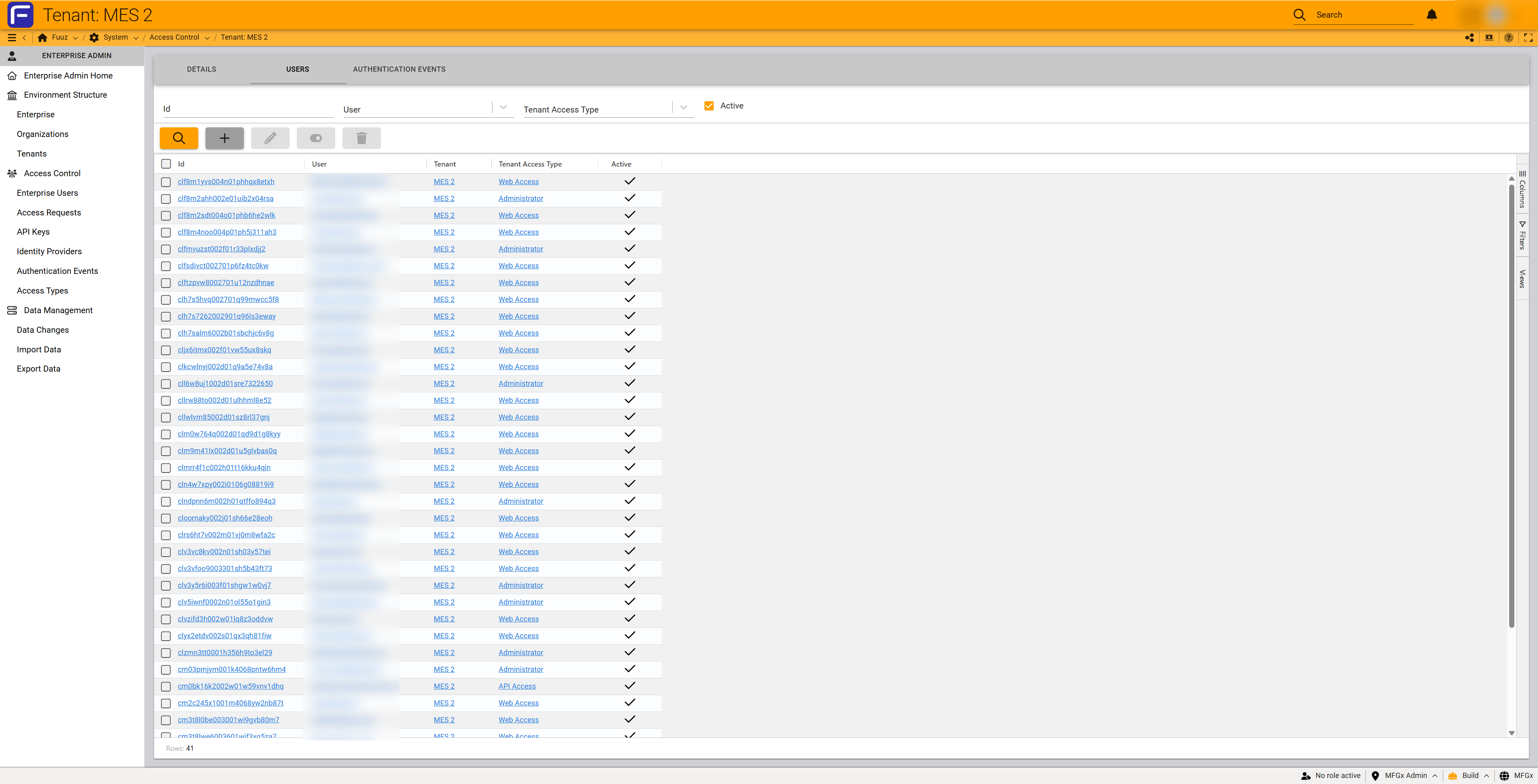
Application user access can be managed from two locations:
- Enterprise Users Screen: Grant users access to multiple applications from the centralized Enterprise Users interface
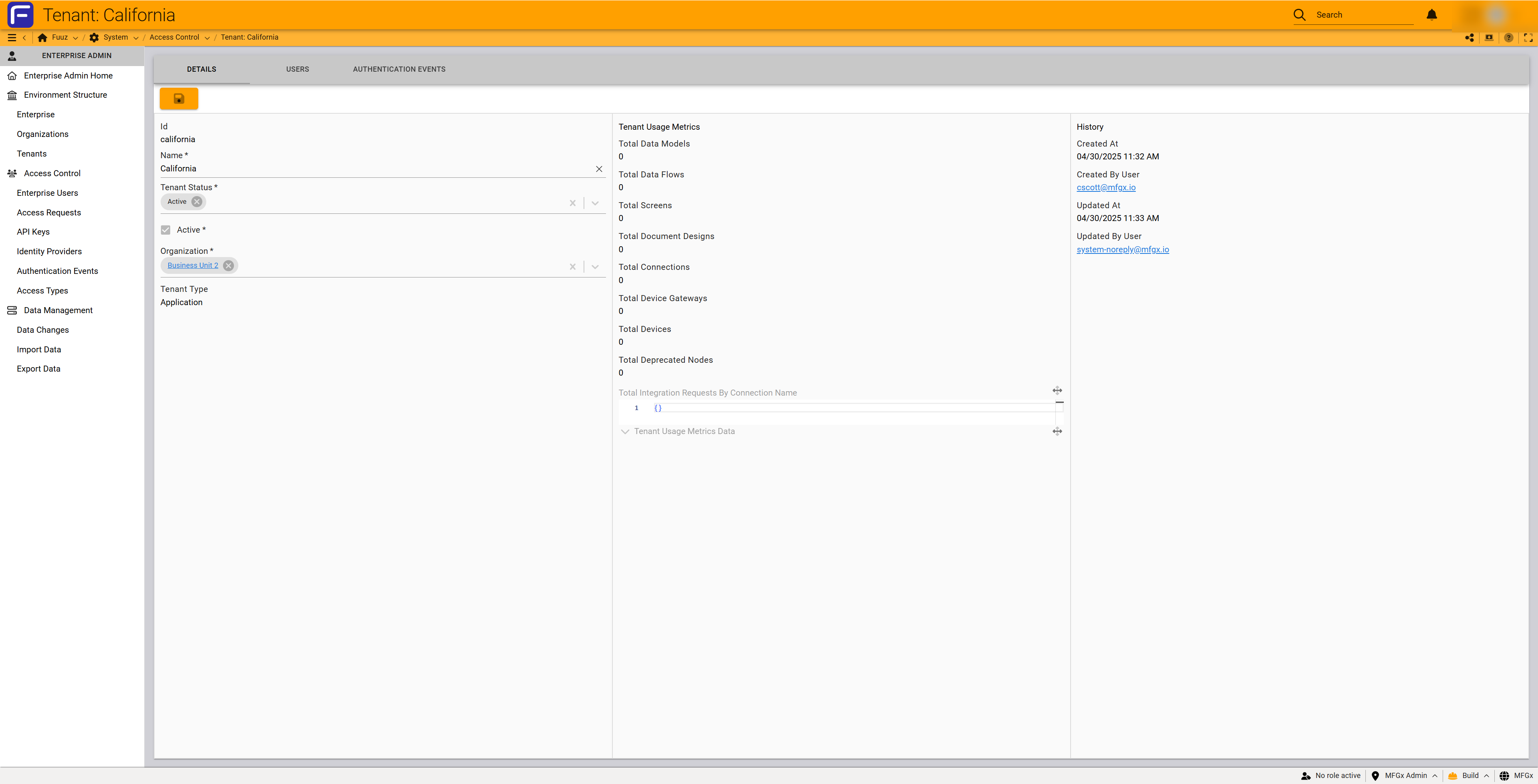
- Application Detail Form: Navigate to the application detail form and use the Users tab to add and remove users directly
Viewing Authentication Events
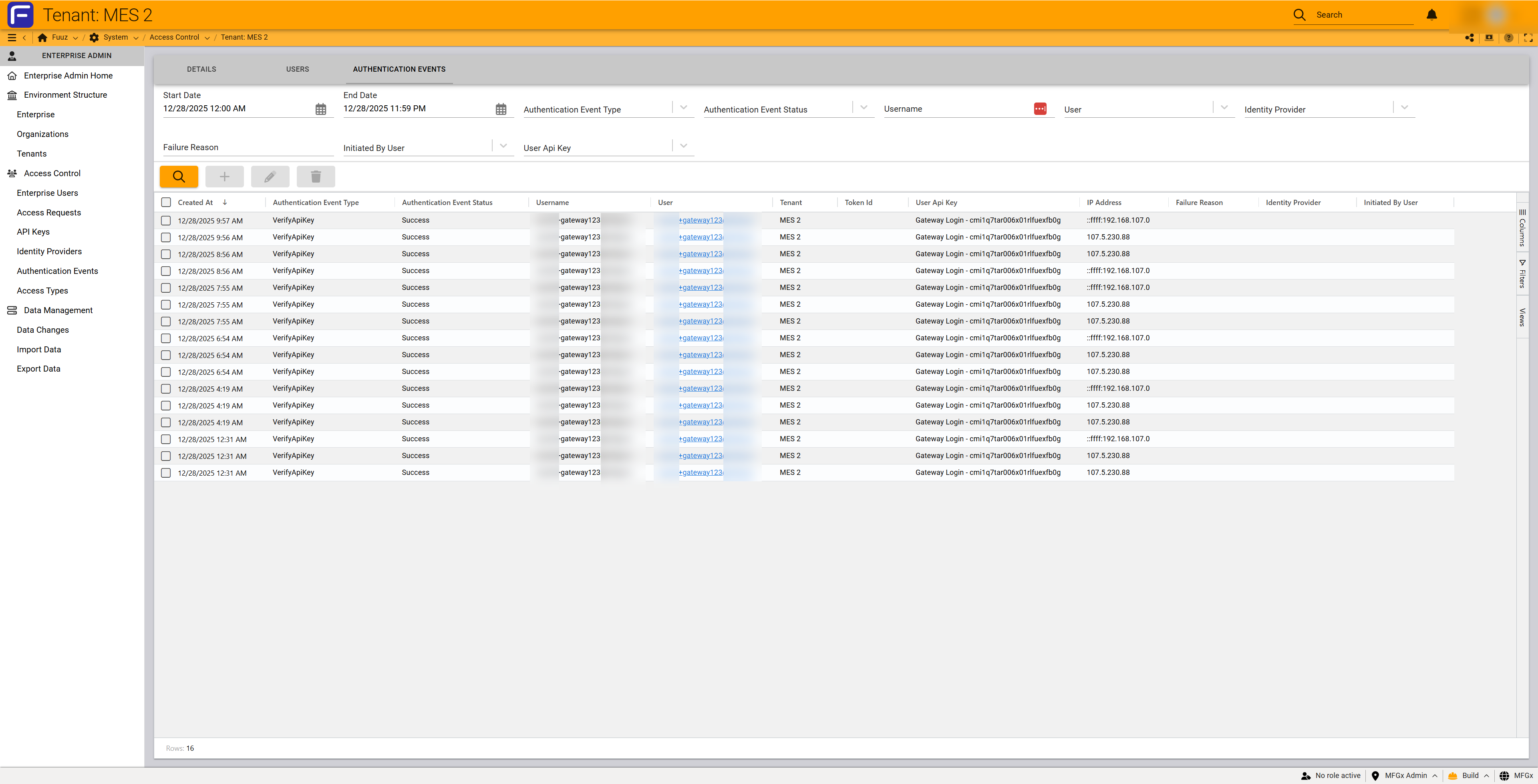
To view authentication events specific to an individual application:
- Navigate to Environment Structure > Tenants
- Click on the application name to open the detail form
- Select the Authentication Events tab at the top of the form
- Review application-specific authentication activity including logins, token refreshes, and API key usage
5. Licensing & Subscription Considerations
Licensing Model
Applications are licensed with an annual fee per application. Each application license includes unlimited users—there are no per-user costs. This allows you to scale user access within an application without incurring additional licensing costs.
Build Environment
To create Application Development type applications, you must purchase a build environment. The build environment is enterprise-wide, not per-application. Once purchased, you can create unlimited Application Development type applications within your enterprise.
You can mix and match application types within a single enterprise and organization—some applications can be Application type (pre-built only) while others are Application Development type (custom building enabled).
Scaling
For hosted Fuuz deployments, the platform automatically scales applications vertically and horizontally as needed. There are no performance implications based on how you structure applications (monolithic vs. small focused apps).
For self-hosted deployments, you are responsible for infrastructure configuration to support scaling. Since each application has its own database and application services, ensure your infrastructure can support the number and size of applications deployed.
6. Best Practices
Application Sizing Strategy
The decision to create small focused applications versus large monolithic applications involves tradeoffs:
Small Focused Applications (Recommended):
- Advantages: Easy to update, take offline for maintenance, make changes without impacting adjacent systems, clearer user access control, simpler to manage
- Disadvantages: Requires more configuration on the backend, more applications to manage overall
- Examples: Single workcenter apps, function-specific tools, site-specific MES instances
Large Monolithic Applications:
- Advantages: Fewer applications to manage, less integration configuration needed
- Disadvantages: More attention required for user access, roles, and policies. Changes are more time-consuming. Downtime affects more users and processes
- Examples: Enterprise-wide MES covering all plants, combined WMS+MES+CMMS for small operations
Application Splitting Criteria
General recommendations for when to split applications:
- By Function: Separate applications for WMS, MES, CMMS, or other business functions. This provides clear functional boundaries and independent lifecycle management
- By Production Line: Create separate applications for different production lines to ensure availability—if one line's application has issues, other lines continue operating
- By Physical Site/Location: Deploy site-specific applications (one WMS and one MES per site) for clear data boundaries and localization support
Multi-Site Deployment Pattern
Recommended Pattern: Create one application per business function per physical site, plus aggregation applications.
Example for 5 Manufacturing Sites with MES and WMS:
- 10 business applications: Site 1 MES, Site 1 WMS, Site 2 MES, Site 2 WMS... Site 5 MES, Site 5 WMS
- 1 HQ aggregation application: Consolidates data from all 10 business applications for enterprise reporting
- 1-2 integration applications: One for ERP integration, optionally one for PLM integration
- Total: 12-13 applications
Integration Application Pattern
Consolidate External Integrations: Create one Integration application per external system type. For example:
- ERP Integration App: Single integration application with SAP connector that publishes data to all MES and WMS applications across all sites
- PLM Integration App: Single integration application with PLM connector for engineering data distribution
- IIoT Integration App: Integration application connected to the Edge Gateway for machinery monitoring across facilities
Note: If integrating PLM and ERP systems with each other (bypassing Fuuz business apps), create separate integration apps for each external system, then use Fuuz internal data flow tools and data mapping to move data between the two integration apps.
Naming Conventions
While there are no required naming conventions, applications commonly include site name and function for clarity:
- Site-Function Pattern: "Detroit - MES", "Detroit - WMS", "Chicago - MES"
- Integration Pattern: "SAP Integration", "ADP to SAP Integration", "Master Shipping Integration"
- Development Pattern: "Detroit Thermal Development" (for development/testing instances)
- HQ Pattern: "HQ Aggregation", "Corporate Dashboard"
Lifecycle Management
- Use Obsolete Status: Mark applications as Obsolete rather than Inactive when phasing out systems that still need occasional access for historical data
- Extract Data Before Deletion: Always use API Explorer, Data Export, or API to extract data before inactivating applications intended for deletion
- Test in Development: Use Application Development instances for testing changes before deploying to production applications
- Document Purpose: Use the Description field to document application purpose, scope, dependencies, and any special considerations
- Monitor Deprecated Nodes: Regularly review applications with deprecated nodes and plan updates to avoid future compatibility issues
7. Troubleshooting
| Issue | Cause | Resolution |
|---|---|---|
| Cannot create Application Development type | Build environment not purchased | Contact your Fuuz account representative to purchase build environment capability for your enterprise |
| Need to change application type | Application type cannot be changed after creation | Create new application with desired type. Use package management to migrate data and configurations from old to new application. Inactivate and delete old application |
| Cannot delete application | Application is not Inactive | Change Tenant Status to Inactive first. This terminates all flows, integrations, and user access. Then delete the application |
| Application cannot connect to external system | Application or Application Development types cannot integrate directly with external systems | Create an Integration type application. Configure connections and connectors in the Integration app. Use internal data flows to publish data from Integration app to business applications |
| Users cannot access application | Users not granted application access or application is Inactive | Verify application status is Active. Grant users explicit access via Enterprise Users screen or application Users tab |
| Deprecated nodes showing in metrics | Application uses outdated flow nodes | Review Fuuz release notes for deprecation details. Contact a Fuuz partner for assistance updating nodes. Plan migration to replacement nodes |
| Lost data after deletion | Deletion is permanent and irreversible | Data cannot be recovered after deletion. Always extract data using API Explorer, Data Export, or API before inactivating applications intended for deletion |
| Application metrics not updating | Metrics are cached nightly | This is expected behavior. Metrics update once per day overnight. For real-time usage details, log in to the specific application |
| Integration app cannot access Connections | Application type is not Integration | Only Integration type applications can access Connections and Connectors. Create an Integration app or migrate to Integration type using package management |
| Need to migrate Custom type app | Custom type is deprecated | Separate business logic into Application Development app and integrations into Integration app. Use package management for migration. Contact Fuuz partner for assistance |