2024.7 (July 2024)
Article Type: Release Notes Audience: All Users Module: Platform Releases
The July release includes a range of features designed to streamline app development and administration in Fuuz. Read on to learn more!
App Designer Navigator Drag & Drop
The July 2024 release includes an exciting new feature for the Application Designer which brings together the various app components in the platform. With this release, users can now drag screens, data models, and data flows from the Navigator panel into a screen design to create screen elements! Each of those component types will create a different element:
- Dragging and dropping a screen into another screen will create an action button which navigates to the dropped screen.
- Dragging and dropping a data flow into a screen will create a flow button which executes that data flow.
- Dragging and dropping a data model into a screen will ask the user whether they wish to create a table or form, then allow them to pick the fields and sections they want to include before generating a table with filters and actions or a form with actions.
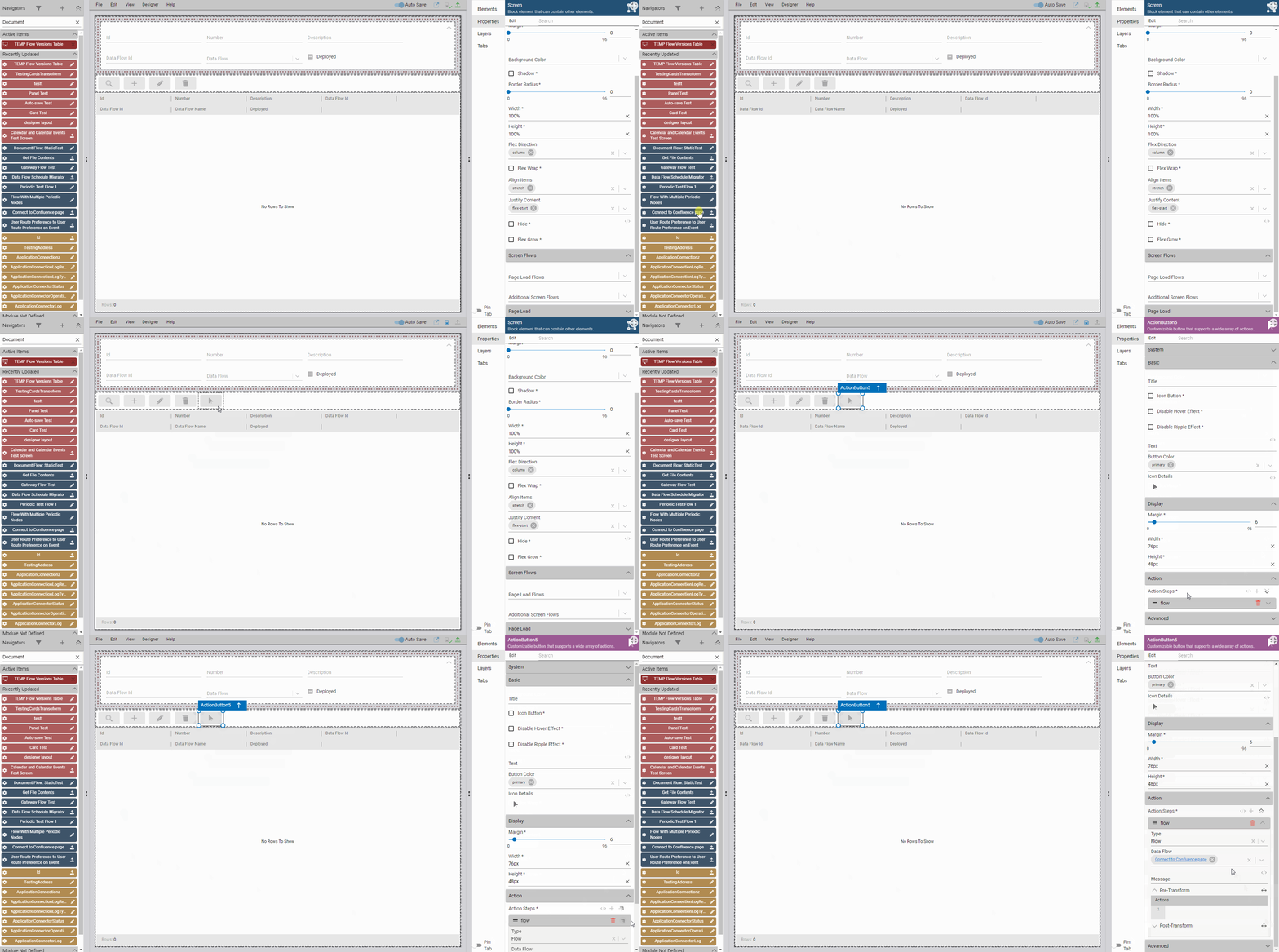
This feature is just the first step down the path of more fluidly integrating app components together in the app designer; future releases will add support for dragging and dropping into flows, as well as the ability to drag and drop specific fields from a data model to create just a single column or input.
Data Change History Screen
This month's release also includes a new system screen we're very excited about: a global Data Change History!
First, some background: as an event-driven system, Fuuz has always had a very comprehensive change capture system, useful as an edit history or audit tool; if data change capture is enabled on a data model (and it is by default), metadata about any change to any record is captured separately from the model and stored for a specified retention period - even if the record itself is deleted. However, before this change, there was no consistent way to view that change history; some screens had a "Data Changes" tab available on the form, but not all, and even then the user experience left much to be desired.
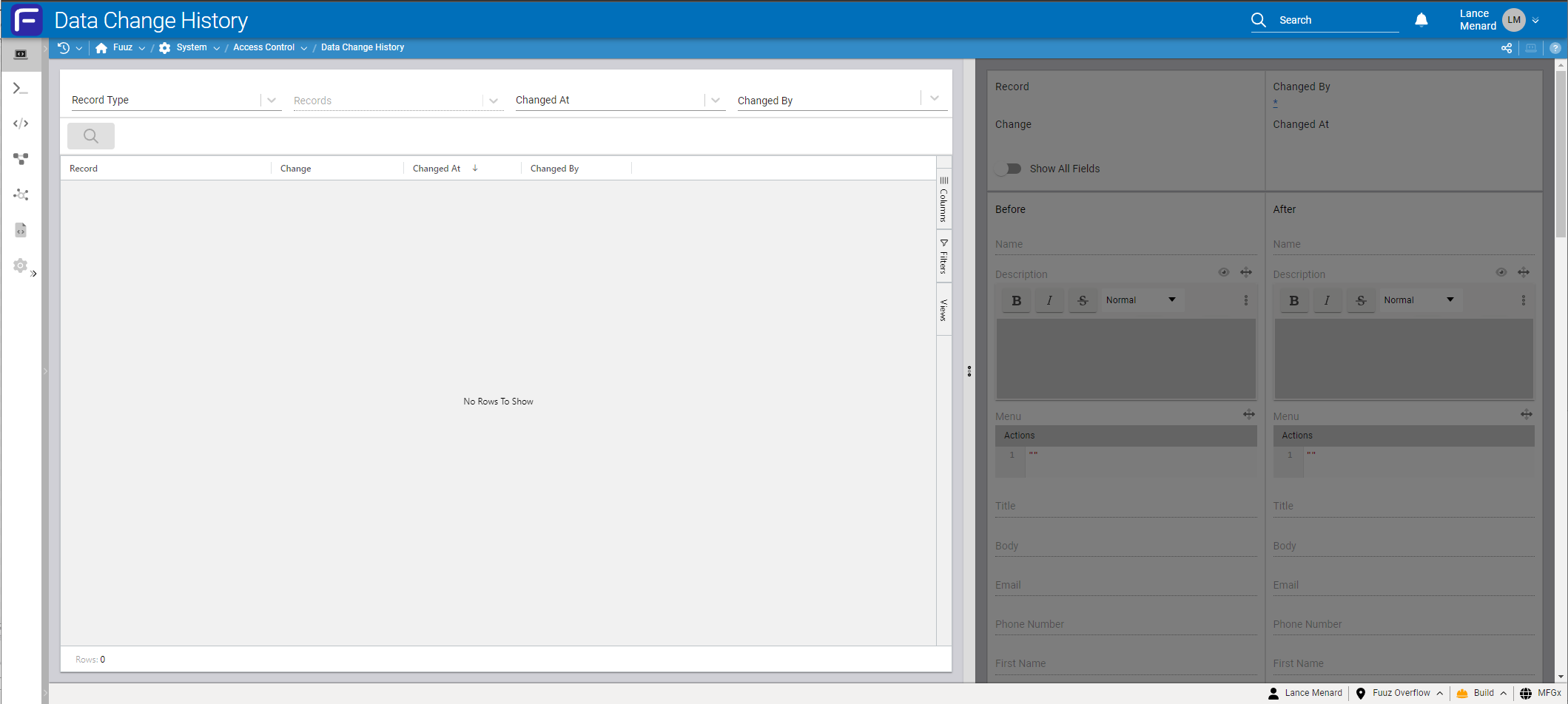
This new Data Change History screen, accessible via the Administration menu or search bar, solves those problems. This split-screen view allows administrators to select what type of record to view changes for and then filter based on a specific record, change date, user, or other criteria.
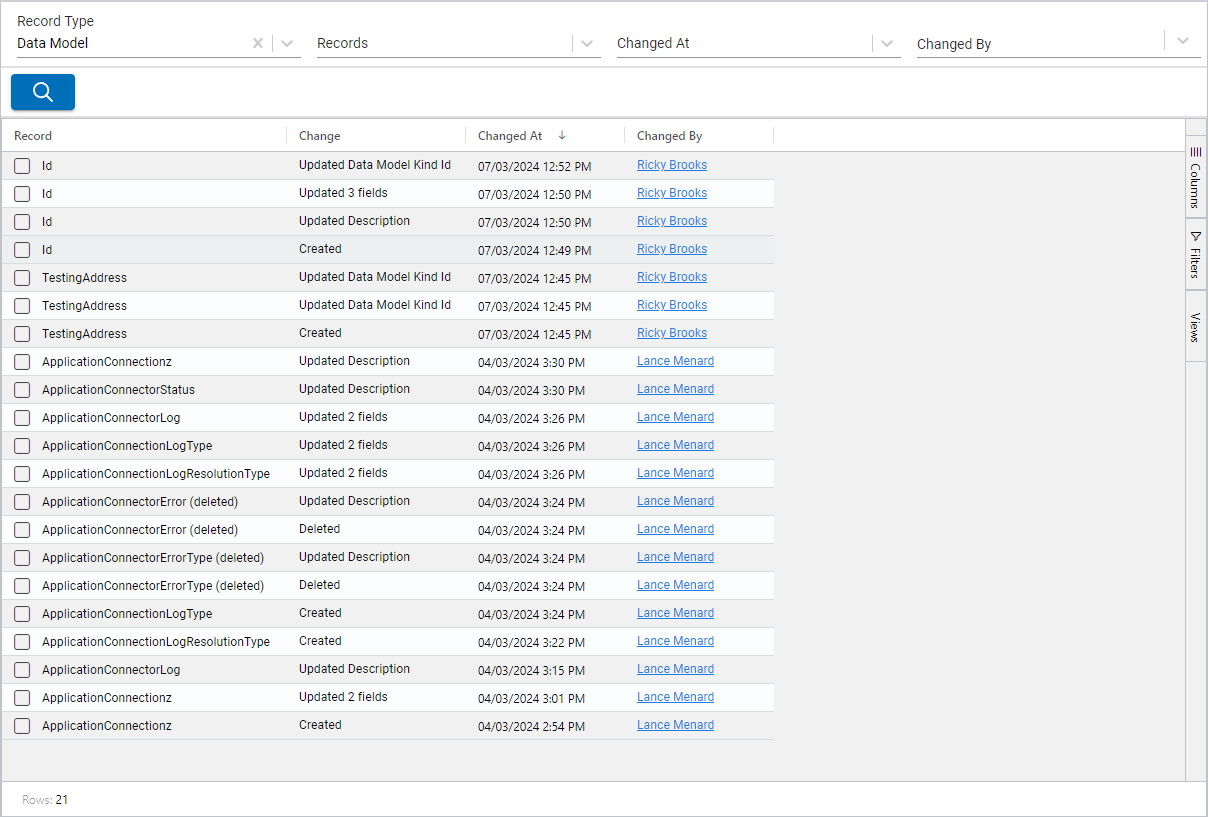
The table on the left will display the change history - who changed what when - allowing admins to understand how a record may have changed over time.
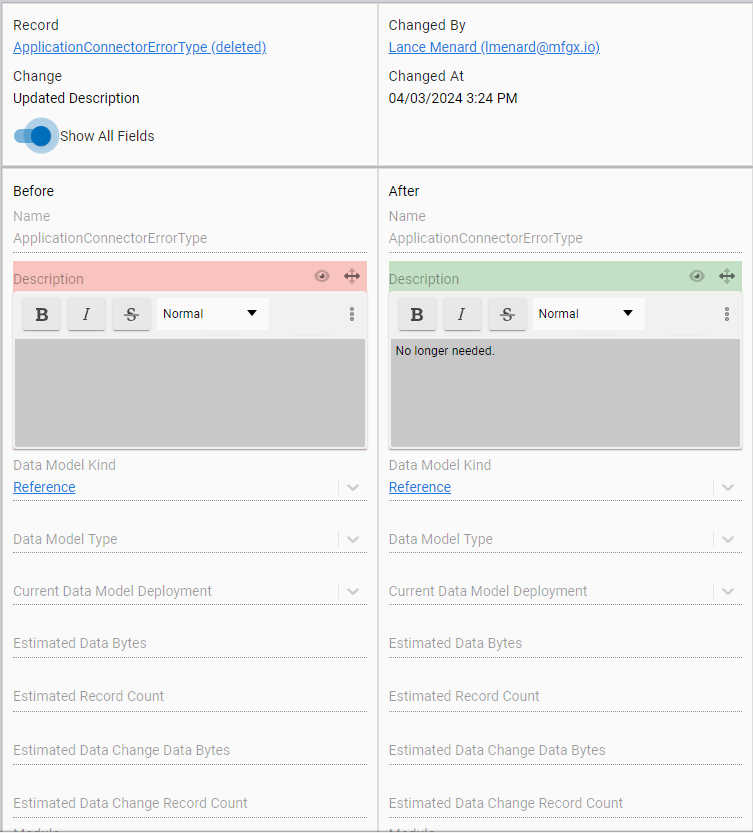
To dive into the details of a specific change, administrators can select a change from the table. This will load the change into the form on the right, highlighting which fields changed and allowing administrators to view the entire record if desired.
In a future release, we'll add a link to this page to the system subheader, so users can quickly view the relevant data changes for the context of the screen they're viewing - keep an eye out for that feature!
Embedded Webpage Element
The 2024.7 release features a new screen element with the ability to embed an external webpage inside a Fuuz screen. This Embedded Webpage element allows app builders to set up a URL or transform to load, and to select the permissions required for the embedded page to run. Most sites will require at least the navigation and script permissions, but others may be required depending on how the embedded site operates and what it should be allowed to do. End users can then interact with the embedded page within the context of a Fuuz screen!
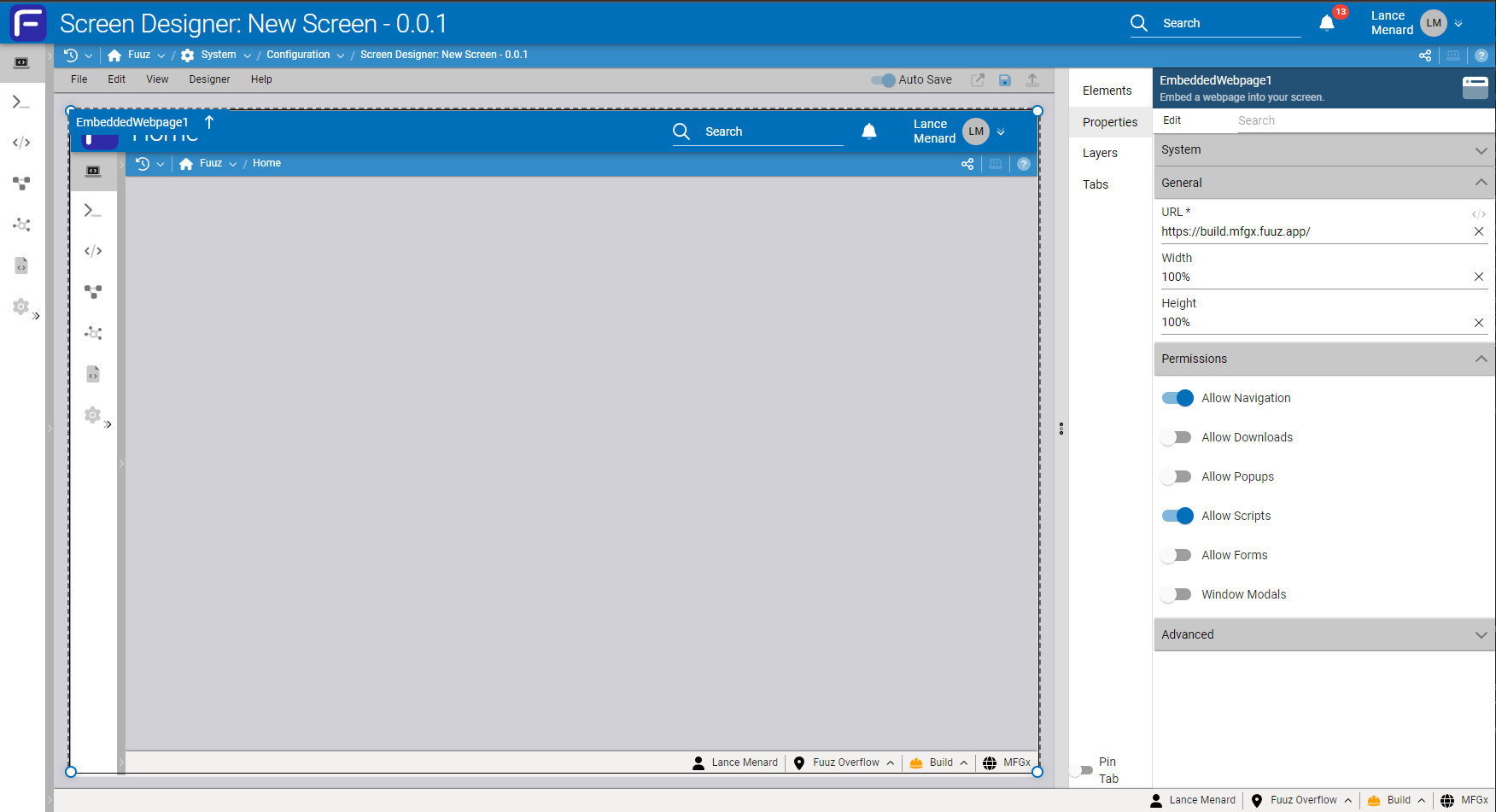
This element is most helpful for displaying information from an external page, or to streamline a manual process which would normally require multiple browser tabs. It will allow app builders to create more seamless integrations with external systems such as ERP or TMS.
Important: Not every webpage permits itself to be embedded, and how those embedded pages work can change with browser updates as permissions and standards evolve over time. As such, it's recommended to restrict use of this element to non-mission-critical processes where a backup or alternative process exists, and to test a specific site with the element before assuming it will work.
More Highlights
Data Model Types
The July release adds a new Type field to data models which will streamline the process of developing applications. This field is available while creating a model, or in the Properties panel for existing models.
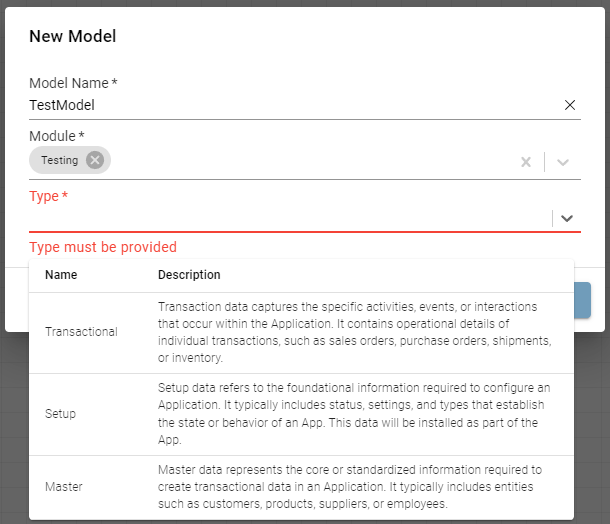
These types define broad categories of the type of data stored in the model, and will eventually be used to drive default model properties and fields, as well as to automate the process of including setup data as part of an app during publishing. There are three types available:
- Master: Master data represents the core or standardized information required to create transactional data in an Application. It typically includes entities such as customers, products, suppliers, or employees.
- Setup: Setup data refers to the foundational information required to configure an Application. It typically includes status, settings, and types that establish the state or behavior of an App. This data will be installed as part of the App.
- Transactional: Transactional data captures the specific activities, events, or interactions that occur within the Application. It contains operational details of individual transactions, such as sales orders, purchase orders, shipments, or inventory.
For the moment, this data model type is largely informational, but it's important to select the type that best aligns with the model to get the most benefit from future enhancements.
Note: Models that were already deployed prior to this release won't have a type, but a data model type must be selected during model creation or before deploying a new version of an existing model.
Web Flow Loading On Demand
This month's release simplifies the process of using web flows in screens. Prior to this release, web flows either needed to be used with a Flow Button element, or they needed to be selected in the "Additional Screen Flows" field on the screen itself. With this release, web flows will now be automatically loaded when executed, which means "Additional Screen Flows" is no longer required when using a web flow with the $executeFlow binding or Flow action button step.
Additionally, we've improved the compatibility between web flows and backend flows with the various methods of running them: you can now use the $executeFlow binding, Flow action step, or Flow Button screen element to run either a web flow or backend flow. This should help streamline app development, with less time spent worrying about using the right element with the right flow type.
Schema Deployment Optimizations
The 2024.7 release includes a significant set of optimizations to data model deployments to reduce deployment times and improve reliability when installing large packages of data models. Single models now generally deploy in a few seconds where they took 15-20 seconds before, which speeds up iteration during the early stages of app development.
Additionally, large batches of data models deploy much more quickly and reliably; our flagship MES app, which has 242 data models at last count, deploys in around three minutes, which speeds up the process of installing apps and gets those apps into your user's hands faster!
User Access Management Changes
User access management is one of the points of friction that has developed over the past year as we've invested in our app platform. The existing approach was developed early on in the life of the platform, and as the system as grown and evolved over the years, it's become clear that a number of aspects of user management don't nicely align with how customers are using the platform now. To address that, we're rolling out a range of changes in the July release which will collectively have a significant impact on how user access is managed in Fuuz.
These changes were described in detail in a preview in the release notes for the 2024.6 release; rather than repeat them here, please refer to those notes for details!
Full Release Notes: 2024.7.0
Data Team
Data Modeling
- Added a Type field to data models to streamline application packaging and master data import/export
- Updated schema designer to not prompt for a description or data mapping when deploying many models at once
- Improved schema deployment to reduce deployment times for single models and increase reliability when installing packages with large numbers of data models
- Added validation to ensure the "Set Null" deletion reference behavior can't be used with non-nullable fields
- Changed Deletion Reference Behavior input to a Select field so descriptions are also displayed
- Updated the model "Edit Definition" action to "View Definition" and disallow changes
- Updated deployment status snackbars to use data change notifications instead of full events
GraphQL APIs
- Added a global Data Change History screen to display data changes from any model in the system
- Refactored scalar map and document conversions to ensure scalar type consistency between APIs
- Added support for deprecation reasons on queries and mutations
Security
- Added a specific error message when trying to change the password of a user configured with a single sign-on identity provider
- Implemented a wide array of changes aimed at making user access management simpler and more intuitive
- Access control policies and groups are now managed per-tenant/app, rather than in the enterprise admin tenant
- Policy groups can now be applied to users by linking them to roles
- Added an Access Type field to users to indicate the basic level of permissions/access the user should have
- Added a streamlined "Invite User" action to the App Users screen in app tenants
Replication
- Converted replication service to Typescript in preparation for upcoming enhancements
DevOps Team
- Updated core services to RabbitMQ 13 and MongoDB 7
- Updated AJV validator library
Integration Team
Integration Connectors
- Updated SMTP connector to use the latest version of
nodemailerand to disallow certain attachment options
Edge Gateway
- Added handling for an edge case that could cause the Edge Gateway to crash
Notification Platform
- Corrected a bug with the Recipients list dialog on the notification channel table
Subscription Service
- Corrected an edge case that could leave lingering queue consumers after subscription queue errors
Orchestration Team
Data Flow Designer
- Applied styling and functionality tweaks to the console component to improve usability with large objects
User Interface Team
Framework
- Updated input tab navigation to improve usability of keyboard-only input with text and select inputs
- Added icon picker to module group form
- Updated web flow system to load web flows on demand, rather than requiring them to be specifically loaded into a screen, and to add more interoperability between web and backend flows with flow buttons and the
$executeFlowbinding - Updated
markedlibrary used in Markdown components and conversions
Components
- Updated field group inputs to start collapsed by default
- Updated the array input to better handle values of various types
- Added a 300px maximum width to columns in the Select input's popper to force long text to wrap
- Updated Cron, Date Time Range, Measure, and Ratio Measure inputs to use Select inputs instead of Comboboxes
Screen Designer
- Updated Select Input element Additional Filter to a transform input
- Corrected a bug causing the screen designer not to update the screen route during deployment
- Corrected a bug causing an error if a default tab is set on a Tab element when tabs have no names
- Added an
iconformat option for table columns - Added an Embedded Webpage element
- Updated screen designer to allow pasting nested cards/forms
Application Designer
- Added functionality to create tables, forms, and buttons by dragging data models, flows, or screens from the Navigator panel into a screen