2023.10 (October 2023)
Article Type: Release Notes Audience: All Users Module: Platform Releases
Note: QA Release Date: October 3, 2023. Production Release Date: October 17, 2023.
The October release of Fuuz is full of treats (and maybe a few tricks), sure to give you chills! Read on to find out what the engineering team has been cooking up in our cauldron.
Notification Platform
The 2023.10 release features a major new feature for the Fuuz platform: a simplified and integrated notification system, streamlining the process of configuring and sending notifications and alerts from Fuuz, no eye of newt or summoning charm required. To read more about the new notification system, see the documentation on Notifications.
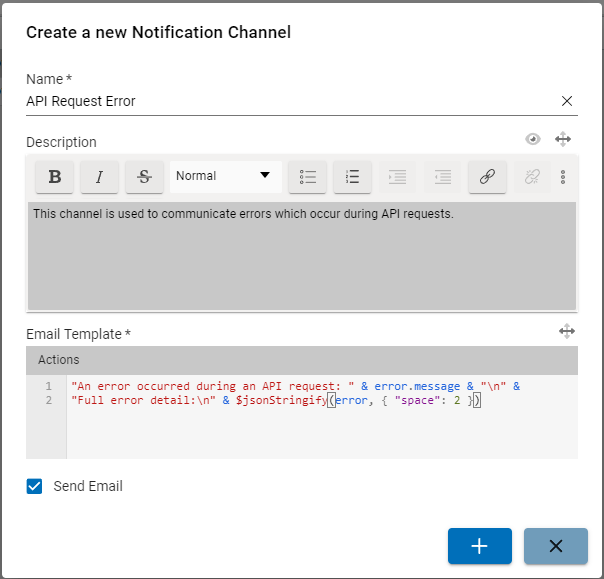
The process starts on the new Notification Channels table, where app builders can create a new notification channel. The channel includes a transform template for the email message to be sent, and a checkbox allowing email notifications to be easily enabled or disabled for testing.
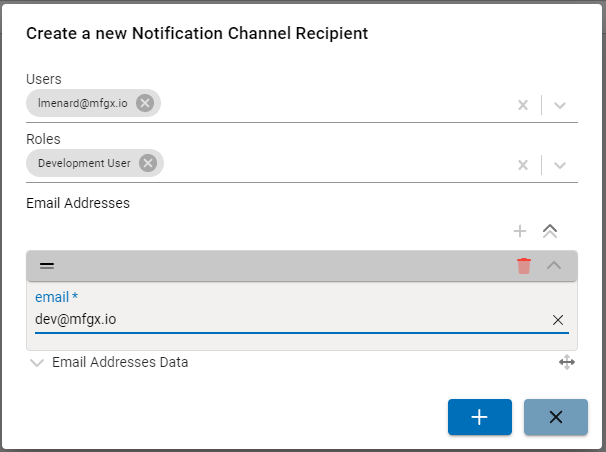
Once the channel is created, administrators can easily add, remove, or modify recipients for notifications sent to the channel. Recipients can be a mix of any of the following:
- Fuuz Users: Notifications are sent to the email address on file for the user.
- Fuuz Roles: Notifications are sent to all Fuuz users with the role assigned.
- Email Addresses: Notifications are sent to a specific email address, for non-Fuuz users or distribution groups.
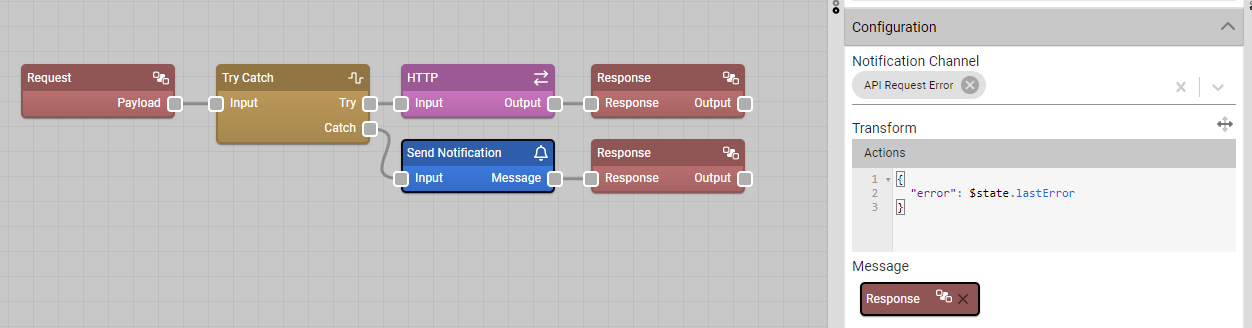
Finally, to send notifications to a channel, app builders can use the new Send Notification node in their data flows. They simply need to select the channel they wish to use and define what data to pass through to the template, and notifications will be sent to the configured recipients.
Additionally, if app builders wish to implement custom handling for notifications - say, sending notifications to an external API - they can do so using the new Receive Notification source node in a custom data flow.
There already are a range of improvements planned for this system, including new notification types, in-app notifications, notification priority and throttling, and more! Over time, this notification platform will also become the foundation for many of the system notifications we already send from Fuuz, allowing administrators to choose who receives which system notifications.
Tab Bar Screen Element
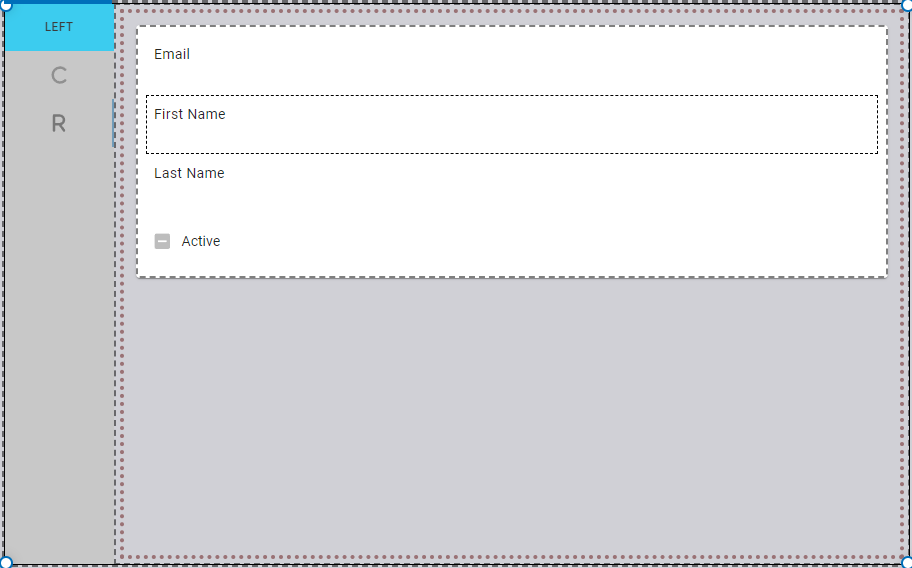
The October 2023 release also includes a new screen element which will support a wide range of rich UI designs: in-screen tab bars! This element allows app builders to easily create a panel which changes content as users click through the available tabs - no witchcraft required. To read all about the configuration properties available in the new element and download an example screen, check out the documentation: Tab Bar.
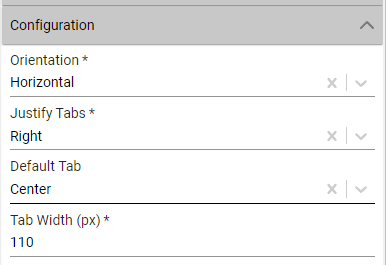
The process starts by dragging a Tab Bar element in from the Layout section of the toolbox. This adds an element to the screen to which app builders can then add tabs. For the tab bar as a whole, app builders can decide between horizontal or vertical tabs, as well as which tab is the default and what the standard width for the tabs should be. For each tab, there are properties to configure a title and/or icon, color, width, and more.
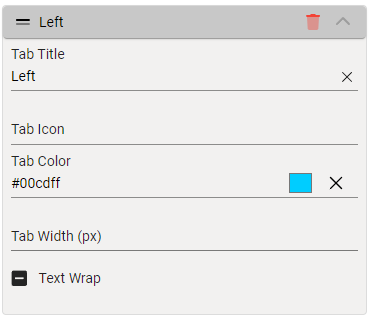
Once tabs are added, users can simply select the tab they want to add content to in the designer, then drag and drop whatever elements they wish to display in that tab into the container. This means tabs have the same rich UI flexibility as the rest of the screen designer, supporting tables, forms, visualizations, and even nested tabs!
We're looking forward to seeing what you build with this new element - as always, we love to hear feedback from our users, so let us know if there's something you like or would like to see added.
More Highlights
MQTT Broker Driver
This month's release also includes a new Edge Gateway driver: an MQTT Broker. This driver complements the existing MQTT client driver, allowing the Edge Gateway to run an MQTT server which can receive connections and messages from any MQTT client. IT administrators can then configure a device subscription for those message streams to run data flows as messages arrive, supporting real-time monitoring, control, or data acquisition from existing MQTT edge devices.
For more information on the MQTT Broker driver, see our documentation: MQTT Broker.
Console Component Improvements
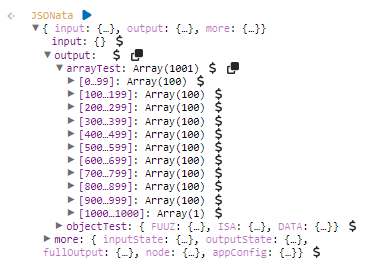
The 2023.10 release features several improvements to the console UI used in both the data flow designer and developer mode.
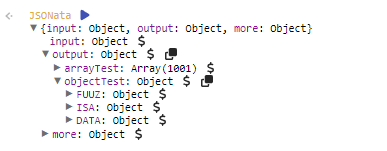
First, unexpanded objects now include a preview of properties inside the object, improving visibility into the structure of the data and simplifying the process of locating properties inside nested objects:
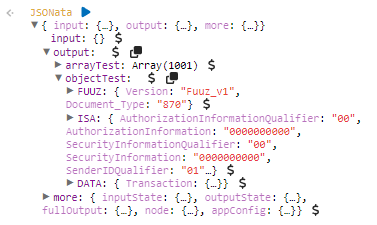
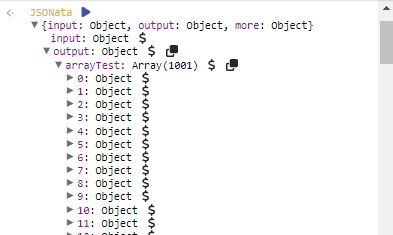
Second, large arrays are now grouped into chunks of 100 records. This allows the console to render very large arrays much more efficiently, and also makes it easier to locate a specific array value by index:
There are more improvements to the console component coming in future releases, so keep an eye on your crystal ball!
Authentication Event Request IP Tracking
Finally, the October 2023 release adds a new field to the existing Authentication Events system: the IP address the request originated from. This field allows administrators and auditors to narrow down the origin of a request, identify potentially malicious traffic, or investigate issues with IP restriction rules on policies. Spooky!
Full Release Notes: 2023.10.0
Data Team
Security
- Added request IP to authentication event logging
Core APIs
- Added
modelReferencesquery to return computed relations for GraphQL schema - Added tenant type-based API restrictions for admin tenants
- Updated schema generation to reuse static model map to reduce generation time
DevOps Team
- Added additional logging on service request timeouts
- Updated to latest load balancer controller, cluster autoscaler, and external DNS charts
Integration Team
Integration Connectors
- Improved error messages when endpoints return unsupported HTTP 3XX status codes
Edge Gateway
- Corrected issue with configuration schema for MQTT client that was preventing device configuration UI from rendering
- Corrected a bug causing the Edge Gateway to log an unexpected error when starting up when not logged in
- Added MQTT Broker server-type device driver
Notifications
- Added a system for managing and sending outbound notifications from Fuuz
Orchestration Team
Data Flow Designer
- Updated flow designer and developer mode consoles to display a preview for un-expanded objects
- Updated flow designer and developer mode consoles to group large arrays into chunks of 100 records to reduce render load
Scripting Language
- Updated
$getCalendarbinding to support passing an array of calendars to retrieve - Added snippets for the
$executeSavedQuerybinding
Scheduler Service
- Updated tenant migration collection cleanup to use scheduler service schedule
User Interface Team
Screen Designer
- Added a Tab Bar screen element
- Added "Multiline" configuration option for plain text inputs
- Updated drag handle font to correctly respect theme mode
- Updated flow buttons to allow the same flow to be used in multiple elements on a screen
- Updated Options and Select inputs to work nicely with default screen "save" functionality
- Added "skeleton" during screen loading and generation
- Corrected a bug when trying to open a screen when no screen was currently open
Components
- Corrected a bug causing the screen designer to fail to generate screens from data models with Rich Text fields
- Added support for treemap visualizations
- Corrected a bug causing color inputs to not be clearable
- Updated to AG Grid v30
Framework
- Updated role menu persistence to persist role menus across tabs by name rather than ID
- Updated default value for system theme mode from "dark" to "light"
- Added userRoles to
$metadataavailable in screen transforms