2023.6 (June 2023)
Article Type: Release Notes Audience: All Users Module: Platform Releases
The Fuuz engineering team is kicking off summer with a big update full of exciting features and improvements! Here are the major highlights.
Select & Options Inputs
The June release includes a feature the UI team has been working on for some time - an improved Select input element which addresses some of the most requested enhancements to the Combobox element.
What enhancements are those? First and foremost, one of the biggest complaints about the Combobox is that it only displays and searches against a single field on a record. While that may work for simple cases like statuses, it becomes very difficult to find the records you're looking for with more complicated schema. The new Select element supports displaying multiple fields at once in a tabular format, and searches against all the displayed fields.
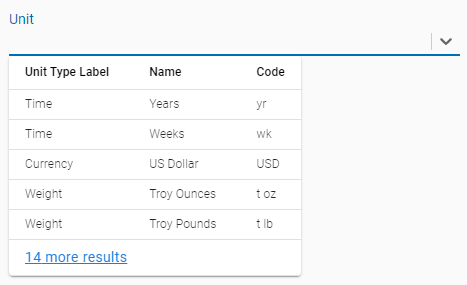
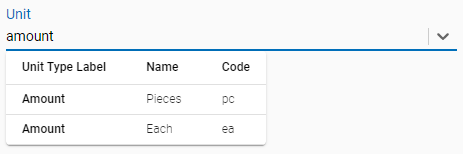
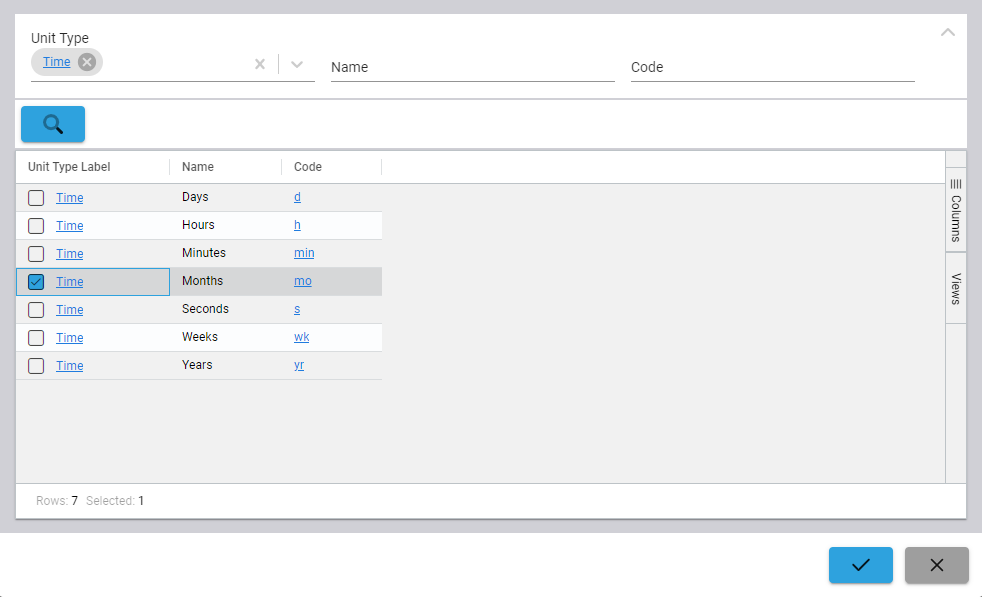
Another common issue with the Combobox element is that it doesn't work well with very large collections. The element only supports displaying a limited number of options or all options; there's no middle ground - and it displays those options in a small dropdown with a scroll bar. The new Select element has a specific "dialog" mode to address those use cases, which can be enabled by checking the "Dialog Mode" box under the Behavior section in the element properties. With this box checked, rather than displaying an inline dropdown when clicked, the Select element will instead display an automatically generated table in a dialog with columns and filters for the selected fields. This allows for a much more powerful search, and allows the UI to more comfortably display large volumes of data.
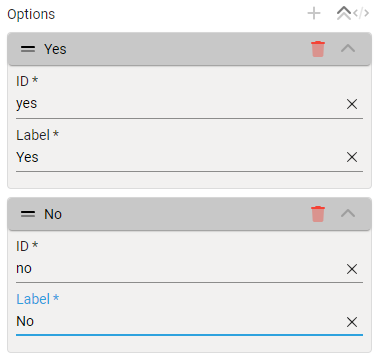
Finally, one issue we often heard from screen designers was that setting up a Combobox to just use a static set of options was complicated and confusing. To address that concern, we've added a new Options element, which is essentially just a simplified Select element; it has a properties input which makes it easy to configure static options.
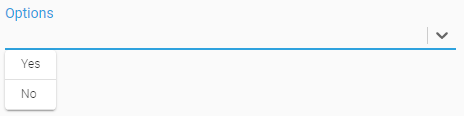
These new elements are ready for use, but we're not done by any means - we have several more improvements to them in the works. If you have suggestions or feedback on them, we'd love to hear it!
Data Flow Schedule System
This month's release includes a new system for managing schedules in data flows which allows easy configuration of when flows run and what parameters they run with.
First, some background: the previously available (now deprecated) Schedule node in flows operates on a simple system where the schedule configuration was included as part of the data flow itself. This worked fine for simple cases, but meant any changes to either the schedule frequency or the initial payload would require a data flow deployment. Flow deployments are a higher risk operation, though, which meant schedules were very tricky to change once an application was deployed to a production environment.
This new system replaces the previous Schedule node with configuration that lives outside the data flow, allowing nontechnical users to edit when flows run and what inputs they run with. Documentation on the new data flow schedule system is available in the platform help.
While developing a flow, designers will still pull in and use a Schedule node, but the configuration for that node will direct users to the Data Flow Schedules screen.
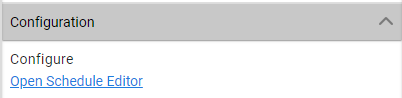
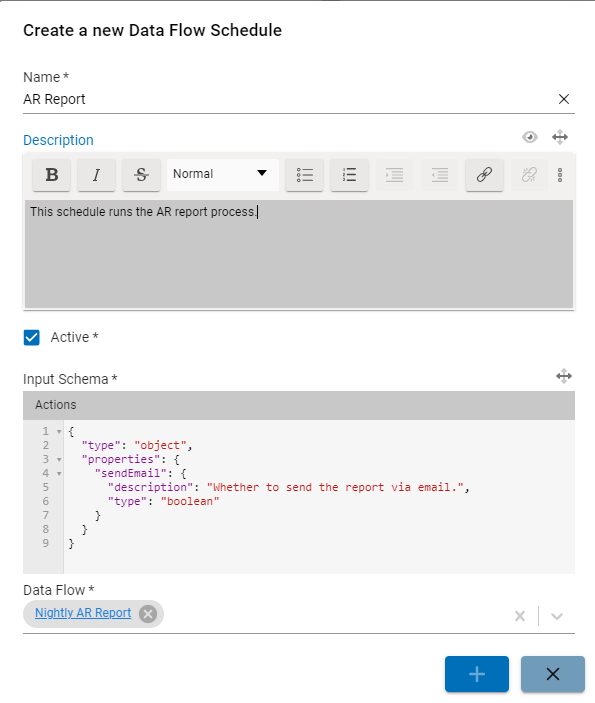
There, flow designers can add a schedule for their flow, and define the structure of the input payload.
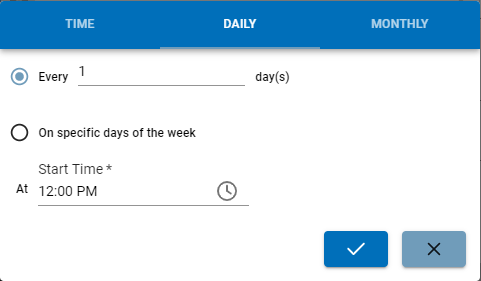
Once the schedule record is created, non-designer users can easily use the UI create, update, or delete frequencies, selecting when they want the flow to run and what they want the input to be. Once created, the schedule editor provides information on when a schedule last ran and when it is expected to run next based on the schedule.
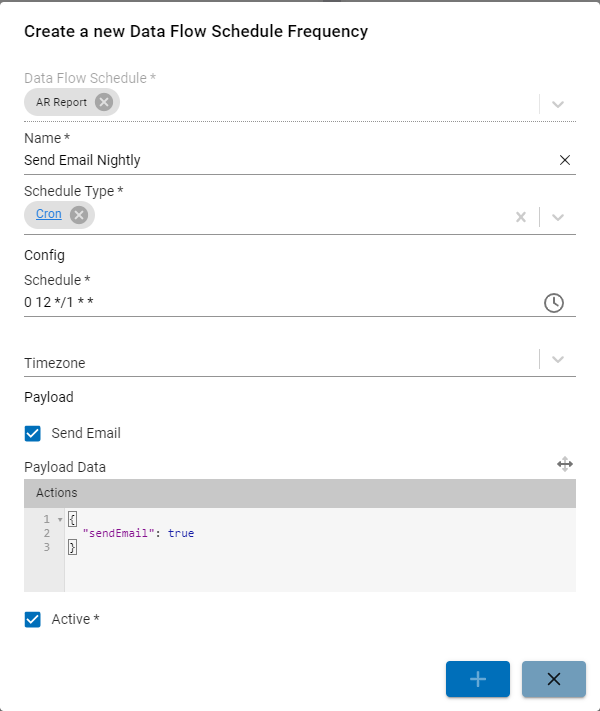
Until existing flows are migrated, the deprecated schedule node will continue to function; the team has released a migrator package which will automate that transition (see the migrator documentation for how to use it). The team is also working on the ability to run a frequency on demand - say, if an API call failed or a master data integration needs to be run immediately - so keep an eye out for those features in future releases!
Application Configuration System
On a similar note, the June release also includes a new tenant-wide application configuration system. This solves a very similar problem to the schedule system described above: previously, there was no central place to store or change app configuration, requiring data flow deployments even for simple changes like which connection to use for an integration.
The new Application Configuration system addresses these issues by providing a central location for app configuration that is then made available in screens, flows, transforms, etc. via a new $appConfig binding. More documentation on application configuration and how to use it is available in the platform help.
App developers can create app configurations that their flows and screens reference; they define the schema for the configuration, which ensures the configuration values match the expected structure and allows Fuuz to generate inputs for the configuration. Site administrators can then configure their apps using simple inputs on the Application Configurations screen.
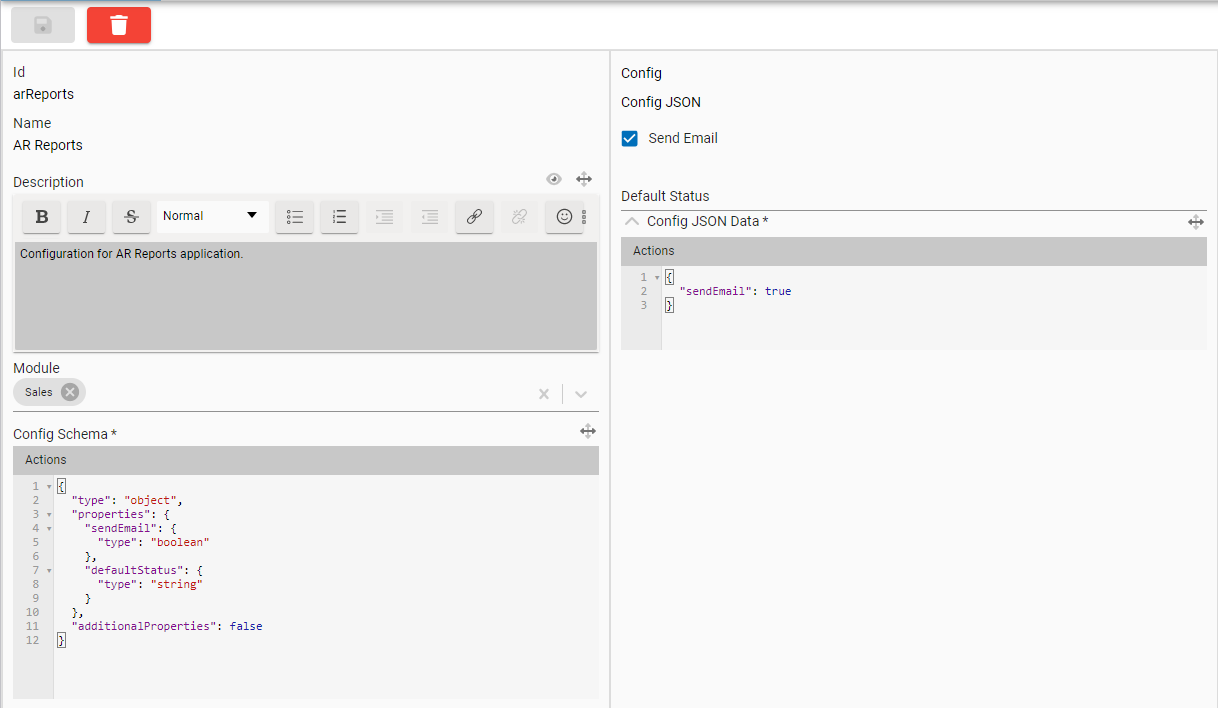
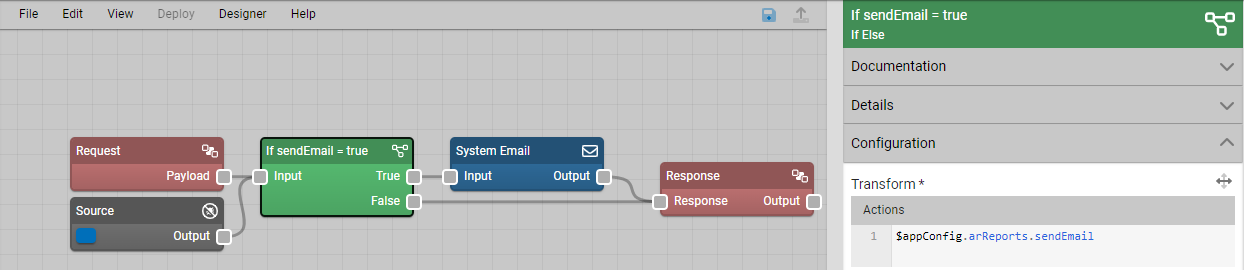
The application configurations stored in the system can then be accessed in any transform in any screen or data flow using the $appConfig binding and the ID of the application configuration. The example below uses it to decide whether to send emails. This setup would allow administrators to easily turn this behavior on and off tenant-wide without touching a data flow.
More Highlights
Edge Gateway Drivers Screen
Since the new Edge Gateway service allows administrators to install only the drivers they need, one of the open items was a UI for easily installing those drivers. This month's release includes that new screen. On the Device Drivers page in the Edge Gateway, users can easily see what drivers are available, what versions are available or installed, and can install or update a driver with two clicks.
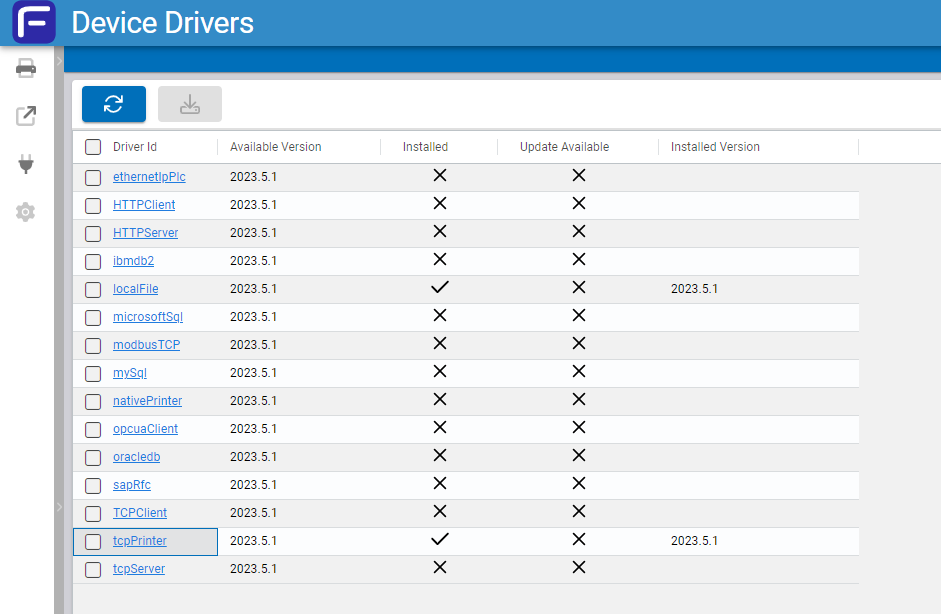
With the release of this feature, we're promoting the Edge Gateway service to "production" status, and deprecating the legacy desktop app version. The legacy app will no longer be supported going forward, and administrators are advised to migrate to the new service as soon as possible. For information on the new Edge Gateway service, including how to migrate from the legacy version, see Edge Gateway Installation Step-by-Step.
API Pagination Improvements
Another significant improvement in the June release is a major update to the API pagination system. This update improves the performance of the pagination system and addresses a number of bugs present in the old implementation. The simplest way to paginate is demonstrated below: just supply a first parameter to determine how many records to retrieve at once, then pass the cursor obtained from pageInfo.endCursor into the after parameter of the next query. Simply repeat until pageInfo.hasNextPage is false, and you've retrieved all the available data!
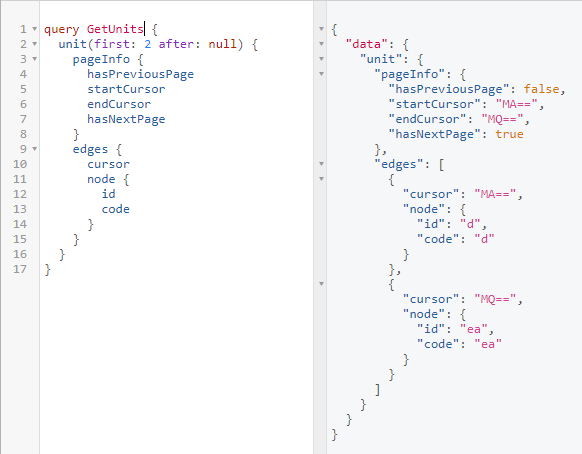
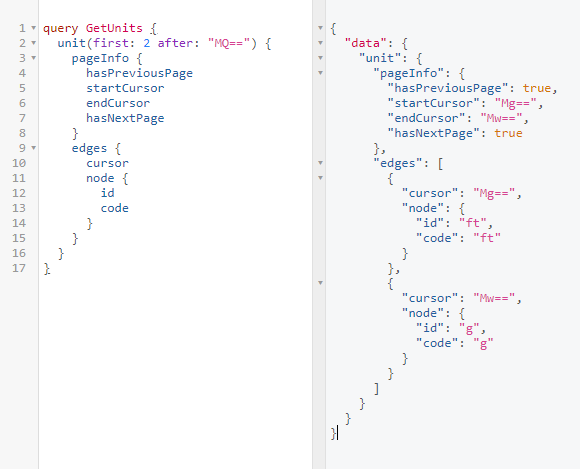
It's important to note that this update doesn't change the functionality of the pagination API, but does change the cursor values. Previously, it was possible to use a record ID in place of a pagination cursor; while some effort has been made to ensure applications using that approach continue to work, that approach has never been supported. Instead, API consumers should use cursor values obtained from edges.cursor, pageInfo.startCursor, or pageInfo.endCursor to pass to the after parameter. Obtaining a cursor value from any other source is unsupported and not guaranteed to work with future updates.
Enterprise Administration Updates
This month's release includes a wide range of changes to support more seamless management of enterprises, tenants, and users.
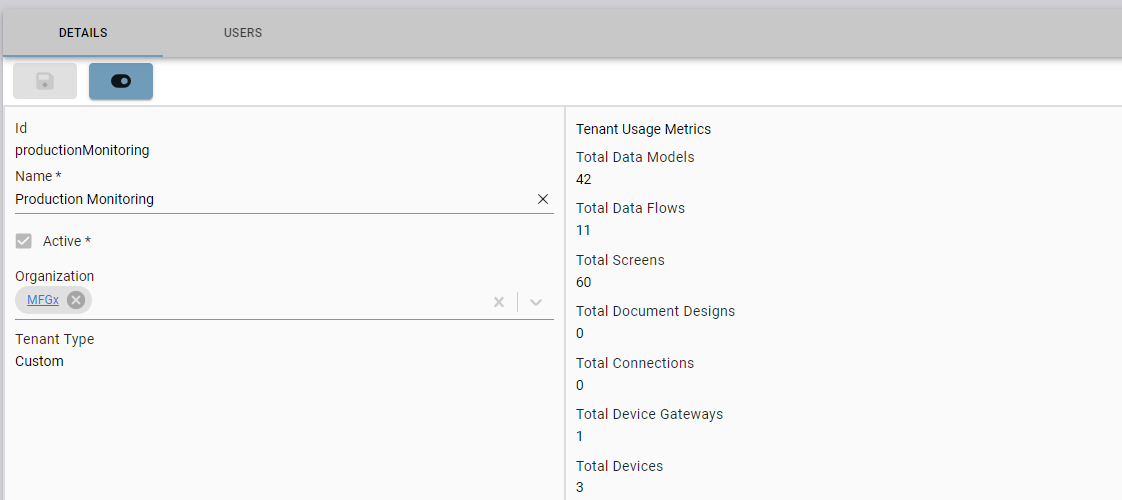
First, tenants and tenant users now has an Active field which determines whether the tenant is accessible. This allows administrators to deactivate tenants or user access without completely deleting the record and losing any configuration or audit history. Deactivated tenants are not accessible through the UI or API, but the tenant data is retained until the tenant is fully deleted. This allows tenants to be quickly reactivated should the stored data be needed. Tenants and user access can be deactivated or reactivated using the "active toggle" action.

Additionally, tenants now have a Tenant Type, selected at time of creation, and an Organization, which can be changed at any time. New organizations can be created as needed; they allow administrators to group tenants based on location or business unit. These new fields are in preparation for a broader set of changes to be delivered over the coming months to support a more integrated app system in Fuuz.
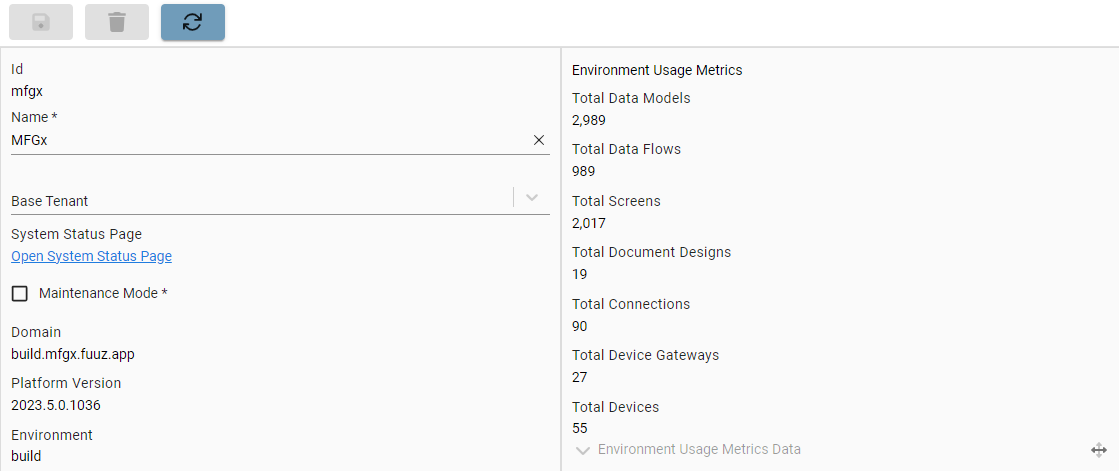
Finally, the tenant and enterprise screens have been updated to display aggregated metrics on usage, including the total data models, flows, screens, etc. deployed and active in the tenant or environment. These metrics mirror those used by Fuuz for billing purposes, and give administrators a snapshot view of the overall system usage across their enterprise. These metrics are updated nightly, but an update can be run on demand using the "Sync" action on the enterprise form.
Fuuz Status Page
Finally, the 2023.6 release includes links in Fuuz to our new status page: Fuuz Status. This page is our central place for communicating incidents, maintenance, and production deployments. It allows anyone to subscribe to updates; if you want to be notified of upcoming maintenance events or unexpected service interruptions, that's the way to go!
Full Release Notes: 2023.6.0
Data Team
Schema Designer
- Updated indexing of fields that are unique but not required so unique constraint only applies to non-null values
- Added check to prevent deleting data models if the data model has records
- Added check to ensure module / module group on data models are valid
Security
- Added phone number field to user record
- Added active field to user tenant records and disabled deletion
- Added active field to tenant records and disabled deletion
- Added schema and screens for organizations (groups of tenants)
- Added type field to tenants, with Custom (current style), Administration, and Application options
- Added "metrics" data to tenant and enterprise records to simplify enterprise administration and mirror metrics used by Fuuz for billing
- Updated API key verification to use case-insensitive comparison for email address
Core APIs
- Implemented significant bug fix and performance improvements to the API's cursor-based pagination system
- Updated "after" logic to correctly include updated audit fields in DCC records
Miscellaneous
- Added "Copy to Node" button to API explorer to copy the current query or mutation to a node on the clipboard
DevOps Team
Monitoring
- Various tweaks to metric collection resources, scope, and frequency to improve stability and latency
- Added links to Fuuz status page on login screen and enterprise form
Framework
- Implemented traffic authorization policies as an initial step to reduce potential attack surface
- Updated MongoDB Node.js driver to V5
- Replaced node-redis with ioredis as core network cache library
- Tweaked service shutdown grace periods to permit more time for in-flight requests to complete
Integration Team
Edge Gateway
- Added Device Drivers screen to display available drivers and allow easy installation
- Improved error message for mismatched gateway and platform release channel (e.g. build and production)
- Updated version matching to correctly handle four-part build version numbers
Integration Service
- Added active flag to integration connections to allow customers to deactivate unused connections without completely deleting them
Integration Connectors
- Updated HTTP connector to disallow connecting to IP addresses and to require SSL (https)
- Updated ODBC connector to apply a generous request timeout
- Added Atlassian Confluence connector
Subscription Service
- Implemented various fixes to prevent double-unsubscribe errors
- Added diagnostic data to subscription service client library
Orchestration Team
Data Flows
- Removed "Data Flow Logs (Deprecated)" screen
- Added "Application Configuration" schema and screens, available in all transforms/data flows as
$appConfig - Added checkbox to force stop previous versions when deploying a new version of a flow
- The default behavior is to allow any in-process requests on old versions to finish
- Implemented improved expanded transform editor in data flow designer
Scheduler Service
- Implemented new schema, screens, and service for central management of scheduled actions in Fuuz
Scripting Language
- Updated core JSONata library version
- Removed deprecated
$httpbinding from backend transforms - Added
$jsonToMarkdownbinding to simplify programmatically generating markdown
Miscellaneous
- Added "early data insert" functionality to the package designer to support sequences
- Updated message broker service map to use separate channels for publishing and subscribing
- Corrected an edge case error with the core message handler library
- Improved "Copy Path" logic in flow console to correctly escape path segments including spaces and hyphens
User Interface Team
Components
- Added configurable icon colors to action buttons
- Added new Select and Options dropdown inputs as an improved replacement for the Combobox
- Updated data table "row limit" indicator to successively request more data when clicked, instead of completely removing the limit
Screen Designer
- Added checkbox and logic to sort string data table columns as numbers
Framework
- Added "share" button to submenu which includes tenant
- Updated role menu to persist selected role to new tabs
Miscellaneous
- Corrected a bug which could cause the developer mode console to crash when filtering